

ຄຳອະທິບາຍ
Easily redirect any post or page to another page with a dropdown menu or by manually typing in a URL. Check out the screenshots. This plugin also changes permalinks and menus to point directly to the new location of the redirect – this prevents bots from getting a redirect and helps boost your SEO.
Description and Use
Simple redirection from pages or posts with an easy to use menu.
- Edit the page, post, or custom post type you wish to redirect from.
- There is a dropdown menu in the right hand column
- Choose where you want to redirect to and save the post / page
ພາບໜ້າຈໍ
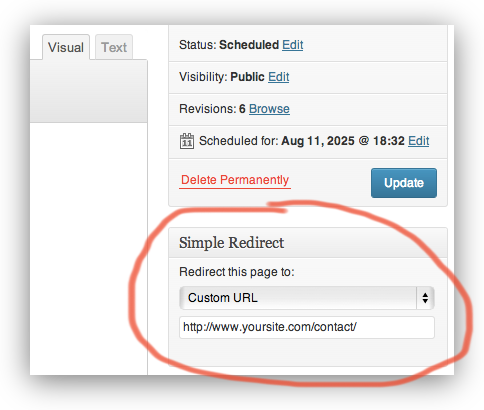


ການຕິດຕັ້ງ
- Upload whole simple-redirect folder to the /wp-content/plugins/ directory
- Activate the plugin through the ‘Plugins’ menu in WordPress
ຄຳຖາມທີ່ພົບເລື້ອຍ
- Installation Instructions
-
- Upload whole simple-redirect folder to the /wp-content/plugins/ directory
- Activate the plugin through the ‘Plugins’ menu in WordPress
ການຣີວິວ

11 ທັນວາ 2018
Places a redirect option right in the page’s editing view. I typically use this as a work-around for placeholder pages. When I want a page link to appear in a menu, but want it to redirect elsewhere.

18 ກັນຍາ 2018
Simple and easy. Congrats for your work

8 ສິງຫາ 2018
Add the desired URL destination. It’s that easy. It works!

21 ມີນາ 2018
Not much to it.
Add the url – you’re done. That simple.

20 ກຸມພາ 2018
It does exactly what it says it will do and is very easy. The title says it all, simple redirect.
Thanks!

29 ກັນຍາ 2017
Does what is says with no extra stuff in the way
ຜູ້ຮ່ວມພັດທະນາ ແລະ ຜູ້ພັດທະນາ
“Redirect” ແມ່ນຊອຟແວໂອເພັນຊອດ (Open Source). ບຸກຄົນຕໍ່ໄປນີ້ໄດ້ມີສ່ວນຮ່ວມໃນການພັດທະນາປລັກອິນນີ້.
ຜູ້ຮ່ວມພັດທະນາ
ແປ “Redirect” ເປັນພາສາຂອງເຈົ້າ.
ສົນໃຈຮ່ວມພັດທະນາບໍ່?
ເບິ່ງລະຫັດ, ກວດເບິ່ງ ຄັງເກັບ SVN, ຫຼື ຕິດຕາມ ບັນທຶກການພັດທະນາ ຜ່ານ RSS.