
ຄຳອະທິບາຍ
WP-MediaWiki adds a subset of MediaWiki markups to WordPress.
Currently, the following MediaWiki markups are supported.
- Bold
- Italic
- Heading
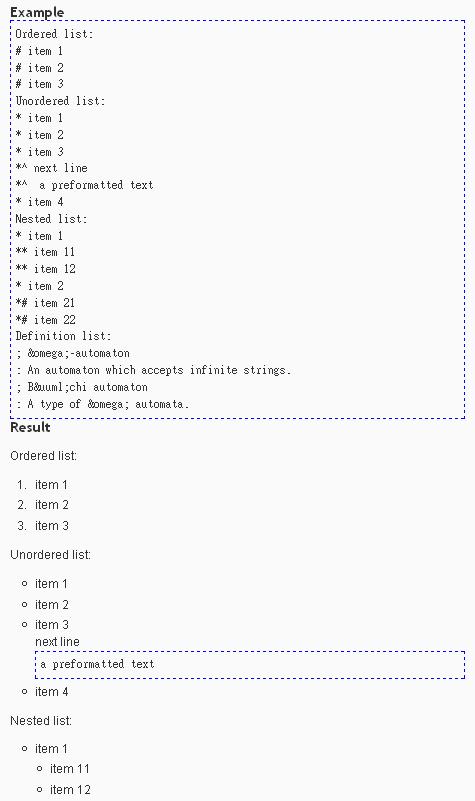
- Lists: Besides the list markups come from MediaWiki, I also added a continuation markup such that users can put preformatted text in a list item.
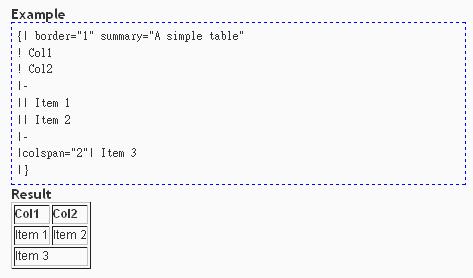
- Tables
- External links
- WikiLinks: the wikilink will link to Wikipedia by default, you can change the wiki site in the admin option page.
- Table of content
- Horizontal line
- Preformatted text
For more information about MediaWiki markups, please refer to http://meta.wikimedia.org/wiki/Help:Editing.
For a demo of this plugin, please refer to http://zechs.dyndns.org/wordpress/?page_id=152.
There is also a sandbox (http://zechs.dyndns.org/wordpress/wp-content/files/wp-mediawiki/sandbox/index.php) for you to preview the effect of this plugin.
ພາບໜ້າຈໍ

ການຕິດຕັ້ງ
- Please make sure you have PHP 5 installed.
- Upload
wp-mediawiki.phpand the folderwp-mediawikicontaining wp-mediawiki.css and wp-mediawiki.js to the/wp-content/plugins/directory. - Activate the plugin through the ‘Plugins’ menu in WordPress
- Complete options in the ‘Options’ page.
ການຣີວິວ
ບໍ່ມີການຣີວິວສຳລັບປລັກອິນນີ້.
ຜູ້ຮ່ວມພັດທະນາ ແລະ ຜູ້ພັດທະນາ
“WP-MediaWiki” ແມ່ນຊອຟແວໂອເພັນຊອດ (Open Source). ບຸກຄົນຕໍ່ໄປນີ້ໄດ້ມີສ່ວນຮ່ວມໃນການພັດທະນາປລັກອິນນີ້.
ຜູ້ຮ່ວມພັດທະນາ
ແປ “WP-MediaWiki” ເປັນພາສາຂອງເຈົ້າ.
ສົນໃຈຮ່ວມພັດທະນາບໍ່?
ເບິ່ງລະຫັດ, ກວດເບິ່ງ ຄັງເກັບ SVN, ຫຼື ຕິດຕາມ ບັນທຶກການພັດທະນາ ຜ່ານ RSS.