
ຄຳອະທິບາຍ
UserVoice is a Customer Feedback system that makes it easy for your users to report bugs and vote on new features. From their website:
“UserVoice allows your customers to vote on feedback and ideas submitted in the customer community. There is a limit on the number of votes a user can spend at any given time. When a customer creates an account, they are given 10 votes they can use as they see fit.”
Normally, JavaScript code has to be inserted on each page where you want UserVoice to be used. That approach requires editing of templates and including conditionals based on post ID.
This plugin makes it easy to incorporate the UserVoice customer feedback system on your posts and pages without editing templates.
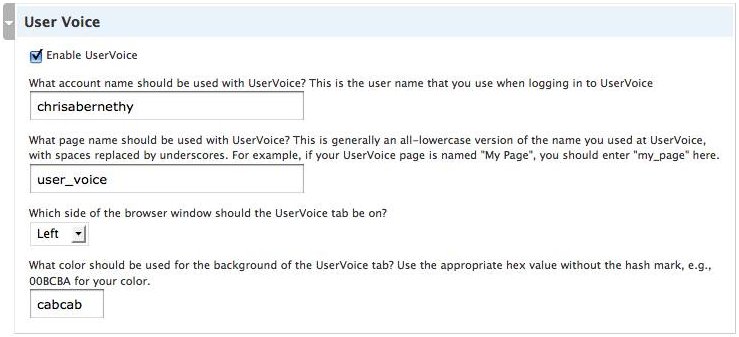
Once you have installed UserVoice, navigate to the edit screen for any post or page on your site and scroll down to see the UserVoice configuration options for that post or page.
More info:
* UserVoice plugin.
* Check out the other WordPress plugins by the same author.
* To be notified of plugin updates, follow me on Twitter!
More Information
- For more info, version history, etc. check out the page on my site about the UserVoice plugin.
- To check out the other WordPress plugins I wrote, visit my WordPress plugins page.
- For updates about this plugin and the other plugins that I maintain, read my consulting blog or follow me on Twitter!
ພາບໜ້າຈໍ
ການຕິດຕັ້ງ
Installing UserVoice is easy:
- Download and unzip the plugin.
- Copy the user-voice folder to the plugins directory of your blog.
- Enable the plugin in your admin panel.
- Edit any post or page on your site and configure UserVoice for that post see screenshot.
ການຣີວິວ
ບໍ່ມີການຣີວິວສຳລັບປລັກອິນນີ້.
ຜູ້ຮ່ວມພັດທະນາ ແລະ ຜູ້ພັດທະນາ
“UserVoice” ແມ່ນຊອຟແວໂອເພັນຊອດ (Open Source). ບຸກຄົນຕໍ່ໄປນີ້ໄດ້ມີສ່ວນຮ່ວມໃນການພັດທະນາປລັກອິນນີ້.
ຜູ້ຮ່ວມພັດທະນາ
ແປ “UserVoice” ເປັນພາສາຂອງເຈົ້າ.
ສົນໃຈຮ່ວມພັດທະນາບໍ່?
ເບິ່ງລະຫັດ, ກວດເບິ່ງ ຄັງເກັບ SVN, ຫຼື ຕິດຕາມ ບັນທຶກການພັດທະນາ ຜ່ານ RSS.