

ຄຳອະທິບາຍ
Top Scroller plugin allows the visitor to easily scroll back to the top of the page, with fully customizable options. Top Scroller plugin has the following features.
Features
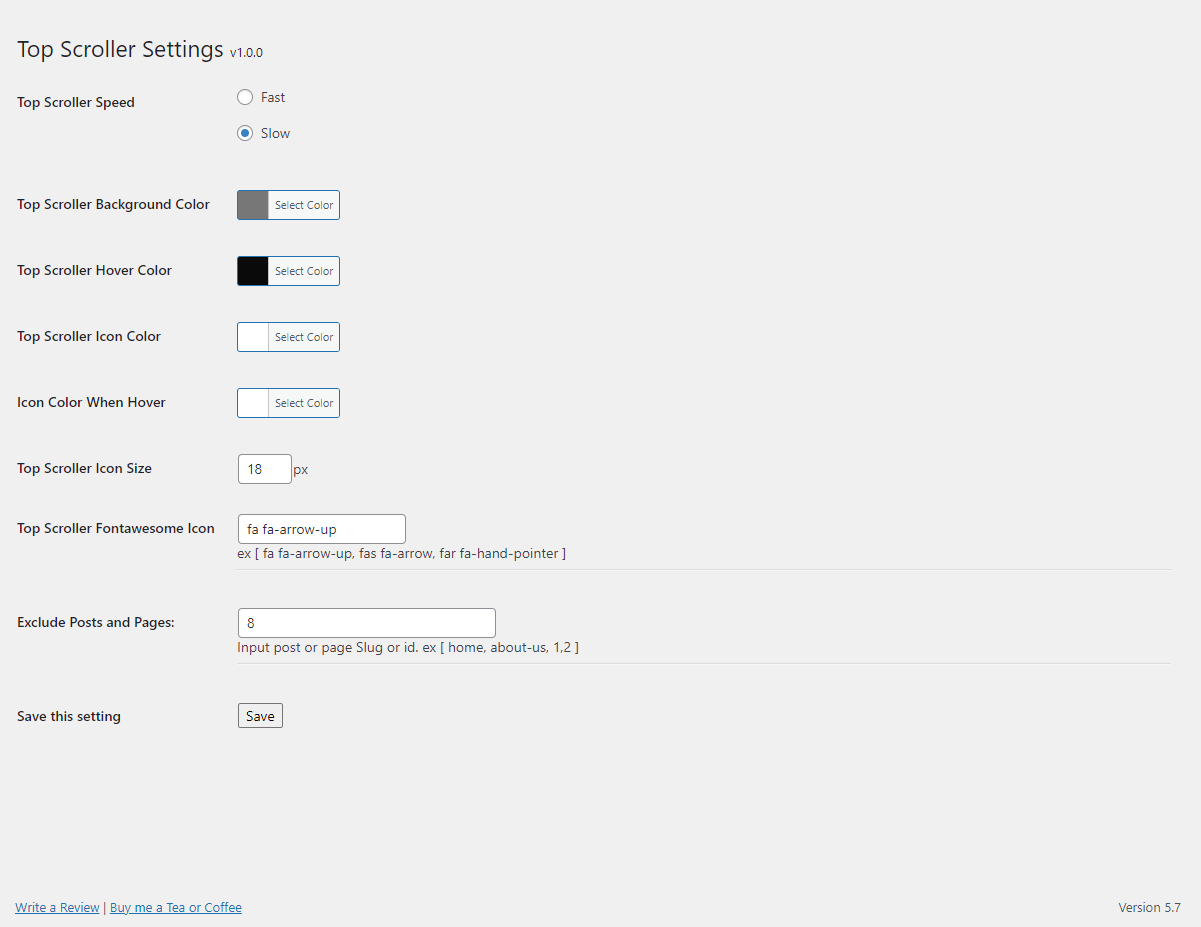
- Displays a button when user scrolls down the page.
- Compatible with all WordPress themes.
- It is user friendly and very easy to install.
- Zero coding skills required to set up this plugin.
- Scrolls the page back to top with animation.
- Customizable options via the admin panel
- You can change background color.
- You can change hover color.
- You can set icon size.
- You can change icon color.
- You can change icon color when hover.
- Create Font Awesome icon button.
- Pages/Posts filter.
ພາບໜ້າຈໍ
ການຕິດຕັ້ງ
- Search for Top Scroller through ‘Plugins > Add New’ interface.
- Find the plugin box of Top Scroller and click on the ‘Install Now’ button.
- Then activate Top Scroller plugin.
-or-
- Download the .zip package.
- Unzip into the subdirectory ‘top-scroller’ within your local WordPress plugins directory.
- Refresh plugin page and activate plugin.
ການຣີວິວ

29 ພຶດສະພາ 2021
Wow! this plugin has many customizations and really secure safe for the site. Thanks, Hamza

29 ພຶດສະພາ 2021
best scroller plugin. Good work!

22 ເມສາ 2021
Good Work!

21 ເມສາ 2021
Great plugin

21 ເມສາ 2021
very helpful plugin! very optimized and bug less plugin.Thank you
ຜູ້ຮ່ວມພັດທະນາ ແລະ ຜູ້ພັດທະນາ
“Top Scroller” ແມ່ນຊອຟແວໂອເພັນຊອດ (Open Source). ບຸກຄົນຕໍ່ໄປນີ້ໄດ້ມີສ່ວນຮ່ວມໃນການພັດທະນາປລັກອິນນີ້.
ຜູ້ຮ່ວມພັດທະນາ
“Top Scroller” ໄດ້ຖືກແປເປັນ 1 ພາສາທ້ອງຖິ່ນ. ຂໍຂອບໃຈ ທີມງານຜູ້ແປ ສຳລັບການປະກອບສ່ວນຂອງເຂົາເຈົ້າ.
ແປ “Top Scroller” ເປັນພາສາຂອງເຈົ້າ.
ສົນໃຈຮ່ວມພັດທະນາບໍ່?
ເບິ່ງລະຫັດ, ກວດເບິ່ງ ຄັງເກັບ SVN, ຫຼື ຕິດຕາມ ບັນທຶກການພັດທະນາ ຜ່ານ RSS.
ບັນທຶກການປ່ຽນແປງ
1.0.0
- Initial release