
ຄຳອະທິບາຍ
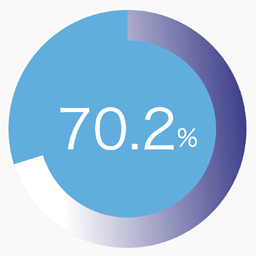
SPW Pie Chart adds a simple shortcode for displaying a single percentage-based pie chart with gradient colors, optional label text, and entry animation.
Features:
- Render a single pie chart with the
[spw_pie_chart]shortcode. - Control the percentage, size, thickness, colors, stops, angle, and label.
- Enable or disable animation when the chart becomes visible.
- Generate shortcode parameters from the admin screen under
Settings > Pie Chart.
Example shortcode:
[spw_pie_chart percent="75" label="Sample" colors="#3d3e8e,#009ef9,#affffb" stops="0,50,100" angle="135"]
ພາບໜ້າຈໍ


ການຕິດຕັ້ງ
- Upload the plugin files to the
/wp-content/plugins/spw-pie-chartdirectory, or install the plugin through the WordPress plugins screen. - Activate the plugin through the
Pluginsscreen in WordPress. - Open
Settings > Pie Chartto generate a shortcode. - Paste the shortcode into a post, page, or widget area that supports shortcodes.
ຄຳຖາມທີ່ພົບເລື້ອຍ
-
How do I add a chart?
-
Add the
[spw_pie_chart]shortcode to any post or page. -
Which shortcode attributes are supported?
-
Supported attributes are:
percentorvaluelabelsizethicknessdurationanimatecolorsstopsangletrack_colortext_color
-
Does the plugin store any settings permanently?
-
No. The shortcode generator is a helper UI and does not save persistent plugin options.
ການຣີວິວ
ບໍ່ມີການຣີວິວສຳລັບປລັກອິນນີ້.
ຜູ້ຮ່ວມພັດທະນາ ແລະ ຜູ້ພັດທະນາ
“SPW Pie Chart” ແມ່ນຊອຟແວໂອເພັນຊອດ (Open Source). ບຸກຄົນຕໍ່ໄປນີ້ໄດ້ມີສ່ວນຮ່ວມໃນການພັດທະນາປລັກອິນນີ້.
ຜູ້ຮ່ວມພັດທະນາ
ແປ “SPW Pie Chart” ເປັນພາສາຂອງເຈົ້າ.
ສົນໃຈຮ່ວມພັດທະນາບໍ່?
ເບິ່ງລະຫັດ, ກວດເບິ່ງ ຄັງເກັບ SVN, ຫຼື ຕິດຕາມ ບັນທຶກການພັດທະນາ ຜ່ານ RSS.
ບັນທຶກການປ່ຽນແປງ
1.0.0
- Initial public release.