

ຄຳອະທິບາຍ
Attach to your posts your keyword research an other instructions to your editors. After your data recolection and keyword research, append your valuable requirements for your editors on posts.
Set on every posts your number of this requirements:
- Words
- Quantity of images
- Paragraphs & bold words
- H1 & H2 number of tags
- Internal & external links
- Keyword counting
- Highlighted & colored density keywords
- WordPress classic editor support
- JSON import data
- Free Generator
- Optional Analyze of Google Serp
- Shift key or mouse over to highlight
ພາບໜ້າຈໍ
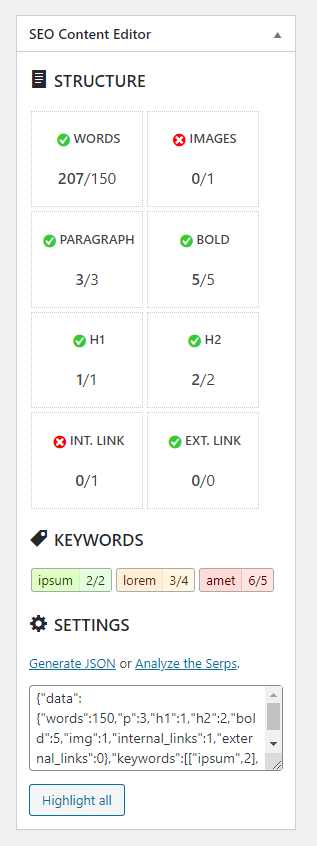
Metabox for classic editor 
Highlighted text
ການຕິດຕັ້ງ
- Upload the plugin files to the
/wp-content/pluginsdirectory, or install the plugin through the WordPress plugins screen directly. - Activate the plugin through the ‘Plugins’ screen in WordPress
- A new metabox appear on your classic editor.
- A button on plugins page or in settings menu, for the generator form.
ຄຳຖາມທີ່ພົບເລື້ອຍ
-
Is free to use?
-
Yes, but to reward my work please donate here
ການຣີວິວ
ບໍ່ມີການຣີວິວສຳລັບປລັກອິນນີ້.
ຜູ້ຮ່ວມພັດທະນາ ແລະ ຜູ້ພັດທະນາ
“SEOCE – SEO Content Editor” ແມ່ນຊອຟແວໂອເພັນຊອດ (Open Source). ບຸກຄົນຕໍ່ໄປນີ້ໄດ້ມີສ່ວນຮ່ວມໃນການພັດທະນາປລັກອິນນີ້.
ຜູ້ຮ່ວມພັດທະນາ
ແປ “SEOCE – SEO Content Editor” ເປັນພາສາຂອງເຈົ້າ.
ສົນໃຈຮ່ວມພັດທະນາບໍ່?
ເບິ່ງລະຫັດ, ກວດເບິ່ງ ຄັງເກັບ SVN, ຫຼື ຕິດຕາມ ບັນທຶກການພັດທະນາ ຜ່ານ RSS.
ບັນທຶກການປ່ຽນແປງ
1.0
- First functional version.