

ຄຳອະທິບາຍ
Easily display WordPress Gutenberg Editor saved reusable blocks anywhere via widget.
Easy Setup
After plugin activation, Reusable Block widget will be available under Appearance > Widgets, just drag and drop to any desired widget area.
Extensible
If you want to upgrade your widgets usage. You can use Modal Pop-up & Sliding Widget Options to display your widgets as modal pop-ups, slide-ins and/or sliding widgets. Powered with triggers like exit-intent, on load and on scroll you can increase your user engagement easily.
ພາບໜ້າຈໍ
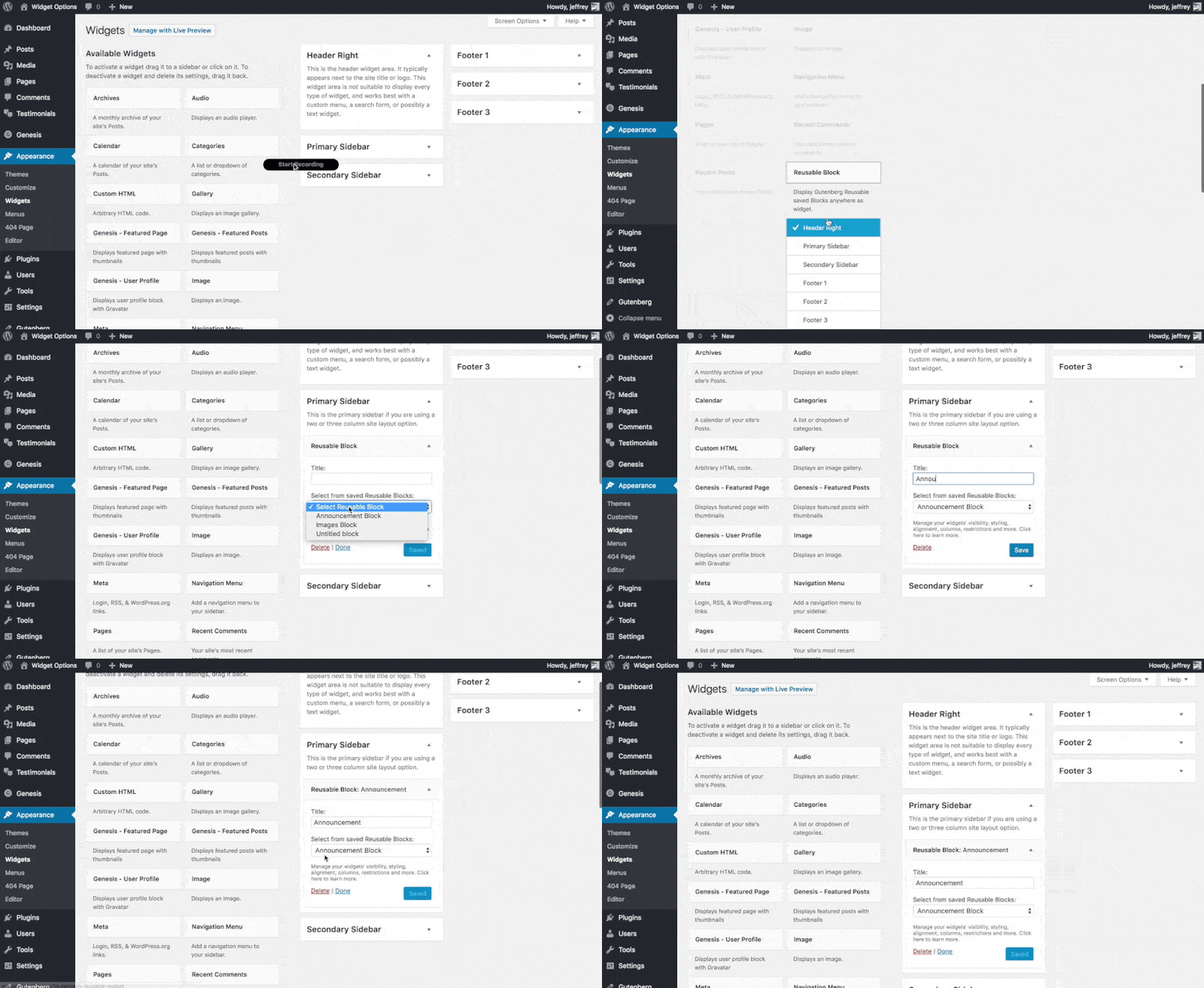
ການຕິດຕັ້ງ
- Upload the full directory into your wp-content/plugins directory
- Activate the plugin at the plugin administration page
- Go to Appearance > Widgets then drag and drop “Reusable Block” to any widget area
ຄຳຖາມທີ່ພົບເລື້ອຍ
- Installation Instructions
-
- Upload the full directory into your wp-content/plugins directory
- Activate the plugin at the plugin administration page
- Go to Appearance > Widgets then drag and drop “Reusable Block” to any widget area
ການຣີວິວ

19 ເມສາ 2023
It’s silly that WP core still doesn’t allow reusable blocks in widget areas in 2023, but thankfully this plugin gets it done.

20 ກໍລະກົດ 2020
Great plugin. If you want to add gutenberg re-usable blocks to widgets this does it well. Tested and works straight out the box, no complaints

23 ມັງກອນ 2020
1 ການຕອບກັບ
This plugin rocks because it allows to design your widgets in Gutenberg!

17 ກໍລະກົດ 2019
1 ການຕອບກັບ
A very nice plugin to use until WordPress team add support for blocks in widgets.

2 ເມສາ 2019
Created an account specifically to leave this review.
Love the implementation, was happy to see all js initiated as expected.

7 ມີນາ 2019
This worked as intended in my case and allows my client to modify their header Call-To-Action via Gutenberg Block.
Using:
WP Version: 5.1
Framework: Genesis Framework
ຜູ້ຮ່ວມພັດທະນາ ແລະ ຜູ້ພັດທະນາ
“Reusable Gutenberg Blocks Widget” ແມ່ນຊອຟແວໂອເພັນຊອດ (Open Source). ບຸກຄົນຕໍ່ໄປນີ້ໄດ້ມີສ່ວນຮ່ວມໃນການພັດທະນາປລັກອິນນີ້.
ຜູ້ຮ່ວມພັດທະນາ
ແປ “Reusable Gutenberg Blocks Widget” ເປັນພາສາຂອງເຈົ້າ.
ສົນໃຈຮ່ວມພັດທະນາບໍ່?
ເບິ່ງລະຫັດ, ກວດເບິ່ງ ຄັງເກັບ SVN, ຫຼື ຕິດຕາມ ບັນທຶກການພັດທະນາ ຜ່ານ RSS.