
ຄຳອະທິບາຍ
JETPACK – ປັກອິນ WORDPRESS ທີ່ດີທີ່ສຸດ
Jetpack ແມ່ນປັກອິນ WordPress ທີ່ຊ່ວຍທ່ານສ້າງເນື້ອຫາທີ່ດີກວ່າ, ເພີ່ມຜູ້ຕິດຕາມ, ສ້າງລາຍໄດ້ຈາກເວັບໄຊ ແລະ ຮັກສາໃຫ້ມັນປອດໄພ, ໄວ ແລະ ໝັ້ນຄົງ. ທ່ານສາມາດຂະຫຍາຍ ແລະ ຕິດຕາມຍອດເຂົ້າຊົມເວັບໄຊຂອງທ່ານດ້ວຍສະຖິຕິ Jetpack, ແລະ ສ້າງເນື້ອຫາທີ່ດີກວ່າດ້ວຍ Jetpack AI. ທ່ານສາມາດເລີ່ມຕົ້ນຈົດໝາຍຂ່າວ ແລະ ຂະຫຍາຍຖານຜູ້ຊົມຂອງທ່ານ, ປ່ຽນແຟນຄລັບໃຫ້ກາຍເປັນຜູ້ຕິດຕາມທີ່ຈ່າຍເງິນ. ສ້າງເນື້ອຫາທີ່ສວຍງາມດ້ວຍ Jetpack Creator ແລະ ຮັກສາເວັບໄຊໃຫ້ໄວດ້ວຍ Jetpack Boost.
ວິທີເລີ່ມຕົ້ນໃຊ້ງານ JETPACK
ການຕິດຕັ້ງແມ່ນຟຣີ, ໄວ ແລະ ງ່າຍ. ຕັ້ງຄ່າ Jetpack ພາຍໃນບໍ່ກີ່ນາທີ. ໃຊ້ປະໂຫຍດຈາກຄຸນສົມບັດທີ່ແຂງແກ່ນກວ່າ ເຊັ່ນ: ຄວາມປອດໄພຂອງເວັບໄຊ WordPress ແລະ ເຄື່ອງມືການອອກແບບ ແລະ ການເຕີບໂຕ ໂດຍ ການອັບເກຣດເປັນແພັກເກັດທີ່ຈ່າຍເງິນ.
ຕ້ອງການການສະໜັບສະໜູນຈາກຜູ້ຊ່ຽວຊານບໍ່?
ພວກເຮົາມີທີມງານ Happiness Engineer ທົ່ວໂລກທີ່ພ້ອມໃຫ້ການສະໜັບສະໜູນທີ່ຍອດຢ້ຽມ. ຖາມຄຳຖາມຂອງທ່ານໃນຟໍຣຳສະໜັບສະໜູນ ຫຼື ຕິດຕໍ່ຝ່າຍສະໜັບສະໜູນ.
ເປັນຫຍັງຕ້ອງໃຊ້ JETPACK ໃນເວັບໄຊຂອງທ່ານ
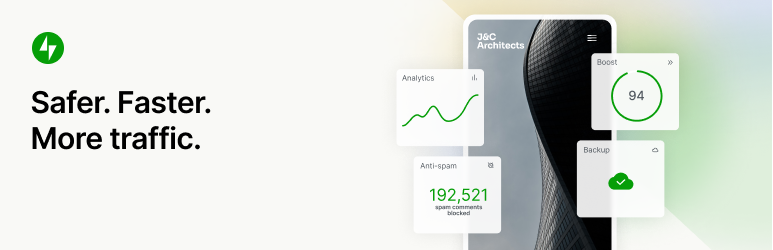
ປອດໄພກວ່າ. ໄວກວ່າ. ຍອດເຂົ້າຊົມຫຼາຍກວ່າ.
ເຄື່ອງມືຄວາມປອດໄພ, ປະສິດທິພາບ, ການຕະຫຼາດ ແລະ ການອອກແບບ WordPress — Jetpack ຖືກສ້າງຂຶ້ນໂດຍຜູ້ຊ່ຽວຊານ WordPress ເພື່ອເຮັດໃຫ້ເວັບໄຊ WP ປອດໄພຂຶ້ນ ແລະ ໄວຂຶ້ນ, ແລະ ຊ່ວຍທ່ານເພີ່ມຍອດເຂົ້າຊົມ.
ຄວາມປອດໄພເວັບໄຊອັດຕະໂນມັດ 24/7
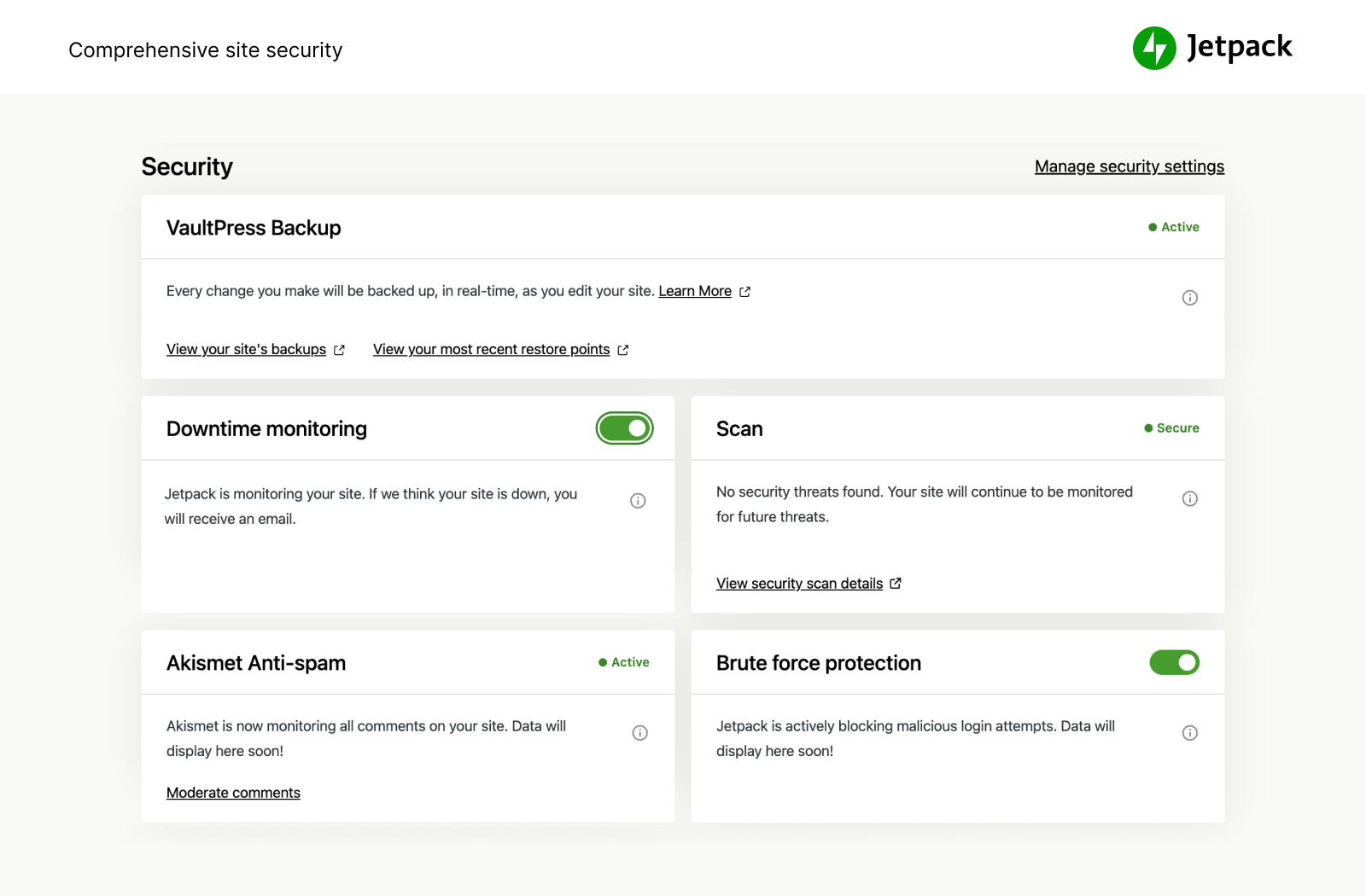
ພວກເຮົາປົກປ້ອງເວັບໄຊຂອງທ່ານ ເພື່ອໃຫ້ທ່ານສາມາດດຳເນີນການເວັບໄຊ ຫຼື ທຸລະກິດຂອງທ່ານໄດ້. Jetpack Security ມອບຄວາມປອດໄພຂອງເວັບໄຊ WordPress ທີ່ສົມບູນແບບ ແລະ ໃຊ້ງານງ່າຍ ລວມທັງການສຳຮອງຂໍ້ມູນແບບ Real-time ອັດຕະໂນມັດ ແລະ ການກູ້ຄືນທີ່ງ່າຍດາຍ, ການສະແກນມັນແວ ແລະ ການປ້ອງກັນສະແປມ. ຄຸນສົມບັດທີ່ຈຳເປັນ ເຊັ່ນ: ການປ້ອງກັນ Brute Force ແລະ ການຕິດຕາມ Downtime / Uptime ພື້ນຖານ ແມ່ນໃຫ້ໃຊ້ຟຣີ.
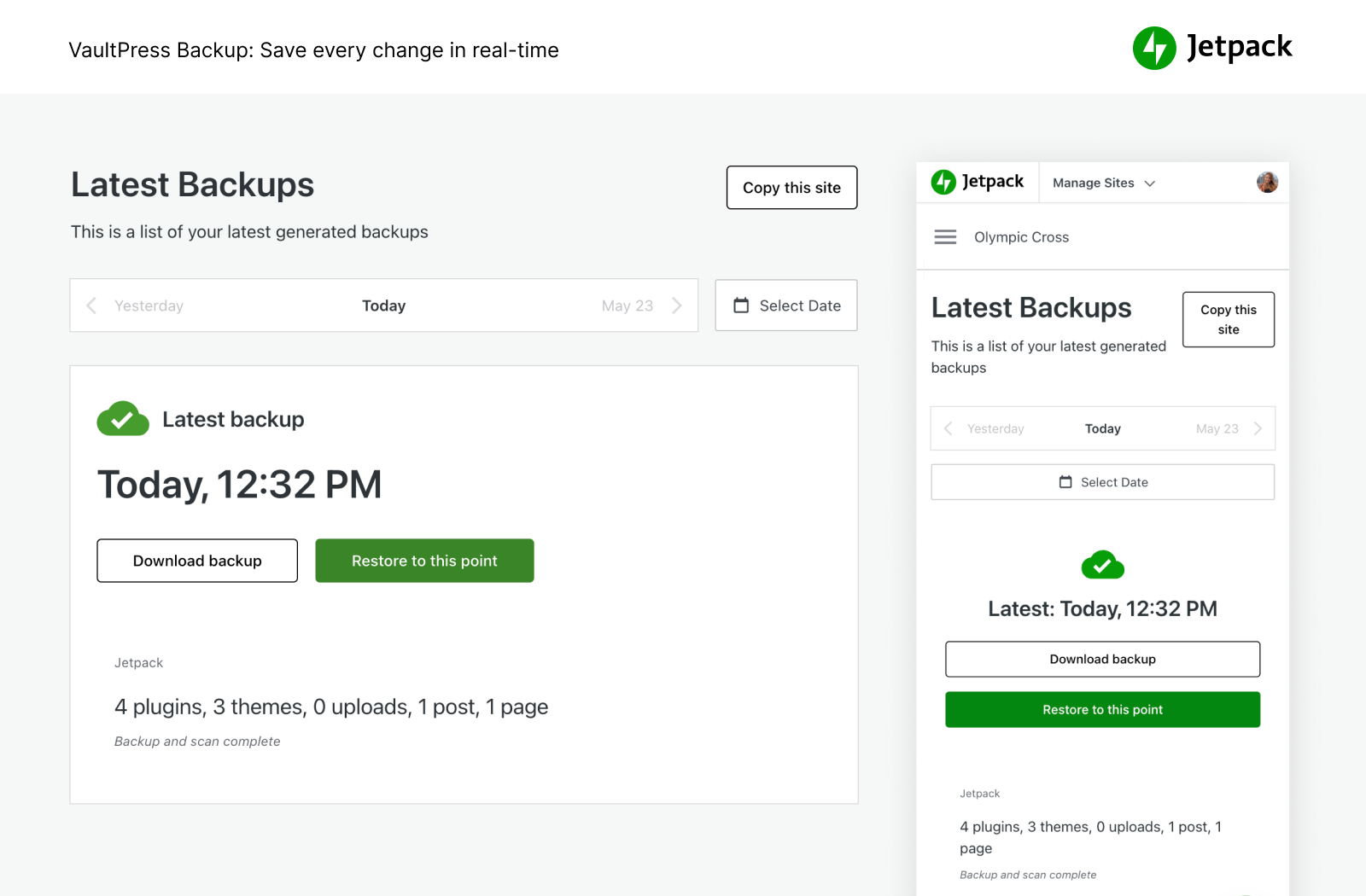
- ສຳຮອງຂໍ້ມູນເວັບໄຊຂອງທ່ານໂດຍອັດຕະໂນມັດແບບ Real-time ແລະ ກູ້ຄືນໄປຍັງຈຸດໃດກໍໄດ້ດ້ວຍຄິກດຽວ. ພື້ນທີ່ຈັດເກັບຂໍ້ມູນ Cloud ເລີ່ມຕົ້ນທີ່ 10GB, ເຊິ່ງພຽງພໍສຳລັບເວັບໄຊສ່ວນໃຫຍ່, ພ້ອມຕົວເລືອກພື້ນທີ່ຈັດເກັບຂໍ້ມູນເພີ່ມເຕີມຫາກຕ້ອງການ. ດີຫຼາຍສຳລັບຮ້ານຄ້າ eCommerce ໂດຍສະເພາະ Woo.
- ຈັດການການຍ້າຍໄປຍັງໂຮດໃໝ່, ຍ້າຍໄຟລ໌ຮູບແບບ ແລະ ປັກອິນໄປຍັງຖານຂໍ້ມູນໃໝ່, ເຮັດສຳເນົາເວັບໄຊໄດ້ງ່າຍ, ສ້າງການສຳຮອງຂໍ້ມູນຖານຂໍ້ມູນເຕັມຮູບແບບ, ໂຄລນເວັບໄຊ, ສ້ອມແປງເວັບໄຊທີ່ເສຍຫາຍໂດຍການກູ້ຄືນການສຳຮອງຂໍ້ມູນເກົ່າ ຫຼື ຕັ້ງຄ່າເວັບໄຊທົດສອບໄດ້ງ່າຍໆໂດຍການສ້າງສຳເນົາຂອງເວັບໄຊ WP ທີ່ມີຢູ່ຂອງທ່ານ.
- ເບິ່ງທຸກການປ່ຽນແປງຂອງເວັບໄຊ ແລະ ໃຜເປັນຜູ້ເຮັດ ດ້ວຍ Activity log, ດີຫຼາຍສຳລັບການປະສານງານ, ແກ້ໄຂຂໍ້ຜິດພາດ, ບຳລຸງຮັກສາ ຫຼື ແກ້ໄຂບັນຫາ.
- ກວດສອບການເຂົ້າຊົມທີ່ເຂົ້າມາໃນເວັບໄຊ WordPress ຂອງທ່ານດ້ວຍ WAF (Web Application Firewall) ຂອງພວກເຮົາ ແລະ ຕັດສິນໃຈວ່າຈະອະນຸຍາດ ຫຼື ບລັອກມັນ ໂດຍອີງໃສ່ກົດລະບຽບຕ່າງໆ.
- ເພີ່ມຊັ້ນການປ້ອງກັນທີ່ສຳຄັນໃຫ້ກັບເວັບໄຊຂອງທ່ານດ້ວຍ WAF (Web Application Firewall) ຂອງພວກເຮົາ, ໂດຍສະເພາະເມື່ອຜູ້ໂຈມຕີພະຍາຍາມໃຊ້ປະໂຫຍດຈາກຊ່ອງໂຫວ່ທີ່ຍັງບໍ່ທັນໄດ້ຮັບການແກ້ໄຂ.
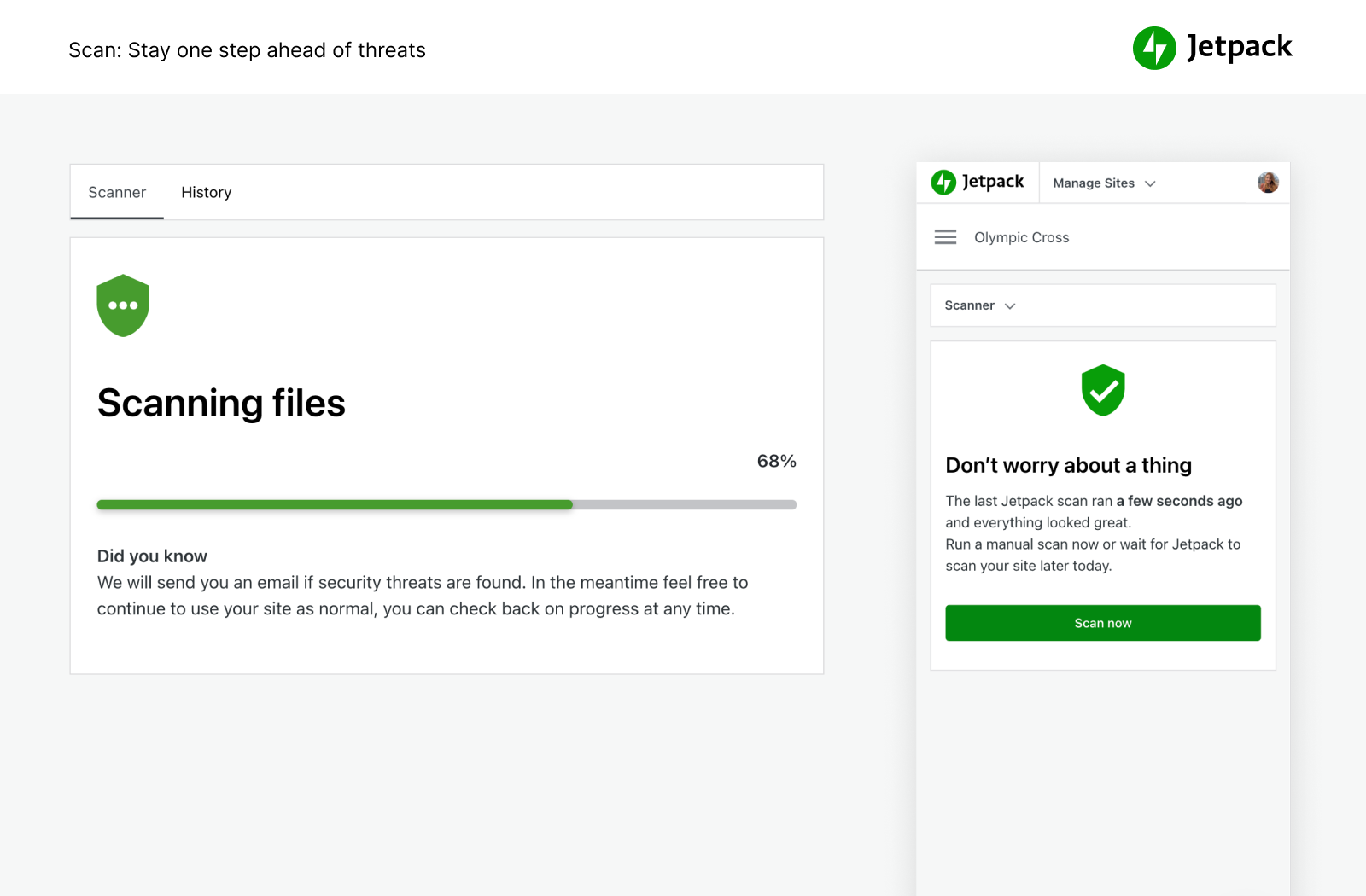
- ດຳເນີນການສະແກນມັນແວ ແລະ ການສະແກນຄວາມປອດໄພສຳລັບໄພຂົ່ມຂູ່ທາງໂຄດອື່ນໆໂດຍອັດຕະໂນມັດ. ແກ້ໄຂໃນຄິກດຽວເພື່ອກູ້ຄືນເວັບໄຊຂອງທ່ານຈາກມັນແວ.
- ບລັອກຄຳເຫັນສະແປມ ແລະ ການຕອບກັບຟອມດ້ວຍຄຸນສົມບັດຕໍ່ຕ້ານສະແປມທີ່ຂັບເຄື່ອນໂດຍ Akismet.
- ການປ້ອງກັນການໂຈມຕີແບບ Brute Force ເພື່ອປົກປ້ອງໜ້າເຂົ້າສູ່ລະບົບ WordPress ຂອງທ່ານຈາກການໂຈມຕີ.
- ຕິດຕາມ uptime / downtime ຂອງເວັບໄຊຂອງທ່ານ ແລະ ຮັບການແຈ້ງເຕືອນທັນທີເມື່ອມີການປ່ຽນແປງໃດໆທາງອີເມວ.
- ການເຂົ້າສູ່ລະບົບທີ່ປອດໄພຂັບເຄື່ອນໂດຍ WordPress.com ທີ່ໃຊ້ໂດຍເວັບໄຊນັບລ້ານ ພ້ອມທາງເລືອກ 2FA (ການຢືນຢັນຕົວຕົນສອງປັດໄຈ) ເພື່ອການປ້ອງກັນພິເສດ.
- ອັບເດດປັກອິນແຕ່ລະຕົວໂດຍອັດຕະໂນມັດ ເພື່ອການບຳລຸງຮັກສາ ແລະ ຈັດການເວັບໄຊທີ່ງ່າຍດາຍ.
ທ່ານສາມາດຊື້ຄຸນສົມບັດຄວາມປອດໄພທັງໝົດຂອງ Jetpack ໃນ Security bundle ຂອງພວກເຮົາ, ຫຼື VaultPress Backup, Scan ແລະ Akismet Anti-spam ສາມາດຊື້ແຍກຕ່າງຫາກໄດ້.
ຄວາມໄວ ແລະ ປະສິດທິພາບສູງສຸດ
ຮັບຄວາມໄວເວັບໄຊທີ່ໄວທີ່ສຸດດ້ວຍ Jetpack. CDN (Content Delivery Network) ຟຣີຂອງ Jetpack ຈະປັບແຕ່ງຮູບພາບຂອງທ່ານໂດຍອັດຕະໂນມັດ. ເບິ່ງເວລາໂຫຼດໜ້າເວັບຂອງທ່ານຫຼຸດລົງ — ພວກເຮົາຈະປັບແຕ່ງຮູບພາບຂອງທ່ານ ແລະ ສົ່ງພວກມັນຈາກເຄືອຂ່າຍທົ່ວໂລກທີ່ມີປະສິດທິພາບຂອງພວກເຮົາເອງ, ແລະ ເລັ່ງຄວາມໄວເວັບໄຊຂອງທ່ານໃນອຸປະກອນມືຖື ເພື່ອຫຼຸດຜ່ອນການໃຊ້ແບນວິດ ແລະ ປະຢັດເງິນ!
- Image CDN ສຳລັບຮູບພາບ ແລະ ໄຟລ໌ຄົງທີ່ຫຼັກ, ເຊັ່ນ CSS ແລະ JavaScript, ໃຫ້ບໍລິການຈາກເຊີບເວີຂອງພວກເຮົາ, ບໍ່ແມ່ນຂອງທ່ານ, ເຊິ່ງຊ່ວຍທ່ານປະຢັດເງິນ ແລະ ແບນວິດ.
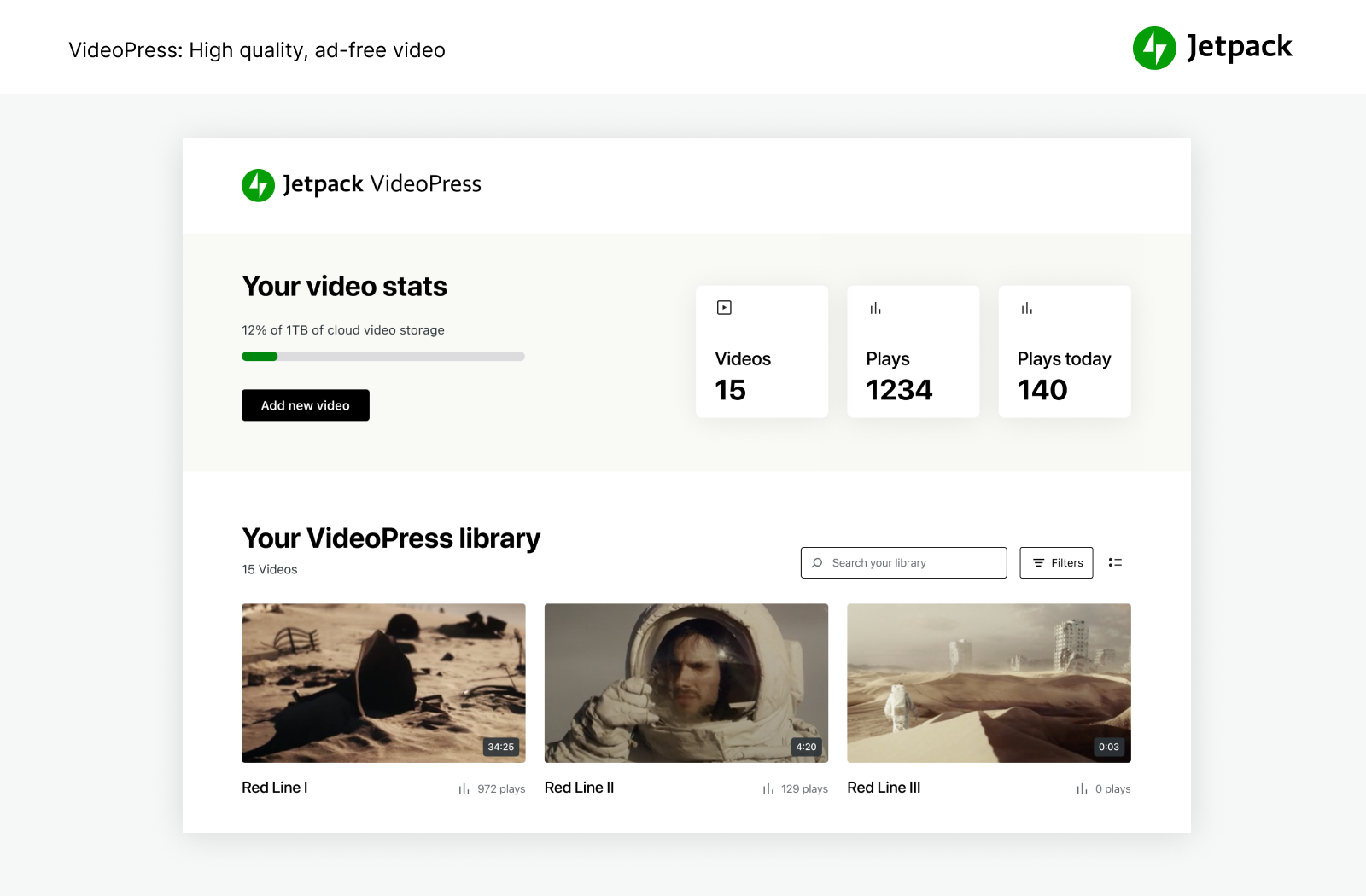
- ໂຮດຕິງວິດີໂອແບບບໍ່ຈຳກັດ, ຄວາມໄວສູງ, ບໍ່ມີໂຄສະນາ ຈະຮັກສາຄວາມສົນໃຈໄວ້ທີ່ເນື້ອຫາຂອງທ່ານ, ບໍ່ແມ່ນທີ່ໂຄສະນາ ຫຼື ຄຳແນະນຳທີ່ນຳພາຄົນອອກຈາກເວັບໄຊ.
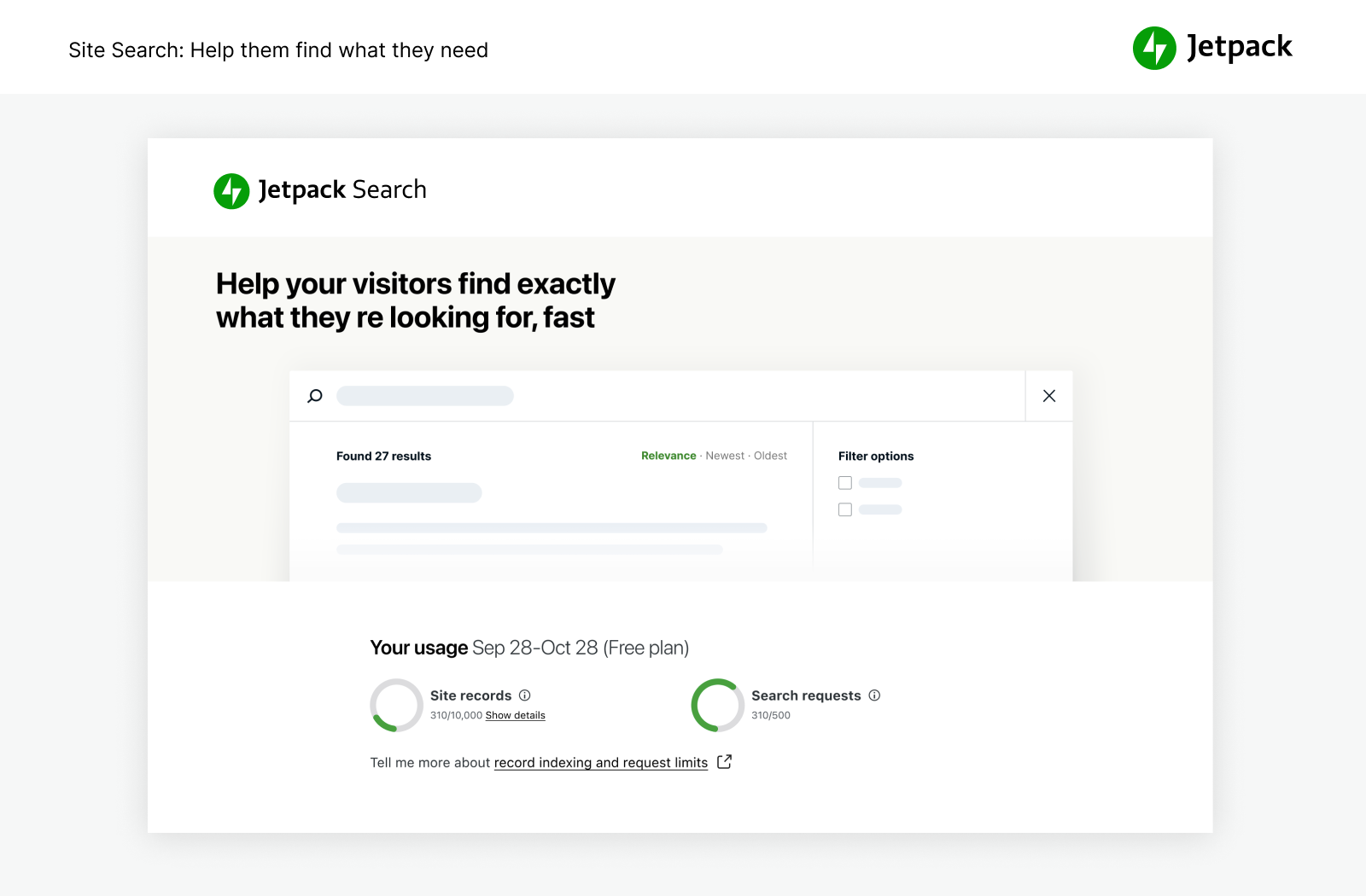
- Custom site search ມີປະສິດທິພາບ ແລະ ປັບແຕ່ງໄດ້ຢ່າງບໍ່ໜ້າເຊື່ອ. ຊ່ວຍໃຫ້ຜູ້ເຂົ້າຊົມຂອງທ່ານຊອກຫາເນື້ອຫາທີ່ຖືກຕ້ອງໄດ້ທັນທີ ເພື່ອໃຫ້ພວກເຂົາອ່ານ ແລະ ຊື້ຫຼາຍຂຶ້ນ. ເຮັດວຽກໄດ້ດີກັບເວັບໄຊ WooCommerce / eCommerce ເພື່ອຊ່ວຍກອງສິນຄ້າ ໃຫ້ລູກຄ້າໄດ້ສິ່ງທີ່ພວກເຂົາຕ້ອງການໃນເວັບໄຊຂອງທ່ານໄວຂຶ້ນ.
- ແນະນຳໃຫ້ໃຊ້ກັບ Jetpack Boost ເພື່ອຄວາມໄວສູງສຸດຂອງເວັບໄຊ WordPress.
ເຄື່ອງມືທີ່ມີປະສິດທິພາບສຳລັບການເຕີບໂຕ
ສ້າງ ແລະ ປັບແຕ່ງເວັບໄຊ WordPress ຂອງທ່ານ, ປັບໃຫ້ເໝາະສົມສຳລັບຜູ້ເຂົ້າຊົມ ແລະ ລາຍຮັບ, ແລະ ເພີດເພີນກັບການເບິ່ງສະຖິຕິຂອງທ່ານເພີ່ມຂຶ້ນ. ສ້າງມັນ, ແບ່ງປັນມັນ ແລະ ເບິ່ງມັນເຕີບໂຕ.
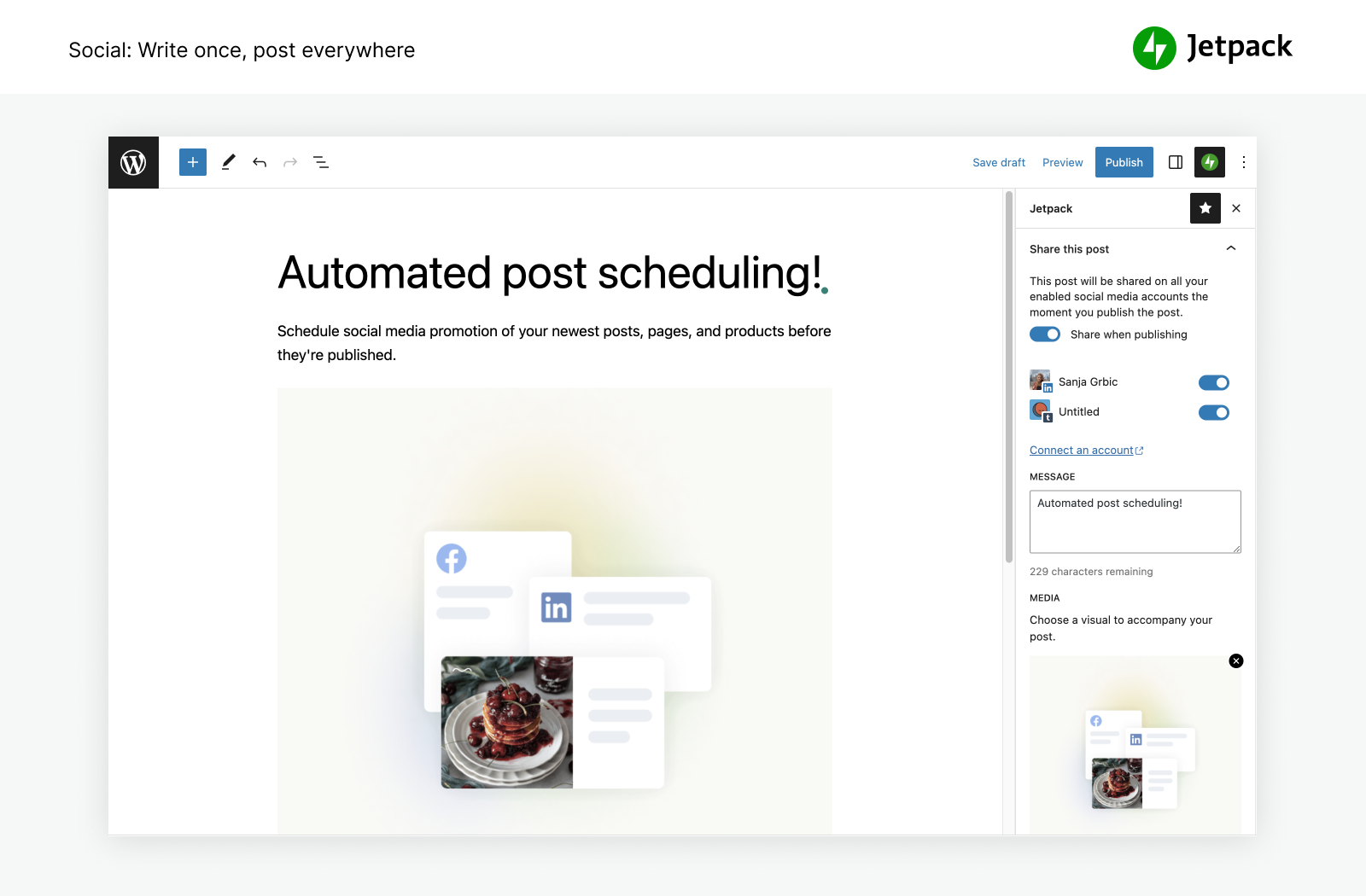
- ເຜີຍແຜ່ບົດຄວາມບລັອກ ແລະ ສິນຄ້າລົງສື່ສັງຄົມອອນລາຍໂດຍອັດຕະໂນມັດ ພຽງແຕ່ໃຊ້ເຄື່ອງມືຂອງພວກເຮົາເຊື່ອມຕໍ່ກັບ Facebook, Bluesky, Threads, Tumblr, Mastodon, LinkedIn ແລະ Nextdoor.
- ແບ່ງປັນໂພສ Instagram ໃນໜ້າ ແລະ ບົດຄວາມບລັອກຂອງທ່ານໄດ້ຢ່າງງ່າຍດາຍ.
- ເກັບເງິນ ຫຼື ການບໍລິຈາກ, ຂາຍສິນຄ້າ, ບໍລິການ ຫຼື ສະມາຊິກ ດ້ວຍການເຊື່ອມໂຍງທີ່ງ່າຍດາຍກັບ PayPal ແລະ Stripe.
- ເພີ່ມຍອດເຂົ້າຊົມດ້ວຍເຄື່ອງມື SEO ສຳລັບ Google, Bing, Facebook ແລະ WordPress.com. XML Sitemap ຖືກສ້າງຂຶ້ນໂດຍອັດຕະໂນມັດ.
- ລົງໂຄສະນາໃນເວັບໄຊຂອງທ່ານເພື່ອສ້າງລາຍຮັບ. ເຄືອຂ່າຍໂຄສະນາຈະເຮັດວຽກໃຫ້ທ່ານໂດຍອັດຕະໂນມັດ ເພື່ອຊອກຫາໂຄສະນາຄຸນນະພາບສູງມາໃສ່ໃນເວັບໄຊຂອງທ່ານ.
- ຈັດການຄຸນສົມບັດ Jetpack ໄດ້ຈາກທຸກບ່ອນດ້ວຍແອັບມືຖື WordPress ຢ່າງເປັນທາງການ, ມີໃຫ້ສຳລັບ Apple iOS (iPhone ຫຼື iPad) ແລະ Google Android.
- ກຳລັງຊອກຫາ Customer Relationship Management ຢູ່ບໍ່? ລອງເບິ່ງ ປັກອິນ Jetpack CRM ເຊິ່ງເຮັດວຽກຮ່ວມກັບ Jetpack ເພື່ອມອບວິທີທີ່ງ່າຍ ແລະ ໃຊ້ໄດ້ຈິງໃນການສ້າງຄວາມສໍາພັນກັບລູກຄ້າ ແລະ ຜູ້ສົນໃຈຂອງທ່ານ.
ສະຖິຕິທີ່ມີປະສິດທິພາບເພື່ອຂະຫຍາຍເວັບໄຊຂອງທ່ານ
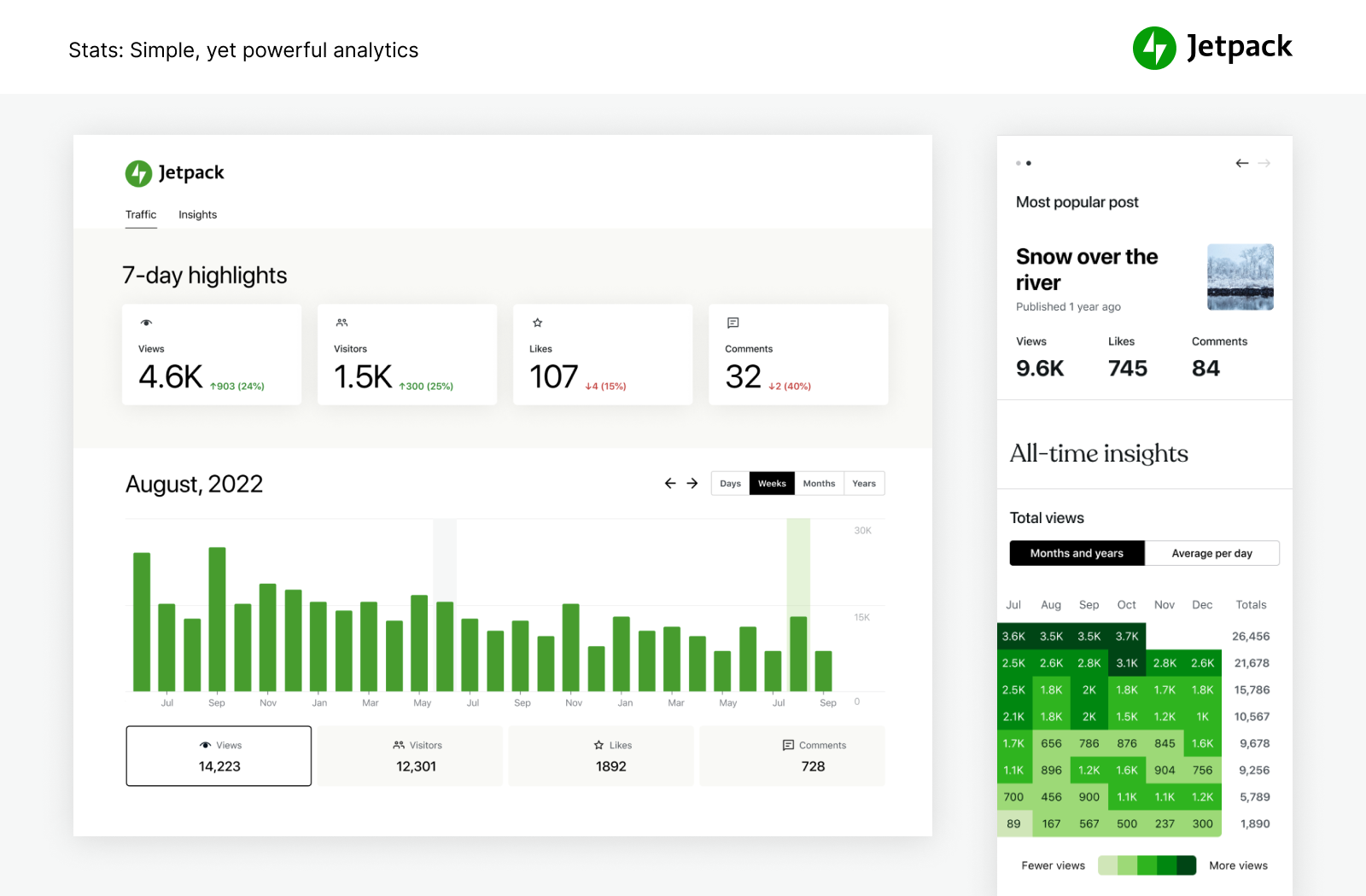
ດ້ວຍສະຖິຕິ Jetpack, ທ່ານບໍ່ຈຳເປັນຕ້ອງເປັນນັກວິທະຍາສາດຂໍ້ມູນ ເພື່ອເບິ່ງວ່າເວັບໄຊຂອງທ່ານມີປະສິດທິພາບແນວໃດ.
- ສະຖິຕິເວັບໄຊຂັ້ນສູງ ແລະ ການວິເຄາະເພື່ອຊ່ວຍທ່ານເຂົ້າໃຈຜູ້ຊົມຂອງທ່ານ.
- ຄົ້ນພົບໂພສ & ໜ້າທີ່ມີປະສິດທິພາບສູງສຸດຂອງທ່ານ.
- ເບິ່ງວ່າໃຜໃນທີມຂອງທ່ານທີ່ສ້າງເນື້ອຫາຍອດນິຍົມທີ່ສຸດ ດ້ວຍຕົວຊີ້ວັດຜູ້ຂຽນຂອງພວກເຮົາ.
- ຕິດຕາມນິໄສການສ້າງເນື້ອຫາ & ທ່າອ່ຽງຂອງທ່ານໃນແຕ່ລະປີໄດ້ຢ່າງງ່າຍດາຍ.
- ເບິ່ງທ່າອ່ຽງລາຍອາທິດ ແລະ ລາຍປີດ້ວຍ ໄຮໄລ້ 7 ວັນ ແລະ ສະຫຼຸບປະຈຳປີ.
- ເບິ່ງວ່າເນື້ອຫາຂອງທ່ານຖືກແບ່ງປັນໄປຍັງເຄືອຂ່າຍສັງຄົມຍອດນິຍົມໃດຫຼາຍທີ່ສຸດ.
- ສຳຫຼວດຂໍ້ມູນແບບ Real-time ກ່ຽວກັບຜູ້ເຂົ້າຊົມ, ການຖືກໃຈ ແລະ ຄຳເຫັນ.
- ຮັບຂໍ້ມູນເຊີງເລິກຢ່າງລະອຽດກ່ຽວກັບແຫຼ່ງອ້າງອີງທີ່ນຳພາການເຂົ້າຊົມມາສູ່ເວັບໄຊຂອງທ່ານ.
- ຄົ້ນພົບວ່າຜູ້ເຂົ້າຊົມຂອງທ່ານມາຈາກປະເທດໃດ.
- ວັດແທກການຄິກລິ້ງ, ການຫຼິ້ນວິດີໂອ ແລະ ການດາວໂຫຼດໄຟລ໌ພາຍໃນເວັບໄຊຂອງທ່ານ.
ຂຽນໃຫ້ສະຫຼາດຂຶ້ນ, ບໍ່ແມ່ນຍາກຂຶ້ນ.
ສຳຜັດກັບຄວາມງ່າຍດາຍໃນການສ້າງເນື້ອຫາແບບມືອາຊີບດ້ວຍ AI ທີ່ເຂົ້າໃຈງ່າຍ ແລະ ມີປະສິດທິພາບ. Jetpack AI Assistant ເຊື່ອມໂຍງກັບຕົວແກ້ໄຂ WordPress ຂອງທ່ານຢ່າງລຽບງ່າຍ, ສະເໜີອິນເຕີເຟດທີ່ເຂົ້າໃຈງ່າຍໃນການໂຕ້ຕອບກັບ AI.
ບລັອກທີ່ມີປະສິດທິພາບນີ້ຊ່ວຍໃຫ້ທ່ານສ້າງເນື້ອຫາທີ່ຫຼາກຫຼາຍຕາມຄຳສັ່ງຂອງທ່ານ, ຊ່ວຍຫຼຸດຜ່ອນເວລາ ແລະ ຄວາມພະຍາຍາມໃນການສ້າງເນື້ອຫາໄດ້ຢ່າງຫຼວງຫຼາຍ.
ພຽງແຕ່ບອກຄຳສັ່ງ, ແລະ ເບິ່ງ Jetpack AI Assistant ສ້າງບົດຄວາມບລັອກທີ່ໜ້າສົນໃຈ, ໜ້າທີ່ມີລາຍລະອຽດ, ລາຍການທີ່ມີໂຄງສ້າງ ແລະ ຕາຕະລາງທີ່ສົມບູນ – ທັງໝົດນີ້ປັບແຕ່ງຕາມຄວາມຕ້ອງການຂອງທ່ານ.
- ໃຊ້ປະໂຫຍດຈາກພະລັງ AI ໂດຍກົງຈາກຕົວແກ້ໄຂຂອງທ່ານ.
- ປົດລັອກເນື້ອຫາຄຸນນະພາບສູງທີ່ປັບແຕ່ງໄດ້ຕາມຄຳສັ່ງຂອງທ່ານ.
- ຮັກສາມາດຕະຖານວິຊາຊີບໄດ້ຢ່າງງ່າຍດາຍ.
- ການແປພາສາດ້ວຍ AI ໃນຫຼາຍພາສາຢູ່ປາຍນິ້ວຂອງທ່ານ, ທຳລາຍອຸປະສັກທາງພາສາ.
ໂປຣໂມດເນື້ອຫາຂອງທ່ານໄດ້ງ່າຍໆດ້ວຍ JETPACK BLAZE
ຊອກຫາແຟນຄລັບໃໝ່ໂດຍການໂປຣໂມດໂພສ ແລະ ໜ້າຂອງທ່ານຜ່ານເວັບໄຊນັບລ້ານໃນເຄືອຂ່າຍໂຄສະນາຂອງ WordPress.com ແລະ Tumblr.
- ສ້າງໂຄສະນາຂອງທ່ານ. ເລືອກກຸ່ມເປົ້າໝາຍ. ກຳນົດງົບປະມານ. ມັນງ່າຍແນວນັ້ນເລີຍ.
- ຂະຫຍາຍການເຂົ້າເຖິງຂອງທ່ານດ້ວຍເງິນພຽງເລັກນ້ອຍ.
ເຄື່ອງມືອອກແບບທີ່ງ່າຍດາຍ
ປັບແຕ່ງເວັບໄຊຂອງທ່ານຢ່າງໄວວາເພື່ອເຮັດໃຫ້ມັນໂດດເດັ່ນ — ບໍ່ຈຳເປັນຕ້ອງຂຽນໂຄດ.
- ຮູບແບບ — ຮູບແບບ WordPress ທີ່ລຽບງ່າຍເພື່ອເລີ່ມຕົ້ນກັບເວັບໄຊຂອງທ່ານ.
- Related posts — ຮັກສາຜູ້ເຂົ້າຊົມໃຫ້ຢູ່ໃນເວັບໄຊຂອງທ່ານ ໂດຍການສະແດງເນື້ອຫາທີ່ກ່ຽວຂ້ອງທີ່ພວກເຂົາຈະສົນໃຈໂດຍອັດຕະໂນມັດ.
- Gallery and Slideshow tools — ຄັງຮູບພາບ, Carousel Slider ແລະ ສະໄລ້ໂຊສຳລັບເວັບໄຊ WP ແລະ ຮ້ານຄ້າ.
- Subscriptions — ເຮັດໃຫ້ມັນງ່າຍສຳລັບຜູ້ເຂົ້າຊົມໃນການລົງທະບຽນເພື່ອຮັບການແຈ້ງເຕືອນໂພສ ແລະ ຄຳເຫັນຫຼ້າສຸດຂອງທ່ານ.
- Contact form — ສ້າງຟອມຕິດຕໍ່ໄດ້ບໍ່ຈຳກັດແບບຟຣີໆຢ່າງງ່າຍດາຍໂດຍບໍ່ຕ້ອງຂຽນໂຄດ. ຮັບການແຈ້ງເຕືອນທາງອີເມວສຳລັບແຕ່ລະການຕອບກັບ. ເຊື່ອມໂຍງກັບໂຊລູຊັນອີເມວ ເຊັ່ນ Creative Mail ເພື່ອເຂົ້າເຖິງລູກຄ້າ ແລະ ຜູ້ສົນໃຈຂອງທ່ານໄດ້ໄວ. ເຊື່ອມຕໍ່ກັບ Jetpack Anti spam (ຂັບເຄື່ອນໂດຍ Akismet) ເພື່ອກອງການສົ່ງຂໍ້ມູນ.
- oEmbed Support — ຝັງຮູບພາບ, ໂພສ ແລະ ລິ້ງຈາກ Facebook ແລະ Instagram ໄດ້ຢ່າງງ່າຍດາຍ.
ການເຊື່ອມໂຍງ
Jetpack ໄດ້ຮັບການອັບເດດທຸກເດືອນເພື່ອຮັບປະກັນການເຊື່ອມໂຍງທີ່ລຽບງ່າຍກັບປັກອິນ WordPress ຊັ້ນນຳ ແລະ ຜະລິດຕະພັນເທັກໂນໂລຊີອື່ນໆ.
- ສ້າງມາເພື່ອ WooCommerce: Jetpack ແລະ WooCommerce ທັງສອງຖືກສ້າງຂຶ້ນໂດຍ Automattic. Backup, Scan, Anti-spam, ເຊື່ອມໂຍງກັນຢ່າງສົມບູນແບບສຳລັບຮ້ານຄ້າ Woo / eComm.
- Jetpack ເຂົ້າກັນໄດ້ຢ່າງສົມບູນກັບ v2.0 ຂອງປັກອິນ AMP ຢ່າງເປັນທາງການສຳລັບ WordPress.
- ເຂົ້າໃຈລູກຄ້າ ແລະ ການຕະຫຼາດຂອງທ່ານໄດ້ດີຂຶ້ນດ້ວຍການເຊື່ອມໂຍງ Google Analytics (GA).
- ແພລັດຟອມສື່ສັງຄົມອອນລາຍ: Instagram, Facebook, Tumblr, LinkedIn, Threads, Bluesky, Nextdoor.
- ບລັອກທີ່ງ່າຍດາຍເພື່ອປັບແຕ່ງເວັບໄຊຂອງທ່ານ: Pinterest, Whatsapp, Podcast player, GIFs, maps, tiled gallery, slideshow.
- ຜູ້ປະມວນຜົນການຊຳລະເງິນ: ເກັບເງິນ ຫຼື ການບໍລິຈາກ ແລະ ຂາຍສິນຄ້າຜ່ານ Stripe ແລະ PayPal ໄດ້ຢ່າງງ່າຍດາຍ.
- ປັກອິນຄວາມໄວ ແລະ ປະສິດທິພາບເວັບໄຊ: ເຮັດວຽກໄດ້ດີກັບ WP Super Cache ໂດຍ Automattic ແລະ Cloudflare.
- Contact form: Anti-spam (ຂັບເຄື່ອນໂດຍ Akismet) ບລັອກຄຳເຫັນສະແປມສຳລັບ Jetpack forms, Contact Form 7, Ninja Forms, Gravity Forms, Formidable Forms ແລະ ອື່ນໆ.
- ການເຊື່ອມໂຍງເທັກໂນໂລຊີອື່ນໆ: Instagram, Creative Mail, Mailchimp, Calendly, Whatsapp, Pinterest, Revue ແລະ ອື່ນໆ.
ສຳຫຼວດເພີ່ມເຕີມກ່ຽວກັບ JETPACK
ຖ້າທ່ານມັກ Jetpack, ລອງເບິ່ງຜະລິດຕະພັນ ແລະ ຊຸດຄຸ້ມຄ່າອື່ນໆຂອງພວກເຮົາ.
- Jetpack Complete – ຊຸດ Complete ພ້ອມຄວາມປອດໄພແບບ Real-time, ປະສິດທິພາບສູງສຸດ ແລະ ທຸກຢ່າງທີ່ທ່ານຕ້ອງການເພື່ອຂະຫຍາຍທຸລະກິດຂອງທ່ານ.
- Jetpack Security – ຊຸດຄວາມປອດໄພຂອງພວກເຮົາສະໜອງຄວາມປອດໄພຂອງເວັບໄຊ WordPress ທີ່ສົມບູນແບບ ແລະ ໃຊ້ງານງ່າຍ, ລວມທັງການສຳຮອງຂໍ້ມູນແບບ Real-time, Web Application Firewall, ການສະແກນມັນແວ ແລະ ການປ້ອງກັນສະແປມ.
- Jetpack Backup – ບັນທຶກທຸກການປ່ຽນແປງ ແລະ ກັບມາອອນລາຍໄດ້ໄວດ້ວຍການກູ້ຄືນໃນຄິກດຽວຈາກ Jetpack VaultPress Backup.
- Jetpack Scan – ປົກປ້ອງເວັບໄຊຂອງທ່ານຈາກຜູ້ບໍ່ຫວັງດີຕະຫຼອດ 24 ຊົ່ວໂມງ ‑ ດ້ວຍ Web Application Firewall (WAF) ຂອງພວກເຮົາ ແລະ ການສະແກນມັນແວອັດຕະໂນມັດພ້ອມການແກ້ໄຂໃນຄິກດຽວ.
- Jetpack Search – ສົ່ງຜົນການຄົ້ນຫາທີ່ກ່ຽວຂ້ອງທີ່ສຸດໃຫ້ກັບຜູ້ເຂົ້າຊົມຂອງທ່ານໄດ້ທັນທີດ້ວຍ Jetpack Search. ບໍ່ຕ້ອງຂຽນໂຄດ, ບໍ່ມີໂຄສະນາ ແລະ ບໍ່ມີການຕິດຕາມ.
- Jetpack Boost – ເພີ່ມຄວາມໄວເວັບໄຊຂອງທ່ານ. ເພີດເພີນກັບຂໍ້ໄດ້ປຽບດ້ານປະສິດທິພາບດຽວກັນກັບເວັບໄຊຊັ້ນນຳຂອງໂລກ, ໂດຍບໍ່ຕ້ອງເພິ່ງນັກພັດທະນາ.
- Jetpack VideoPress – ສະແດງວິດີໂອຄຸນນະພາບສູງໂດຍບໍ່ມີຄວາມຍຸ້ງຍາກ. ລາກ ແລະ ວາງວິດີໂອຜ່ານຕົວແກ້ໄຂ WordPress ແລະ ໃຫ້ຄວາມສຳຄັນກັບເນື້ອຫາຂອງທ່ານ, ບໍ່ແມ່ນໂຄສະນາ.
- Jetpack AI – ປ່ຽນໄອເດຍຂອງທ່ານໃຫ້ເປັນເນື້ອຫາທີ່ພ້ອມເຜີຍແຜ່ດ້ວຍຄວາມໄວແສງ.
- Jetpack Stats – ຕິດຕາມການເຂົ້າຊົມເວັບໄຊ, ໂພສຍອດນິຍົມ, ຜູ້ຕິດຕາມຈົດໝາຍຂ່າວ ແລະ ອື່ນໆຂອງທ່ານ.
- Jetpack Social – ແບ່ງປັນເນື້ອຫາເວັບໄຊຂອງທ່ານໄປຍັງແພລັດຟອມສື່ສັງຄົມອອນລາຍທີ່ທ່ານມັກໂດຍອັດຕະໂນມັດ ຈາກບ່ອນດຽວ.
- Jetpack CRM – Jetpack CRM ມີເຄື່ອງມືທັງໝົດທີ່ທ່ານຕ້ອງການເພື່ອຂະຫຍາຍທຸລະກິດຂອງທ່ານ. ມັນຍັງເປັນແບບໂມດູນ, ດັ່ງນັ້ນທ່ານຈຶ່ງສາມາດປັບແຕ່ງໃຫ້ເໝາະສົມກັບຄວາມຕ້ອງການຂອງທ່ານໄດ້.
- Jetpack Creator – ສ້າງເນື້ອຫາທີ່ໂດດເດັ່ນ, ເພີ່ມຖານຜູ້ຕິດຕາມຂອງທ່ານ ແລະ ສ້າງລາຍໄດ້ຈາກການມີຕົວຕົນໃນໂລກອອນລາຍ.
- Jetpack Newsletter – ປ່ຽນບົດຄວາມບລັອກຂອງທ່ານໃຫ້ເປັນຈົດໝາຍຂ່າວ ເພື່ອເຂົ້າເຖິງຜູ້ຕິດຕາມຂອງທ່ານໄດ້ຢ່າງງ່າຍດາຍ. ສະເໜີການຕິດຕາມແບບຈ່າຍເງິນ ແລະ ສ້າງລາຍໄດ້ຈາກເນື້ອຫາຂອງທ່ານ.
ກັນສະແປມອອກຈາກເວັບໄຊຂອງທ່ານ
- Akismet Anti-spam – ລຶບສະແປມອອກຈາກຄຳເຫັນ ແລະ ຟອມໂດຍອັດຕະໂນມັດ. ປະຢັດເວລາ, ໄດ້ຮັບການຕອບຮັບຫຼາຍຂຶ້ນ, ມອບປະສົບການທີ່ດີກວ່າໃຫ້ກັບຜູ້ເຂົ້າຊົມ – ທັງໝົດນີ້ໂດຍທີ່ທ່ານບໍ່ຕ້ອງເຮັດຫຍັງເລີຍ.
ໂປຣໂມດເນື້ອຫາຂອງທ່ານເພື່ອຍອດວິວທີ່ຫຼາຍຂຶ້ນ
- Blaze – ຊອກຫາແຟນຄລັບໃໝ່ໂດຍການໂປຣໂມດໂພສ ແລະ ໜ້າຂອງທ່ານຜ່ານເວັບໄຊນັບລ້ານໃນເຄືອຂ່າຍໂຄສະນາຂອງ WordPress.com ແລະ Tumblr.
ຈັດການຫຼາຍກວ່າໜຶ່ງເວັບໄຊແມ່ນບໍ່?
- Jetpack Manage – ເຄື່ອງມືທັງໝົດທີ່ທ່ານຕ້ອງການເພື່ອຈັດການເວັບໄຊ WordPress ຫຼາຍໆເວັບ. ຕິດຕາມຄວາມປອດໄພ, ປະສິດທິພາບ ແລະ ຍອດເຂົ້າຊົມຂອງເວັບໄຊ, ແລະ ຮັບການແຈ້ງເຕືອນຫາກເວັບໄຊຕ້ອງການການດູແລ.
ບິນໃຫ້ສູງກວ່າເກົ່າດ້ວຍປັກອິນແຍກ
ເຄີຍຫວັງບໍ່ວ່າຈະມີພຽງແຕ່ຄຸນສົມບັດດຽວຂອງ Jetpack ໃນປັກອິນຂອງມັນເອງ? ດຽວນີ້ທ່ານເຮັດໄດ້ແລ້ວ. ລອງເບິ່ງປັກອິນແຍກຕ່າງຫາກຂອງພວກເຮົາ ແລະ ຕິດຕັ້ງສະເພາະສິ່ງທີ່ທ່ານຕ້ອງການ.
ພາບໜ້າຈໍ
ບລັອກ
ປລັກອິນນີ້ມີ 52 ບລັອກ.
- Form Create forms to collect data from site visitors and manage their responses.
- All Playlists Every playlist on the site, paginated, under a heading you can edit.
- VideoPress Embed a video from your media library or upload a new one with VideoPress.
- Latest Videos Playlist VideoPress powered list of your latest videos in a single customizable player. New uploads show up automatically.
- Video Playlist VideoPress powered list of videos in a single customizable player. Build the playlist from your VideoPress library or video links.
- Related Posts Display a list of related posts.
- Donations Form Collect one-time, monthly, or annually recurring donations.
- GIF Search for and insert an animated image.
- Business Hours Display opening hours for your business.
- Top Posts & Pages Display your most popular content.
- OpenTable Book a reservation with OpenTable.
- Voice to content Transform your spoken words into a post ready to publish with AI.
- Google Calendar Embed a Google Calendar.
- Ad Earn income by adding high quality ads to your post.
- Like Give your readers the ability to show appreciation for your posts.
- Cookie Consent Display a customizable cookie consent banner. To display this block on all pages of your site, please add it inside a Template Part that is present on all your templates, like a Header or a Footer.
- Payments Sell products and services or receive donations on your website.
- Writing Prompt Answer a new and inspiring writing prompt each day.
- Sharing Buttons Give your readers the ability to easily share your content with X, Facebook, Tumblr, LinkedIn, and a host of other services to help spread your message across the web.
- Recipe (Beta) Add images, ingredients and cooking steps to display an easy to read recipe.
- Blog Stats Show a stats counter for your blog.
- Star Rating Rate movies, books, songs, recipes — anything you can put a number on.
- Contact Info Add an email address, phone number, and physical address with improved markup for better SEO results.
- Latest Instagram Posts Display an automatically updating list of the latest posts from your Instagram feed.
- Nextdoor Embed a Nextdoor post for your neighbors on your blog.
- Send A Message Let your visitors send you messages with the tap of a button.
- Podcast Player Select and play episodes from a single podcast.
- Image Compare Compare two images with a slider. Works best with images of the same size.
- Subscriber Login Show links for subscribers to login, logout, or manage their subscription.
- Google Docs (Beta) Embed a Google Document.
- Goodreads Features books from the shelves of your Goodreads account.
- Calendly Embed a calendar for customers to schedule appointments.
- Subscribe Subscribe to this blog's posts as a newsletter.
- Markdown Add headings, lists, or links to plain text with ease.
- Tock Reserve a table at your restaurant with Tock.
- Pinterest Embed a Pinterest pin, board, or user.
- Zoom Scheduler Embed a Zoom Scheduler booking page.
- Mailchimp Allow readers to join a Mailchimp audience.
- Repeat Visitor Control block visibility based on how often a visitor has viewed the page.
- AI Assistant Elevate your content creation with our AI-powered Gutenberg Block, offering seamless customization and generation. Bear in mind that, as an evolving tool, occasional imprecision may occur.
- Blogroll Share the sites you follow with your users.
- Tiled Gallery Display multiple images in an elegantly organized tiled layout.
- Map Add an interactive map showing one or more locations.
- Payment Buttons Sell products and subscriptions.
- Story Add an interactive story.
- Eventbrite Checkout Embed Eventbrite event details and ticket checkout.
- Jetpack AI Search Provide a summarized answer to questions, trained on the sites content. Powered by AI.
- Paid Content Restrict access to your content for paying subscribers.
- Slideshow Display multiple images in sequential order.
- Payment Button Button allowing you to sell products and subscriptions.
- Paywall Limit access to the content below this block to chosen subscribers.
- Sharing Button Display a sharing button, allowing users to share your post.
ການຕິດຕັ້ງ
ການຕິດຕັ້ງແບບອັດຕະໂນມັດ
ການຕິດຕັ້ງແມ່ນຟຣີ, ໄວ ແລະ ງ່າຍ. ຕັ້ງຄ່າ Jetpack ພາຍໃນບໍ່ກີ່ນາທີ.
ທາງເລືອກແບບ Manual
ອີກທາງເລືອກໜຶ່ງ, ຕິດຕັ້ງ Jetpack ຜ່ານ Plugin Directory, ຫຼື ອັບໂຫລດໄຟລ໌ດ້ວຍຕົນເອງໄປຍັງເຊີບເວີຂອງທ່ານ ແລະ ປະຕິບັດຕາມຄຳແນະນຳໃນໜ້າຈໍ. ຫາກທ່ານຕ້ອງການຄວາມຊ່ວຍເຫຼືອເພີ່ມເຕີມ ໃຫ້ອ່ານ ຄຳແນະນຳລະອຽດຂອງພວກເຮົາ.
ຄຳຖາມທີ່ພົບເລື້ອຍ
-
Jetpack ຟຣີບໍ່?
-
ແມ່ນແລ້ວ! ຄຸນສົມບັດຫຼັກຂອງ Jetpack ແມ່ນໃຫ້ໃຊ້ຟຣີສຳລັບເວັບໄຊທີ່ບໍ່ແມ່ນເພື່ອການຄ້າ.
ສິ່ງເຫຼົ່ານີ້ລວມມີ: ສະຖິຕິເວັບໄຊ, CDN ຄວາມໄວສູງສຳລັບຮູບພາບ, ບົດຄວາມທີ່ກ່ຽວຂ້ອງ, ການຕິດຕາມ Downtime, ການປ້ອງກັນການໂຈມຕີແບບ Brute Force, ການແບ່ງປັນອັດຕະໂນມັດໄປຍັງເຄືອຂ່າຍສັງຄົມ, ການປັບແຕ່ງແຖບດ້ານຂ້າງ, ເຄື່ອງມື SEO (Search Engine Optimization) ແລະ ອື່ນໆອີກຫຼາຍຢ່າງ.
-
ຂ້ອຍຄວນຊື້ແພັກເກັດແບບຈ່າຍເງິນບໍ່?
-
ມັນຂຶ້ນກັບເວັບໄຊຂອງທ່ານ ແລະ ປະເພດຂອງການປ້ອງກັນ, ປະສິດທິພາບ ແລະ ການອອກແບບທີ່ທ່ານຕ້ອງການ. ຖ້າທ່ານສ້າງລາຍໄດ້ຈາກເວັບໄຊຂອງທ່ານ, ຄຳຕອບແມ່ນ “ແມ່ນ”. ສຳລັບບໍລິບົດ, ບໍລິການແບບເສຍເງິນຂອງ Jetpack ລວມມີການສຳຮອງຂໍ້ມູນແບບ Real-time, ການສະແກນຄວາມປອດໄພ, ການກອງສະແປມ, ໂຮດຕິງວິດີໂອ, ການສ້າງລາຍໄດ້ຈາກເວັບໄຊ, ການຄົ້ນຫາ, ການສະໜັບສະໜູນແບບບຸລິມະສິດ ແລະ ອື່ນໆ.
ເພື່ອຮຽນຮູ້ເພີ່ມເຕີມກ່ຽວກັບຄວາມປອດໄພທີ່ຈຳເປັນ ແລະ ບໍລິການ WordPress ທີ່ພວກເຮົາສະໜອງໃຫ້ ແລະ ເບິ່ງວ່າພວກເຮົາຈະປັບປຸງເວັບໄຊຂອງທ່ານໄດ້ແນວໃດ, ໃຫ້ເຂົ້າໄປທີ່ ໜ້າແພັກເກັດຂອງພວກເຮົາ.
-
ເປັນຫຍັງຂ້ອຍຈຶ່ງຕ້ອງມີບັນຊີ WordPress.com?
-
ເນື່ອງຈາກ Jetpack ແລະ ບໍລິການຂອງມັນຖືກສະໜອງ ແລະ ໂຮດໂດຍ WordPress.com, ຈຶ່ງຈຳເປັນຕ້ອງມີບັນຊີ WordPress.com ເພື່ອໃຫ້ Jetpack ເຮັດວຽກໄດ້.
-
ຂ້ອຍມີບັນຊີ WordPress ແລ້ວ, ແຕ່ Jetpack ບໍ່ເຮັດວຽກ. ເກີດຫຍັງຂຶ້ນ?
-
ບັນຊີ WordPress.com ແຕກຕ່າງຈາກບັນຊີທີ່ທ່ານໃຊ້ເພື່ອເຂົ້າສູ່ລະບົບ WordPress ທີ່ທ່ານໂຮດເອງ. ຖ້າທ່ານສາມາດເຂົ້າສູ່ລະບົບ WordPress.com ໄດ້, ສະແດງວ່າທ່ານມີບັນຊີ WordPress.com ແລ້ວ. ຖ້າບໍ່ໄດ້, ທ່ານສາມາດສ້າງໄດ້ງ່າຍໆ ໃນລະຫວ່າງການຕິດຕັ້ງ.
-
ຂ້ອຍຈະເບິ່ງສະຖິຕິຂອງຂ້ອຍໄດ້ແນວໃດ?
-
ເມື່ອທ່ານຕິດຕັ້ງ Jetpack ແລ້ວ, ສະຖິຕິຂອງທ່ານຈະມີຢູ່ໃນແດຊບອດ Jetpack ຂອງທ່ານ ແລະ ຜ່ານ ແອັບມືຖື WordPress ຢ່າງເປັນທາງການ.
-
ຂ້ອຍຈະປະກອບສ່ວນໃຫ້ກັບ Jetpack ໄດ້ແນວໃດ?
-
ມີໂອກາດສຳລັບນັກພັດທະນາທຸກລະດັບໃນການປະກອບສ່ວນ. ຮຽນຮູ້ເພີ່ມເຕີມກ່ຽວກັບການປະກອບສ່ວນໃຫ້ກັບ Jetpack ຫຼື ພິຈາລະນາ ເຂົ້າຮ່ວມໂຄງການເບຕ້າຂອງພວກເຮົາ.
-
Jetpack ລວມມີຫຍັງອີກແດ່?
-
Jetpack ແມ່ນຊຸດເຄື່ອງມືສຸດຍອດສຳລັບ WP ທັງຕົວແກ້ໄຂຄລາສສິກ ແລະ ຕົວແກ້ໄຂບລັອກ, ມອບທຸກຢ່າງທີ່ທ່ານຕ້ອງການສຳລັບເວັບໄຊມືອາຊີບ. ມັນລວມມີຄຸນສົມບັດຕໍ່ໄປນີ້:
- Activity log — ຕິດຕາມການປ່ຽນແປງທັງໝົດຂອງເວັບໄຊເພື່ອແກ້ໄຂຂໍ້ຜິດພາດ, ແກ້ໄຂບັນຫາ ຫຼື ບຳລຸງຮັກສາ
- Ads — ສ້າງລາຍໄດ້ໂດຍການສະແດງໂຄສະນາຄຸນນະພາບສູງໃນເວັບໄຊຂອງທ່ານ.
- Beautiful Math — ໃຊ້ພາສາ LaTeX markup ສຳລັບການຂຽນສົມຜົນທາງຄະນິດສາດທີ່ຊັບຊ້ອນ, ສູດ ແລະ ອື່ນໆ.
- Carousel slider — ສະແດງປະສົບການການເບິ່ງຮູບພາບເຕັມໜ້າຈໍທີ່ສວຍງາມ ພ້ອມຄຳເຫັນ ແລະ ຂໍ້ມູນ EXIF.
- CDN — ຊ່ວຍໃຫ້ໜ້າຂອງທ່ານໂຫຼດໄວຂຶ້ນໂດຍການອະນຸຍາດໃຫ້ Jetpack ປັບແຕ່ງຮູບພາບຂອງທ່ານ ແລະ ໃຫ້ບໍລິການຮູບພາບ ແລະ ໄຟລ໌ຄົງທີ່ (ເຊັ່ນ: CSS ແລະ JavaScript) ຈາກເຄືອຂ່າຍເຊີບເວີທົ່ວໂລກຂອງພວກເຮົາ.
- Comments — ແທນທີ່ຟອມຄຳເຫັນເລີ່ມຕົ້ນຂອງທ່ານດ້ວຍລະບົບທີ່ປັບປຸງໃໝ່ ພ້ອມຕົວເລືອກການເຂົ້າສູ່ລະບົບຜ່ານສື່ສັງຄົມ.
- Comment Likes — ອະນຸຍາດໃຫ້ຜູ້ອ່ານຖືກໃຈຄຳເຫັນອື່ນໆ ເພື່ອສະແດງຄວາມເຫັນດີ, ການອະນຸມັດ ຫຼື ຄວາມຊື່ນຊົມ.
- Contact Form — ສະເໜີໃຫ້ຜູ້ອ່ານຂອງທ່ານສາມາດຕິດຕໍ່ໄດ້, ໂດຍບໍ່ຕ້ອງໃຫ້ທີ່ຢູອີເມວສ່ວນຕົວຂອງທ່ານ.
- Custom CSS — ປັບແຕ່ງຮູບລັກສະນະຂອງຮູບແບບຂອງທ່ານໂດຍບໍ່ຕ້ອງສ້າງ Child Theme ຫຼື ກັງວົນວ່າການອັບເດດຈະຂຽນທັບການປັບແຕ່ງຂອງທ່ານ.
- Custom Content Types — ເພີ່ມປະເພດໂພສແບບກຳນົດເອງ (CPTs) ໃສ່ເວັບໄຊຂອງທ່ານ.
- Downtime Monitor — ແຈ້ງເຕືອນທ່ານຜ່ານອີເມວຫາກເວັບໄຊຂອງທ່ານລົ້ມ ເພື່ອຮັບປະກັນວ່າທ່ານຮັກສາເວລາ Uptime ໄວ້.
- Extra Sidebar Widgets — ວິດເຈັດພິເສດທີ່ທ່ານສາມາດເພີ່ມໃສ່ບລັອກຂອງທ່ານ, ລວມທັງ RSS Links ແລະ Facebook Like Boxes.
- Gravatar Hovercards — ເຮັດໃຫ້ໂປຣໄຟລ໌ Gravatar ຂອງທ່ານເບິ່ງເຫັນໄດ້ສຳລັບຜູ້ທີ່ກຳລັງເບິ່ງບລັອກຂອງທ່ານ.
- Google Analytics (GA) — ຕິດຕາມສະຖິຕິເວັບໄຊ WordPress ຂອງທ່ານດ້ວຍ Google Analytics.
- Infinite Scroll — ດຶງໂພສຖັດໄປມາສະແດງໂດຍອັດຕະໂນມັດເມື່ອຜູ້ອ່ານເຂົ້າໃກ້ສ່ວນລຸ່ມຂອງໜ້າ.
- JSON API — ອະນຸຍາດໃຫ້ແອັບພລິເຄຊັນ ແລະ ບໍລິການເຊື່ອມຕໍ່ກັບບລັອກຂອງທ່ານຢ່າງປອດໄພ, ແລະ ອະນຸຍາດໃຫ້ພວກເຂົາໃຊ້ເນື້ອຫາຂອງທ່ານ ຫຼື ສະເໜີຟັງຊັນໃໝ່ໃຫ້ທ່ານ.
- Likes — ອະນຸຍາດໃຫ້ຜູ້ອ່ານສະແດງຄວາມຊື່ນຊົມຕໍ່ໂພສຂອງທ່ານດ້ວຍການຄິກດຽວ.
- Markdown — ຊ່ວຍໃຫ້ທ່ານຂຽນໂພສ ແລະ ຄຳເຫັນທີ່ມີລິ້ງ, ລາຍການ ແລະ ຮູບແບບອື່ນໆໂດຍໃຊ້ຕົວອັກສອນທຳມະດາ ແລະ ເຄື່ອງໝາຍວັກຕອນ. Markdown ຖືກໃຊ້ໂດຍນັກຂຽນ ແລະ ບລັອກເກີທີ່ຕ້ອງການວິທີທີ່ໄວ ແລະ ງ່າຍໃນການຂຽນຂໍ້ຄວາມແບບ Rich Text ໂດຍບໍ່ຕ້ອງຍົກມືອອກຈາກແປ້ນພິມ.
- Malware detection – ການສະແກນມັນແວອັດຕະໂນມັດທີ່ຊ່ວຍປົກປ້ອງເວັບໄຊ WP ຂອງທ່ານດ້ວຍການແກ້ໄຂອັດຕະໂນມັດ.
- Notifications — ຮັບການແຈ້ງເຕືອນສຳລັບຄຳເຫັນໃໝ່ ແລະ ການຖືກໃຈໃນແຖບ Admin ຂອງທ່ານ ແລະ ໃນອຸປະກອນມືຖືຂອງທ່ານ.
- oEmbed Support — ຝັງຮູບພາບ, ໂພສ ແລະ ລິ້ງຈາກ Facebook ແລະ Instagram ໄດ້ຢ່າງງ່າຍດາຍ.
- Plugin Management — ຊ່ວຍໃຫ້ບຳລຸງຮັກສາເວັບໄຊໄດ້ງ່າຍ ໂດຍການເລືອກວ່າປັກອິນໃດຈະອັບເດດໂດຍອັດຕະໂນມັດ.
- Post by Email — ເຜີຍແຜ່ໂພສໂດຍໃຊ້ Mail Client ໃດກໍໄດ້.
- Protect — ປົກປ້ອງເວັບໄຊຂອງທ່ານຈາກການໂຈມຕີເຂົ້າສູ່ລະບົບແບບ Brute Force ທັງແບບດັ້ງເດີມ ແລະ ແບບກະຈາຍ.
- Publicize — ແບ່ງປັນໂພສໃໝ່ລົງໃນເຄືອຂ່າຍສື່ສັງຄົມໂດຍອັດຕະໂນມັດ, ຫຼື ກຳນົດເວລາການແບ່ງປັນໃນອະນາຄົດດ້ວຍຂໍ້ຄວາມແບບກຳນົດເອງ.
- Related Posts — ສະແດງໂພສຕາມບໍລິບົດທີ່ຜູ້ເຂົ້າຊົມຂອງທ່ານອາດສົນໃຈອ່ານ ຫຼັງຈາກທີ່ພວກເຂົາອ່ານໂພສປັດຈຸບັນຈົບແລ້ວ.
- Secure Auth — ການເຂົ້າສູ່ລະບົບທີ່ປອດໄພຂັບເຄື່ອນໂດຍ WordPress.com ທີ່ໃຊ້ໂດຍເວັບໄຊນັບລ້ານ ພ້ອມທາງເລືອກ 2FA (ການຢືນຢັນຕົວຕົນສອງປັດໄຈ) ເພື່ອການປ້ອງກັນພິເສດ.
- Security Scanner — ການປ້ອງກັນໄວຣັດ ແລະ ການກວດຈັບໄພຂົ່ມຂູ່ອື່ນໆສຳລັບເວັບໄຊ WordPress ຂອງທ່ານພ້ອມການແກ້ໄຂອັດຕະໂນມັດ.
- Search — ການທົດແທນທີ່ມີປະສິດທິພາບສຳລັບການຄົ້ນຫາໃນຕົວຂອງ WordPress, ຂັບເຄື່ອນໂດຍ Elasticsearch ໃນຄລາວຂອງ WordPress.com
- SEO Tools — ປັບແຕ່ງເວັບໄຊຂອງທ່ານສຳລັບ Search Engine ໂດຍການໃຊ້ປະໂຫຍດຈາກເຄື່ອງມື SEO ຂອງພວກເຮົາ.
- Sharing — ເພີ່ມປຸ່ມແບ່ງປັນໃສ່ບົດຄວາມບລັອກຂອງທ່ານ ເພື່ອໃຫ້ຜູ້ອ່ານສາມາດແບ່ງປັນເນື້ອຫາຂອງທ່ານໄດ້ງ່າຍ.
- Shortcode Embeds — ຝັງວິດີໂອຈາກ YouTube ແລະ ສື່ຕ່າງໆຈາກທົ່ວເວັບ.
- Site Backup — ສຳຮອງຂໍ້ມູນເວັບໄຊທັງໝົດຂອງທ່ານໂດຍອັດຕະໂນມັດ. ເຮັດສຳເນົາ, ໂຄລນ, ຍ້າຍ, ໂອນໄປຍັງໂຮດໃໝ່ ແລະ ກູ້ຄືນໄດ້ງ່າຍ. ເຄີຍຮູ້ຈັກກັນໃນຊື່ VaultPress.
- Site Stats — ເບິ່ງການເຂົ້າຊົມເວັບໄຊຕາມວັນທີ, ລວມທັງໜ້າ ແລະ ໂພສຍອດນິຍົມທີ່ສຸດ.
- Site Verification — ຢືນຢັນເວັບໄຊຂອງທ່ານເພື່ອໃຊ້ກັບ Google, Bing ແລະ Pinterest ແລະ ເຄື່ອງມືຂອງພວກເຂົາ.
- Sitemap — ສ້າງລາຍຊື່ໜ້າເພື່ອໃຫ້ Search Engine ເຊັ່ນ Google ຫຼື Bing ເກັບດັດຊະນີ.
- Spam Filtering — ກອງສະແປມຄຳເຫັນ, ຣີວິວສິນຄ້າ ຫຼື ການສົ່ງຟອມຕິດຕໍ່ອອກໂດຍອັດຕະໂນມັດ.
- Subscriptions — ອະນຸຍາດໃຫ້ຜູ້ເຂົ້າຊົມຮັບການແຈ້ງເຕືອນໂພສ ຫຼື ຄຳເຫັນຫຼ້າສຸດຂອງທ່ານ.
- Tiled Galleries — ສະແດງຄັງຮູບພາບຂອງທ່ານໃນ 3 ຮູບແບບທີ່ແຕກຕ່າງກັນ: ໂມເສກສີ່ຫຼ່ຽມຜືນຜ້າ, ໂມເສກສີ່ຫຼ່ຽມຈະຕຸລັດ ແລະ ຕາຕະລາງວົງມົນ.
- Video Hosting — ອັບໂຫລດວິດີໂອເພື່ອໂຮດຕິງທີ່ໄວ ແລະ ເຊື່ອຖືໄດ້ໃນ WordPress.com.
- WP.me Shortlinks — ສ້າງລິ້ງສັ້ນ ແລະ ງ່າຍດາຍໄປຍັງເນື້ອຫາຂອງທ່ານໂດຍໃຊ້ໂດເມນ wp.me.
- Widget Visibility — ກຳນົດຄ່າໃຫ້ Widget ປະກົດສະເພາະໃນໜ້າທີ່ກຳນົດ.
- WordPress.com Toolbar — ຄຸນສົມບັດແຖບເຄື່ອງມື WordPress.com ຈະແທນທີ່ແຖບ Admin ເລີ່ມຕົ້ນ ແລະ ສະເໜີລິ້ງດ່ວນໄປຍັງ Reader, ເວັບໄຊທັງໝົດຂອງທ່ານ, ໂປຣໄຟລ໌ WordPress.com ຂອງທ່ານ ແລະ ການແຈ້ງເຕືອນ.
-
Jetpack ລວມມີບລັອກຫຍັງແດ່?
-
ບລັອກແມ່ນສ່ວນແຍກຕ່າງຫາກທີ່ປະກອບເປັນໜ້າ. ມີບລັອກຫຼາຍປະເພດໃຫ້ທ່ານໃຊ້. ແຕ່ລະບລັອກສາມາດແກ້ໄຂ ຫຼື ຍ້າຍໄດ້ໂດຍບໍ່ຂຶ້ນກັບບລັອກອື່ນ. ຕໍ່ໄປນີ້ແມ່ນລາຍຊື່ບລັອກທັງໝົດທີ່ມີຢູ່ໃນ Jetpack ປັດຈຸບັນ.
- Ad Block – ບລັອກໂຄສະນາຊ່ວຍໃຫ້ທ່ານແຊກໜ່ວຍໂຄສະນາ Jetpack ໄດ້ທຸກບ່ອນພາຍໃນເນື້ອຫາຂອງໂພສ ຫຼື ໜ້າໃດໆ.
- Business Hours Block – ບລັອກເວລາເຮັດວຽກຊ່ວຍໃຫ້ທ່ານສະແດງເວລາເປີດຂອງທຸລະກິດຂອງທ່ານໃນເວັບໄຊໄດ້.
- Calendly Block – ບລັອກ Calendly ຂອງ Jetpack ຊ່ວຍໃຫ້ຜູ້ເຂົ້າຊົມຂອງທ່ານນັດໝາຍແບບໜຶ່ງຕໍ່ໜຶ່ງ, ກິດຈະກຳກຸ່ມ ແລະ ການປະຊຸມທີມໄດ້ໂດຍກົງຈາກເວັບໄຊຂອງທ່ານ.
- Contact Info Block – ບລັອກຂໍ້ມູນຕິດຕໍ່ຊ່ວຍໃຫ້ທ່ານເພີ່ມຂໍ້ມູນຕິດຕໍ່ຂອງທ່ານ (ທີ່ຢູອີເມວ, ທີ່ຢູ່, ເບີໂທລະສັບ) ໃສ່ໂພສ ຫຼື ໜ້າໃດໆ.
- Donations Block – ບລັອກການບໍລິຈາກຊ່ວຍໃຫ້ທ່ານເພີ່ມປຸ່ມຊຳລະເງິນໃສ່ໂພສ ຫຼື ໜ້າໃດໆສຳລັບການບໍລິຈາກ, ທິບ ແລະ ການປະກອບສ່ວນອື່ນໆ, ໂດຍໃຊ້ Stripe ເປັນຊ່ອງທາງການຊຳລະເງິນ.
- Eventbrite Block – ດ້ວຍບລັອກ Eventbrite ທ່ານສາມາດຝັງກິດຈະກຳລົງໃນໂພສ ຫຼື ໜ້າໄດ້.
- Form Block – ບລັອກຟອມຊ່ວຍໃຫ້ທ່ານເພີ່ມຟອມໃສ່ໂພສ ຫຼື ໜ້າຂອງທ່ານ.
- GIF Block – ບລັອກ GIF ຊ່ວຍໃຫ້ທ່ານຄົ້ນຫາ ແລະ ຝັງຮູບພາບ GIF ເຄື່ອນໄຫວຈາກ Giphy ລົງໃນໂພສ ຫຼື ໜ້າໃນເວັບໄຊ WordPress ຂອງທ່ານໄດ້ຢ່າງງ່າຍດາຍ.
- Google Calendar Block – ບລັອກ Google Calendar ຊ່ວຍໃຫ້ທ່ານຝັງ Google Calendar ລົງໃນໂພສ ຫຼື ໜ້າຂອງທ່ານໄດ້ຢ່າງງ່າຍດາຍ
- Image Compare Block – ບລັອກປຽບທຽບຮູບພາບຊ່ວຍໃຫ້ທ່ານສະແດງ ແລະ ປຽບທຽບຄວາມແຕກຕ່າງລະຫວ່າງສອງຮູບພາບແບບຄຽງຂ້າງກັນ (ຫຼື ເທິງ ແລະ ລຸ່ມ) ດ້ວຍຕົວເລື່ອນ.
- Latest Instagram Posts Block – ບລັອກໂພສ Instagram ຫຼ້າສຸດຊ່ວຍໃຫ້ທ່ານສະແດງຮູບພາບຫຼ້າສຸດຂອງທ່ານຈາກ Instagram ໃນເວັບໄຊຂອງທ່ານ. ບລັອກຈະອັບເດດໂດຍອັດຕະໂນມັດເມື່ອທ່ານໂພສຮູບພາບໃໝ່ລົງໃນ Instagram.
- Mailchimp Block – ບລັອກ Mailchimp ຊ່ວຍໃຫ້ຜູ້ເຂົ້າຊົມເຂົ້າຮ່ວມລາຍຊື່ Mailchimp ຂອງທ່ານໄດ້.
- Map Block – ບລັອກແຜນທີ່ຊ່ວຍໃຫ້ທ່ານເພີ່ມແຜນທີ່ໃສ່ໂພສ ຫຼື ໜ້າໃດໆໃນເວັບໄຊຂອງທ່ານ.
- Markdown Block – ດ້ວຍບລັອກ Markdown ທ່ານສາມາດສ້າງເນື້ອຫາທີ່ມີຮູບແບບໂດຍໃຊ້ພຽງແຕ່ຕົວອັກສອນທຳມະດາ ແລະ ເຄື່ອງໝາຍວັກຕອນບາງຢ່າງ.
- OpenTable Block – ດ້ວຍບລັອກ OpenTable, ທ່ານສາມາດເພີ່ມຟອມການຈອງລົງໃນໂພສ ຫຼື ໜ້າໄດ້.
- Pay with PayPal Block – Pay with PayPal ຊ່ວຍໃຫ້ທ່ານເພີ່ມປຸ່ມຊຳລະເງິນໃສ່ໂພສ ຫຼື ໜ້າໃດໆ, ແລະ ເລີ່ມຮັບການຊຳລະເງິນ PayPal ໄດ້ທັນທີສຳລັບສິນຄ້າທີ່ຈັບຕ້ອງໄດ້, ສິນຄ້າດິຈິຕອນ ຫຼື ການບໍລິຈາກ.
- Payments Block – ບລັອກການຊຳລະເງິນຊ່ວຍໃຫ້ທ່ານເພີ່ມປຸ່ມຊຳລະເງິນໂດຍໃຊ້ Stripe ເປັນຊ່ອງທາງການຊຳລະເງິນ. ມັນໃຊ້ໄດ້ກັບການຊຳລະເງິນຄັ້ງດຽວ ແລະ ແບບຕໍ່ເນື່ອງ.
- Pinterest Block – ບລັອກ Pinterest ແມ່ນວິທີທີ່ງ່າຍທີ່ສຸດໃນການຝັງເນື້ອຫາ Pinterest ລົງໃນເວັບໄຊຂອງທ່ານ: ມັນຊ່ວຍໃຫ້ທ່ານຝັງບອດ, ໂປຣໄຟລ໌ ແລະ ພິນໄດ້.
- Podcast Player Block – ບລັອກ Podcast Player ຂອງ Jetpack ຊ່ວຍໃຫ້ທ່ານສະແດງລາຍການຕອນຫຼ້າສຸດຈາກ Podcast ໃຫ້ຜູ້ເຂົ້າຊົມເຫັນ ແລະ ຫຼິ້ນມັນຢູ່ໃນເວັບໄຊຂອງທ່ານໄດ້ຢ່າງງ່າຍດາຍ.
- Related Posts Block – ຄຸນສົມບັດບົດຄວາມທີ່ກ່ຽວຂ້ອງຈະສະແກນເນື້ອຫາຂອງໂພສທັງໝົດຂອງທ່ານ, ວິເຄາະ ແລະ ໃຊ້ມັນເພື່ອສະແດງໂພສຕາມບໍລິບົດທີ່ຜູ້ເຂົ້າຊົມຂອງທ່ານອາດສົນໃຈອ່ານ ຫຼັງຈາກທີ່ພວກເຂົາອ່ານໂພສປັດຈຸບັນຈົບແລ້ວ.
- Repeat Visitor Block – ບລັອກຜູ້ເຂົ້າຊົມຊ້ຳຊ່ວຍໃຫ້ຜູ້ຂຽນສາມາດຄວບຄຸມການເບິ່ງເຫັນຂອງບລັອກທີ່ຊ້ອນກັນໄດ້ ໂດຍຂຶ້ນກັບວ່າຜູ້ເຂົ້າຊົມເຄີຍເຂົ້າເບິ່ງໜ້ານັ້ນຈັກເທື່ອ.
- Revue Block – ບລັອກ Revue ສ້າງຟອມລົງທະບຽນທີ່ງ່າຍດາຍສຳລັບຜູ້ອ່ານ ເພື່ອເລືອກຮັບຈົດໝາຍຂ່າວຂອງທ່ານ.
- Slideshow Block – ບລັອກສະໄລ້ໂຊຊ່ວຍໃຫ້ທ່ານແຊກສະໄລ້ໂຊຮູບພາບລົງໃນໂພສ ຫຼື ໜ້າ.
- Star Rating Block – ບລັອກການໃຫ້ຄະແນນຊ່ວຍໃຫ້ຜູ້ຂຽນເວັບໄຊສາມາດເພີ່ມການຣີວິວລົງໃນເວັບໄຊໄດ້.
- Subscription Form Block – ບລັອກຟອມການຕິດຕາມຊ່ວຍໃຫ້ທ່ານແຊກຟອມການຕິດຕາມລົງໃນພື້ນທີ່ເນື້ອຫາຂອງໂພສ ຫຼື ໜ້າໃດໆ, ເຮັດໃຫ້ຜູ້ອ່ານຂອງທ່ານໄດ້ຮັບການແຈ້ງເຕືອນເມື່ອທ່ານເຜີຍແຜ່ໂພສໃໝ່.
- Tiled Gallery Block – ດ້ວຍ Tiled Galleries ທ່ານສາມາດສະແດງຄັງຮູບພາບຂອງທ່ານໃນ 4 ຮູບແບບ: ໂມເສກ, ຕາຕະລາງວົງມົນ, ກະເບື້ອງສີ່ຫຼ່ຽມ ແລະ ຖັນກະເບື້ອງ.
- Video Block – ບລັອກວິດີໂອຊ່ວຍປັບປຸງບລັອກວິດີໂອ WordPress ທີ່ມີຢູ່ ແລະ ຊ່ວຍໃຫ້ທ່ານອັບໂຫລດວິດີໂອຈາກຄອມພິວເຕີຂອງທ່ານໄປຝາກໄວ້ທີ່ WordPress.com, ແທນທີ່ຈະຢູ່ທີ່ເຊີບເວີຂອງໂຮດຂອງທ່ານ.
- WhatsApp Button Block – ບລັອກປຸ່ມ WhatsApp ຈະຊ່ວຍໃຫ້ລູກຄ້າຂອງທ່ານສົ່ງຂໍ້ຄວາມຫາພວກເຂົາເພື່ອສອບຖາມກ່ຽວກັບສິນຄ້າ ຫຼື ບໍລິການ, ຫຼື ຂໍຄວາມຊ່ວຍເຫຼືອ. ການຄິກທີ່ປຸ່ມຈະເປີດ WhatsApp ແລະ ຕື່ມເບີໂທລະສັບ ແລະ ຂໍ້ຄວາມເບື້ອງຕົ້ນໃຫ້ລ່ວງໜ້າ.
Jetpack ຍັງໄດ້ສ້າງສ່ວນຂະຫຍາຍສຳລັບບລັອກຫຼັກຂອງ WordPress ບາງຢ່າງ:
- Social Previews – ສ່ວນຂະຫຍາຍຂອງ Block Editor ນີ້ຊ່ວຍໃຫ້ທ່ານເບິ່ງຕົວຢ່າງວ່າ ໂພສ / ໜ້າ ຂອງທ່ານຈະມີລັກສະນະແນວໃດໃນ Search Engine ແລະ ສື່ສັງຄົມອອນລາຍ.
-
ຂ້ອຍຕ້ອງການໃບຮັບຮອງ SSL ບໍ່?
-
ທ່ານບໍ່ຈຳເປັນຕ້ອງມີໃບຮັບຮອງ SSL ເພື່ອຣັນ Jetpack ໃນເວັບໄຊ WordPress ຂອງທ່ານ. ແນວໃດກໍຕາມ, ແນະນຳໃຫ້ລວມພວກມັນທັງສອງເຂົ້າໃນຍຸດທະສາດຄວາມປອດໄພ WordPress ໂດຍລວມຂອງທ່ານ. ໃບຮັບຮອງ SSL (Secure Sockets Layer certificate) ສ້າງການເຊື່ອມຕໍ່ທີ່ປອດໄພລະຫວ່າງເວັບໄຊຂອງທ່ານ ແລະ ບຣາວເຊີຂອງຜູ້ເຂົ້າຊົມ. ມັນເຂົ້າລະຫັດຂໍ້ມູນໃດໆທີ່ແບ່ງປັນໃນເວັບໄຊຂອງທ່ານ — ເຊັ່ນ: ທີ່ຢູ່, ອີເມວ, ເບີໂທລະສັບ ແລະ ຂໍ້ມູນບັດເຄຣດິດ — ແລະ ປົກປ້ອງຂໍ້ມູນນັ້ນຈາກແຮັກເກີ.
ຖ້າທ່ານບໍ່ມີໃບຮັບຮອງ SSL, ເວັບໄຊຂອງທ່ານຈະສະແດງຄຳເຕືອນ “ບໍ່ປອດໄພ” ໃນບຣາວເຊີຂອງຜູ້ໃຊ້, ເຊິ່ງສາມາດຫຼຸດຄວາມໜ້າເຊື່ອຖືຂອງທ່ານໃນສາຍຕາຂອງພວກເຂົາ. ໃບຮັບຮອງ SSL ຍັງມີຜົນກະທົບທາງບວກຕໍ່ການຈັດອັນດັບໃນ Search Engine.
ຂັ້ນຕອນການຕັ້ງຄ່າໃບຮັບຮອງ SSL ຈະຂຶ້ນກັບຜູ້ໃຫ້ບໍລິການໂຮດຂອງທ່ານ. ບາງໂຮດລວມມີໃບຮັບຮອງຟຣີ, ໃນຂະນະທີ່ບ່ອນອື່ນຄິດຄ່າບໍລິການເປັນລາຍປີ.
-
Jetpack ເຮັດວຽກກັບ WP Super Cache ແນວໃດ?
-
WP Super Cache ເຮັດວຽກໂດຍການ Cache ໜ້າ WordPress ຂອງທ່ານເປັນໜ້າ HTML ຄົງທີ່ ເພື່ອໃຫ້ການຮ້ອງຂໍໜ້າເວັບ, ສຳລັບໜ້າທີ່ Cache ໄວ້ແລ້ວ, ບໍ່ຈຳເປັນຕ້ອງປະມວນຜົນໂດຍສະຄຣິບ PHP ຂອງ WordPress. ໂດຍທົ່ວໄປ, ຜູ້ເຂົ້າຊົມສ່ວນໃຫຍ່ຂອງເວັບໄຊຂອງທ່ານຈະເບິ່ງໜ້າ WordPress ເວີຊັນທີ່ Cache ໄວ້, ດັ່ງນັ້ນເຊີບເວີຂອງທ່ານຈະມີພະລັງການປະມວນຜົນຫຼາຍຂຶ້ນເພື່ອໃຫ້ບໍລິການຜູ້ໃຊ້ຈຳນວນຫຼາຍຂຶ້ນ.
Jetpack ມີ Image CDN ທີ່ເຮັດວຽກໂດຍການ Cache ແລະ ໃຫ້ບໍລິການຮູບພາບ WordPress ຂອງທ່ານທົ່ວໂລກຈາກເຊີບເວີຂອງມັນເອງ. ປັກອິນທັງສອງນີ້ໄດ້ຮັບການບຳລຸງຮັກສາໂດຍ Automattic ແລະ ເຮັດວຽກຮ່ວມກັນເພື່ອມອບຄວາມໄວເວັບໄຊສູງສຸດໃຫ້ແກ່ທ່ານ.
Automattic ພັດທະນາ Jetpack Boost ຢ່າງຫ້າວຫັນ ເພື່ອຊ່ວຍທ່ານເພີ່ມຄວາມໄວເວັບໄຊໃນແບບທີ່ເໜືອກວ່າ WP Super Cache. ພວກເຮົາແນະນຳໃຫ້ໃຊ້ Jetpack Boost ແທນ WP Super Cache.
-
ຂ້ອຍຕ້ອງການ PHP ເວີຊັນໃດ?
-
Sites must be built on PHP 7.4 or greater, but Jetpack always supports the latest version of PHP.
-
Jetpack ສາມາດຊ່ວຍໃຫ້ເວັບໄຊຂອງຂ້ອຍປະຕິບັດຕາມ GDPR ໄດ້ບໍ່?
-
ແບນເນີຄຸກກີ້ ແລະ ການຍິນຍອມຂອງພວກເຮົາສາມາດຊ່ວຍທ່ານປະຕິບັດຕາມ GDPR. ePrivacy Directive ຂອງສະຫະພາບເອີຣົບ (ມັກເອີ້ນວ່າ ‘ກົດໝາຍຄຸກກີ້’) ແລະ ກົດລະບຽບການປົກປ້ອງຂໍ້ມູນທົ່ວໄປ (GDPR) ກຳນົດຂໍ້ກຳນົດໃຫ້ເຈົ້າຂອງເວັບໄຊ ແລະ ຜູ້ດຳເນີນການ ຕ້ອງໃຫ້ຂໍ້ມູນກ່ຽວກັບ, ແລະ ຂໍຄວາມຍິນຍອມສຳລັບການໃຊ້ຄຸກກີ້ຂອງພວກເຂົາ.
-
ສາມາດໃຊ້ Jetpack ເພື່ອໂອນເວັບໄຊໄປຍັງໂຮດໃໝ່ໄດ້ບໍ່?
-
Jetpack Backup ສາມາດຍ້າຍເວັບໄຊທັງໝົດໄປຍັງໂຮດໃໝ່, ຍ້າຍໄຟລ໌ຮູບແບບ ແລະ ປັກອິນໄປຍັງຖານຂໍ້ມູນໃໝ່, ສ້າງການສຳຮອງຂໍ້ມູນຖານຂໍ້ມູນເຕັມຮູບແບບ, ໂຄລນເວັບໄຊ, ສ້ອມແປງເວັບໄຊທີ່ເສຍຫາຍໂດຍການກູ້ຄືນການສຳຮອງຂໍ້ມູນເກົ່າ ແລະ ຊ່ວຍໃຫ້ທ່ານຕັ້ງຄ່າເວັບໄຊທົດສອບໄດ້ງ່າຍໆໂດຍການສ້າງສຳເນົາຂອງເວັບໄຊທີ່ມີຢູ່ຂອງທ່ານ.
ການຣີວິວ


ຜູ້ຮ່ວມພັດທະນາ ແລະ ຜູ້ພັດທະນາ
“Jetpack – ຄວາມປອດໄພ WP, ການສຳຮອງຂໍ້ມູນ, ຄວາມໄວ & ການເຕີບໂຕ” ແມ່ນຊອຟແວໂອເພັນຊອດ (Open Source). ບຸກຄົນຕໍ່ໄປນີ້ໄດ້ມີສ່ວນຮ່ວມໃນການພັດທະນາປລັກອິນນີ້.
ຜູ້ຮ່ວມພັດທະນາ-
Automattic
-
Adam Heckler
-
Adi Moldovan
-
Andrew Duthie
-
Alex Kirk
-
Allen Snook
-
alternatekev
-
Andy Skelton
-
Anna McPhee
-
annezazu
-
Andy Peatling
-
arcangelini
-
arsihasi
-
Andrew Ozz
-
Barry
-
Mohammad Jangda
-
Beau Lebens
-
bindlegirl (a11n)
-
biskobe
-
Brad Jorsch
-
Ben Lobaugh (blobaugh)
-
brbrr
-
Briley
-
Michael Cain
-
Cena (a11n)
-
Christopher Finke
-
cgastrell
-
Chase Livingston
-
Michelle Langston
-
clickysteve
-
csonnek
-
Daniel Bachhuber
-
daniloercoli
-
Davor
-
Piotr Delawski
-
Sheri Grey
-
dkmyta
-
Daryl L. L. Houston (dllh)
-
Devin Walker
-
Dan (a11n)
-
Derek Smart
-
Jared
-
dzver
-
Eric Binnion
-
Echo
-
Elio Rivero
-
Enej Bajgorić
-
Eoin Gallagher
-
Stef (a11n)
-
Erick Hitter
-
Foteini Giannaropoulou (a11n)
-
Gregory Cornelius
-
George Stephanis
-
Greg Ichneumon Brown
-
goldsounds
-
hew
-
Hugo Baeta
-
hypertextranch
-
Matt Miklic
-
Ian Dunn
-
Joen Asmussen
-
Jeff Bowen
-
jeffgolenski
-
Jeremy Herve
-
Jenny (a11n)
-
Jenia
-
jessefriedman
-
Greg
-
Joey Kudish
-
Jennifer M. Dodd
-
joanrho
-
John James Jacoby
-
Em Shreve
-
kbrownkd (a11n)
-
keoshi
-
Jorge Bernal
-
Brandon Kraft
-
Lance Willett
-
leogermani
-
Luiz Kowalski
-
Lisa Schuyler
-
James Huff
-
martinremy
-
Matt Mullenweg
-
Matt Wiebe
-
Matias Ventura
-
Jeff Golenski
-
Miguel Fonseca
-
Michael Adams (mdawaffe)
-
Matthew Denton
-
Michael Arestad
-
Miguel Lezama
-
miguelxavierpenha
-
Mikey Arce
-
Marcus Kazmierczak
-
Nancy
-
Nick Momrik
-
njweller
-
nunyvega
-
Konstantin Obenland
-
Osk
-
Gary Pendergast
-
Jesse Friedman
-
rachelsquirrel
-
Rich Collier
-
Renato Augusto Gama dos Santos
-
retrofox
-
Richard Archambault
-
Richard Muscat
-
Rob Pugh
-
Rocco Tripaldi
-
Ryan C.
-
Sam Hotchkiss
-
Sami Falah
-
Stefan Carstocea
-
Scott (@scottsweb)
-
sdixon194
-
Stephen Quirk
-
sermitr
-
Mikael Korpela
-
Stephane Daury (stephdau)
-
Douglas Henri
-
Tim Moore
-
Marin Atanasov
-
Alex Mills
-
Peter Westwood
-
William Viana
-
Karen Attfield
-
Yoav Farhi
-
Igor Zinovyev
“Jetpack – ຄວາມປອດໄພ WP, ການສຳຮອງຂໍ້ມູນ, ຄວາມໄວ & ການເຕີບໂຕ” ໄດ້ຖືກແປເປັນ 50 ພາສາທ້ອງຖິ່ນ. ຂໍຂອບໃຈ ທີມງານຜູ້ແປ ສຳລັບການປະກອບສ່ວນຂອງເຂົາເຈົ້າ.
ແປ “Jetpack – ຄວາມປອດໄພ WP, ການສຳຮອງຂໍ້ມູນ, ຄວາມໄວ & ການເຕີບໂຕ” ເປັນພາສາຂອງເຈົ້າ.
ສົນໃຈຮ່ວມພັດທະນາບໍ່?
ເບິ່ງລະຫັດ, ກວດເບິ່ງ ຄັງເກັບ SVN, ຫຼື ຕິດຕາມ ບັນທຶກການພັດທະນາ ຜ່ານ RSS.
ບັນທຶກການປ່ຽນແປງ
16.3 – 2026-10-06
Major Enhancements
- Dashboard: Remove the legacy At a Glance dashboard and Recommendations assistant.
Enhancements
- Activity Log: Make Activity Log a Jetpack module so it can be turned on and off from My Jetpack, hiding the sidebar entry when off.
- Activity Log: Show the connection error notice only when a connection error has been recorded.
- Admin Menu: Hide feature menu items from sidebar when features are turned off.
- AI: Add a “How it works” guide to the top of the MCP and Connectors tab.
- AI: Add ChatGPT and Codex setup instructions to the MCP agent setup page.
- AI: Hide the legacy AI panel once a site is eligible to turn on the WordPress Agent, and offer to open or enable the Agent in its place.
- AI: Load the “Scheduled tasks” tab only when it is opened, so the AI page loads less code.
- AI: Point the Cursor setup instructions on the MCP agent setup page at the WordPress.com plugin on the Cursor Marketplace.
- AI: Point the disconnected-site notice at documentation instead of a connect link when the current user cannot connect the site, as on VIP and multisite.
- AI: Serve the Jetpack AI page through the standard Jetpack admin frame.
- AI: Show one notice explaining why Jetpack AI is unavailable, worded the same on the Overview and AI Features tabs.
- AI: Use WordPress Design System colors in the AI admin, assistant, and image generator.
- Backup: Show the VaultPress Backup dashboard in wp-admin, instead of linking out to Jetpack Cloud.
- Charts: Show Stats, Newsletter, Social, Podcast and VideoPress chart tooltips on the dark WordPress design system tooltip surface.
- Connection: Show an admin notice and a clearer Site Health result when WordPress.com cannot verify the site’s SSL certificate.
- Connection: Show every connection error in one notice, each with the account it affects, and link to Site Health when a firewall is blocking WordPress.com.
- Daily Writing Prompt: Stop offering the Write editor after a switch to the Block editor.
- Donations Form: Replace the “Accept Donations with Stripe” modal with a link to Stripe’s donation requirements.
- External Media: Update the Pexels logo in the media source menu.
- Forms: Make the Delete spam button act on selected responses or the current filter, show how many responses will be deleted, and empty large spam or trash folders in chunks with progress.
- Forms: Reopen the dashboard on the last tab used instead of always the default.
- Forms: Show or hide a field based on the answer to another field, on WordPress.com Business plans and higher.
- Likes: Give Comment Likes their own section on Settings > Sharing, and suggest the Like block on block themes even when Comment Likes are on.
- Likes: Guide block-theme users from legacy Like buttons to the Like block in Jetpack Settings and My Jetpack.
- My Jetpack: Answer module switch clicks immediately, and explain what happened when a change fails.
- My Jetpack: Show product cards flat, without a drop shadow.
- My Jetpack: Show the dashboard in the new rounded admin page frame.
- My Jetpack: Show the Features tab in place of the Products tab, and link the footer’s modules links to its list view.
- My Jetpack: Show the Jetpack menu notification badge when a connection error is detected.
- Newsletter: Add a “Freshly Pressed” tab to the Daily Writing Prompt dashboard widget, listing the posts WordPress.com is currently featuring.
- Newsletter: Format stats metrics and open/click rates with locale-aware number formatters.
- Newsletter: List the enabled pop-up, overlay, and floating button below the footer when editing a template in the Site Editor.
- Newsletter: Redesign the Jetpack Newsletter sidebar with Email, Newsletter categories, and Audience panels.
- Newsletter: Sync the active theme’s colors and typography so post emails can match the site’s design.
- Notices: Render Jetpack admin and My Jetpack dashboard notices with the WordPress design system Notice component.
- Partner Coupons: Move coupon redemption from the legacy dashboard to My Jetpack.
- PayPal Payment Buttons: Use PayPal’s official logos, unmodified, and match the connect wizard to the design.
- Plugins page: Ask for optional feedback when deactivating Jetpack.
- Search: Show each of the No Results block’s empty-state messages as it will appear to visitors while editing, and tell the messages apart by name when browsing the page structure.
- Search: Show the dashboard in the new rounded admin page frame.
- Search: Skip the $0 checkout when activating the free Search plan.
- Settings: Move the Settings page to its own admin page in the new Jetpack admin frame; existing links redirect there.
- Settings: Open support links as WordPress.com support docs inside the Help Center on WordPress.com sites.
- Sharing: Group “Disable CSS and JS” with the sharing button settings, and hide it while sharing buttons are off.
- Sharing settings: Give “Show buttons on” a section of its own.
- Sharing settings: Keep the sharing buttons configuration available on block themes, alongside the recommendation to use the Sharing Buttons block.
- Sharing settings: Show the Sharing and Like buttons sections whichever features are active, each with its own save button.
- Stats: Hide WordPress admin notices on the Stats dashboard, and let hosts show or hide the Stats sidebar entry.
- Stats: Move the Stats settings to a new Settings tab in the Stats dashboard, and link to it from Jetpack Settings.
- Stats: Recognize the standalone Jetpack Stats plugin in My Jetpack, and install it when Stats is activated there.
- Tooltips: Keep focus on information icons when their tooltips open, and announce the content to screen readers.
- Tooltips: Show a focus ring on information icons after clicking them.
- VideoPress: Add a “Learn more” support link to the admin page.
- VideoPress: Add a “Show player” setting to the playlist blocks; when off, clicking a video opens it on VideoPress.
- VideoPress: Add a Latest Videos Playlist block that plays the site’s newest VideoPress videos, with the number of videos set in the block settings.
- VideoPress: Add an All Playlists block that lists every Video Playlist published on the site as a grid or a list.
- VideoPress: Add a setting to render players from one shared player script instead of one frame per video.
- VideoPress: Add a setting to turn off sharing for every video on the site.
- VideoPress: Add support for editing video details while uploads are in progress.
- VideoPress: Add title and description settings to the Video Playlist block.
- VideoPress: Give every video its own page for themes that support it, and add a “Show the video being viewed” option to the video block.
- VideoPress: Show the Video Playlist block’s title as an editable heading above the playlist, with a setting to turn it off.
- VideoPress: Show video library thumbnails in a 16:9 aspect ratio.
- VideoPress: Use the shared in-page player on sites that return
falsefrom thejetpack_videopress_player_use_iframefilter, instead of one inline script per video. - VideoPress: Warn in the caption manager when a private video’s preview may not play.
- Zoom Scheduler: Add a block that embeds Zoom Scheduler booking pages, available on all plans.
Bug fixes
- Admin: Hide default WordPress admin notices and load design tokens on Jetpack pages that non-admin users open before the site is connected or while it is in offline mode.
- Admin: Hide masthead links when My Jetpack is unavailable.
- Admin: Match the Jetpack menu logo’s first paint to the active admin color scheme.
- AI: Avoid an unnecessary request when loading the editor.
- AI: Disable feature toggles when custom code forces AI off.
- AI: Hide feature links when code turns AI features off, as when the site owner turns them off.
- AI: Show the “Learn more” link when SEO settings are unavailable.
- AI: Turn off AI SEO and Search AI Answers when the
jetpack_ai_enabledfilter returns false. - AI blocks: Show a consistent placeholder in the editor when Jetpack AI is turned off.
- Blocks: Align the premium block upgrade banner with its text on narrow screens.
- Blocks: Show the selected style in the Calendly and Eventbrite style pickers.
- Blocks: Show upgrade nudges for paid blocks and SEO settings in the editor’s brand colors instead of pink.
- Calendly: Make the block preview interactive in the editor once the block is selected.
- Charts: Fix keyboard focus and tooltip selection.
- Charts: Fix unreadable axis labels in high-contrast (forced colors) mode.
- Charts: Stop the first and last dates on a chart’s horizontal axis from being cut off.
- Comments API: Return the real total in
foundwhen a post’s comments are filtered by type or date, instead of -1. - Connection: Fix a stale connection error notice that could persist on healthy sites.
- Connection: Hide connection error notices from users who cannot fix the connection.
- Connection: Let users without admin access reconnect their own broken account from the connection error notice.
- Connection: Limit the data returned by the site data endpoint.
- Connection: Reconnect only the owner’s account instead of disconnecting every user, and clear the broken-connection notice on the first attempt.
- Connection: Report a broken connection on My Jetpack’s connection card instead of claiming everything looks good.
- Connection: Show a connection break only its owner can repair as a warning to other users, not an error.
- Connection: Stop Site Health from reporting false connection failures, and stop prompting a reconnect when the WordPress.com connection test is inconclusive.
- Connection: Stop users who cannot set up the site connection from becoming the connection owner when the owner’s connection is missing.
- Content Guidelines: Fix the AI button alignment and the loading shimmer after recent Gutenberg changes.
- Copy Post: Fix footnotes containing links being lost when duplicating a post.
- CRM: Keep the site owner on My Jetpack after activating Jetpack CRM, instead of sending them to CRM’s full-screen setup wizard.
- Dashboards: Show Jetpack in-dashboard messages on the modernized product dashboards again.
- Dashboards: Stop the frame from flashing while loading and when switching admin pages.
- Donations: Fix the donate button rendering as a cross shape on themes that apply block-level styles to
.wp-block-button__link. - Editor: Stop offering to activate the legacy Likes and Sharing buttons modules on block themes, where the corresponding blocks should be added to a template instead.
- External Media: Fix the width of the Select Media button in narrow block placeholders, such as the Media & Text block.
- External Media: Improve validation of imported media URLs.
- External Media: Make the featured image picker fill the sidebar width.
- Firewall: Avoid a fatal error for visitors on the IP block list when the firewall runs before WordPress.
- Firewall: Fix blank Jetpack admin pages when the standalone mode bootstrap loads from an older copy of the plugin.
- Fix Jetpack admin pages and Jetpack blocks in the editor failing to load on WordPress.com-hosted sites.
- Footer: Hide the “Products” and “Help” links when My Jetpack is unavailable.
- Forms: Cap the rating scale when rendering a form or a response so a malformed value cannot exhaust memory.
- Forms: Detect Jetpack CRM installs that use a custom plugin folder or file name.
- Forms: Improve sanitization of submitted values and escaping of form attributes.
- Forms: Open the Forms tab when it is requested directly instead of falling back to Responses.
- Forms: Prevent extra forms from being created when the block placeholder is clicked more than once.
- Forms: Start the Delete permanently and Mark as spam confirmations on Cancel, so pressing Enter no longer permanently deletes a form or marks a response as spam.
- Forms: Start the Empty trash and Delete spam confirmations on Cancel and show Delete in red, so pressing Enter no longer permanently deletes every response in that folder.
- Goodreads: Fix the block rendering empty on the front end of WordPress.com Simple sites.
- Google Fonts: Detect fonts followed by fallback families so selected fonts render on the front end.
- Google Fonts: Preserve theme and user font sources and process only needed catalog font faces on the front end.
- Google Photos: Show an error with a retry option when the picker cannot be opened, instead of loading indefinitely.
- Gravatar Hovercards: Display extra profile details as plain text.
- Heartbeat: Prevent fatal errors when another plugin loads an older Connection package.
- Jetpack Manage: Only show the sidebar link to agency accounts.
- Likes: Hide the “Loading…” placeholder from the widget itself, so it disappears even when the Likes stylesheet fails to load.
- Likes: Let Comment Likes be turned on for a single post in the block editor while Like buttons are off.
- Likes: Load like buttons that a late page reflow brings into view, instead of waiting for the reader to scroll.
- Mailchimp: Save the chosen audience right away, so the block works without also saving the Writing settings.
- Mailchimp: Show progress and explain what is missing when re-checking the connection from the block.
- Media API: Improve validation of requested media items.
- Memberships: Improve access checks for tier-restricted content.
- Modules: Report an error instead of success when WP-CLI or the REST API switches a module the host or site administrator has forced on or off.
- Modules: Show other plugins’ admin notices above the module list instead of inside it.
- My Jetpack: Fix overlapping and misaligned stats on the Protect card.
- My Jetpack: Fix the page failing to load for users who can edit posts but have no Jetpack menu, such as editors on unconnected sites.
- My Jetpack: Offer to activate Search, rather than to buy a plan, when the site already owns it and the module is switched off.
- My Jetpack: Point users who cannot connect the site at an administrator, instead of an onboarding screen they cannot complete.
- My Jetpack: Restore the link from the stats card heading and chart to the Stats page.
- My Jetpack: Show switches instead of purchase links for owned products whose modules are turned off.
- My Jetpack: Stretch the tab content background to the full height of the page.
- Newsletter: Fix the “Send a test email” modal stacking its address field above the Send button.
- Newsletter: Open settings links on the Settings tab.
- Newsletter: Restrict posts to subscribers when a Paywall block is saved outside the block editor.
- Newsletter: Show an error with a retry button when subscriber details fail to load.
- Newsletter: Show the earliest subscription date for subscribers with both an email and a WordPress.com subscription.
- Newsletter: Show the warning when no site owner is connected to WordPress.com.
- PayPal Payment Buttons: Spell “PayPal” with its own capitalization in the connect wizard headings and the wordmark’s alt text.
- Podcast: Draw the daily downloads chart’s gridlines at the same days as its labels.
- Reader: Show the body of a reposted comment instead of an empty quote.
- Search: Fix AI Search errors showing a generic server error instead of the real cause.
- Search: Fix a leaked scroll handler in Instant Search that could trigger stray page loads after several searches.
- Search: Keep the AI Answers preview hidden when answers are turned off.
- Search: Require a paid Search plan to enable and display Site Chat.
- Search: Show an upgrade prompt when editing the AI Search block on sites without a paid Search plan.
- Search: Show the AI Answer disabled notice when the host turns off AI, and hide the block from the inserter whenever Jetpack AI is off.
- Search: Show the connection error at the top of the dashboard on every tab.
- Search: Start the experience switch and Restore default confirmations on Cancel, so pressing Enter no longer switches the search experience or deletes a customized template.
- Search: Stop offering Search blocks in the Overlay search sidebar’s widget inserter, and flag any already there.
- Security: Improve handling of request parameters in Infinite Scroll.
- Security: Improve login verification in Account Protection.
- Security: Improve validation of stored block attributes.
- SEO: Fix Sitemap and Canonical URLs status to reflect the active modules.
- SEO: Fix the Settings tab failing to load after a page title structure was cleared from WordPress.com.
- SEO: Respect excerpt filters in generated
llms.txtsummaries. - Sharing: Open the post template instead of the template list when linking to the Site Editor.
- Sharing Buttons block: Use an unpredictable name for share popups, matching the classic sharing buttons.
- Simple Payments: Improve permission checks for orders.
- Site Verification: Reject invalid verification codes instead of reporting a successful save.
- Slideshow: Render slide captions as plain text.
- Social: Fix publishing failing with a share message database error, which also prevented newsletters and social shares from being sent.
- Social: Let a Facebook or Instagram connection with no Page or account saved pick one when reconnecting.
- Social: Pre-fill the Bluesky handle field when reconnecting an account.
- Social: Show contextual messages on the dashboard again.
- Social: Show each number on the traffic chart’s value axis once when visit counts are small.
- Stats: Draw the My Jetpack stats chart’s gridlines only at whole numbers when counts are small.
- Stats: Prevent bar charts from flickering between the hovered bar and the keyboard-selected bar.
- Stats: Stop showing free-plan paywalls in wp-admin on sites whose plans already include those stats.
- Stats: Stop the pricing grid from coming back after choosing “Start for free”.
- Tooltips: Make information tooltips open from the keyboard and close on Escape.
- VideoPress: Ask before deleting videos, and warn before leaving the page while an upload is running.
- VideoPress: Fix a just-uploaded video briefly showing up a second time as a local video in the Library.
- VideoPress: Fix private video playback on sites using WPML.
- VideoPress: Fix selecting thumbnail frames from private videos and prefer browser-compatible video renditions.
- VideoPress: Fix upgrades on WordPress.com sites by offering the Business plan.
- VideoPress: Keep the dashboard views trend chart’s comparison lines distinguishable, including for color-blind viewers.
- VideoPress: Keep the video editor footer at the bottom of the page.
- VideoPress: Offer an upgrade action in the video block when uploads require a paid plan.
- VideoPress: Prevent the empty library prompt from appearing while videos are loading.
- VideoPress: Show specific validation messages for chapters entered in video descriptions.
- VideoPress: Strengthen authorization for private video playback.