
ຄຳອະທິບາຍ
This plugin displays a message at the top of the screen for visitors running outdated versions of the most popular browsers:
- Internet Explorer 6 SP2 or less
- FireFox 2 or less
- Safari 2 or less
It is designed to be unobtrusive. The message disappears after a few seconds, and it only displays the first time the visitor comes to your WordPress blog/site.
The warning reads: It appears that you are using an outdated version of your browser. Please upgrade your browser for better sercurity and an improved experience.
The message also includes a link where the newest version of the browser can be downloaded.
ພາບໜ້າຈໍ
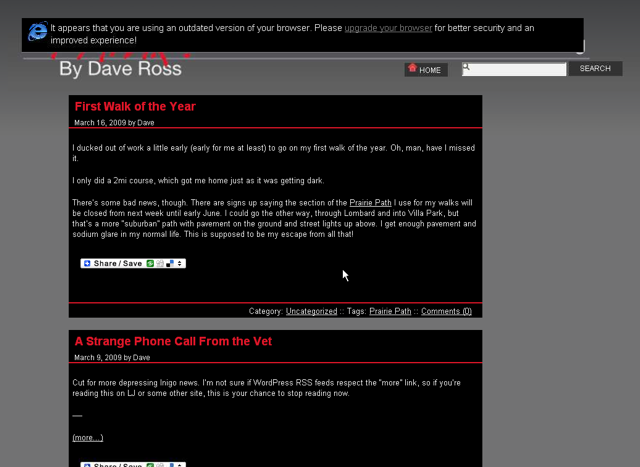
Dave’s Outdated Browser Warning displayed in IE6 SP2.
ການຕິດຕັ້ງ
- Upload
outdated-browser-warningto the/wp-content/plugins/directory - Activate the plugin through the ‘Plugins’ menu in WordPress
ຄຳຖາມທີ່ພົບເລື້ອຍ
- A visitor is getting the warning on every page
-
The plugin uses a cookie to track whether or not a visitor has seen the warning. If your visitor has cookies disabled in their browser, they will continually get the warning.
- A visitor to my site isn’t seeing the outdated browser warning, even on an older browser
-
The message will not display for someone who have Javascript disabled in their browser.
ການຣີວິວ
ບໍ່ມີການຣີວິວສຳລັບປລັກອິນນີ້.
ຜູ້ຮ່ວມພັດທະນາ ແລະ ຜູ້ພັດທະນາ
“Dave’s Outdated Browser Warning” ແມ່ນຊອຟແວໂອເພັນຊອດ (Open Source). ບຸກຄົນຕໍ່ໄປນີ້ໄດ້ມີສ່ວນຮ່ວມໃນການພັດທະນາປລັກອິນນີ້.
ຜູ້ຮ່ວມພັດທະນາ
ແປ “Dave’s Outdated Browser Warning” ເປັນພາສາຂອງເຈົ້າ.
ສົນໃຈຮ່ວມພັດທະນາບໍ່?
ເບິ່ງລະຫັດ, ກວດເບິ່ງ ຄັງເກັບ SVN, ຫຼື ຕິດຕາມ ບັນທຶກການພັດທະນາ ຜ່ານ RSS.