
ຄຳອະທິບາຍ
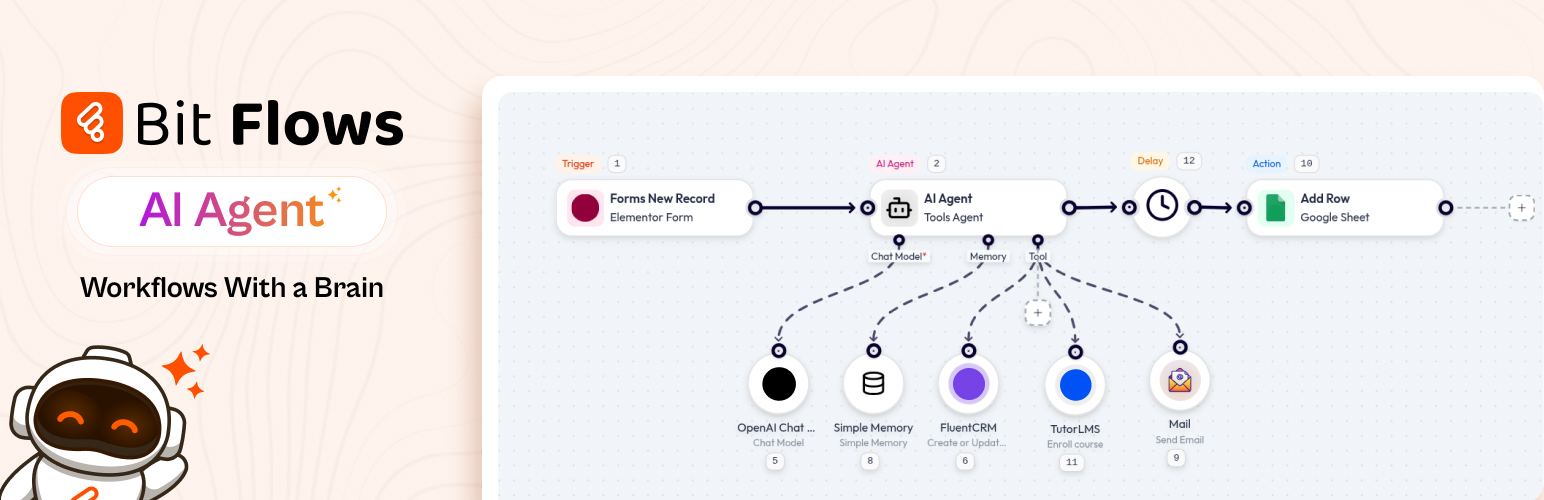
AI Agent inside Bit Flows makes WordPress think, decide, and automate. Experience true AI automation in WordPress.
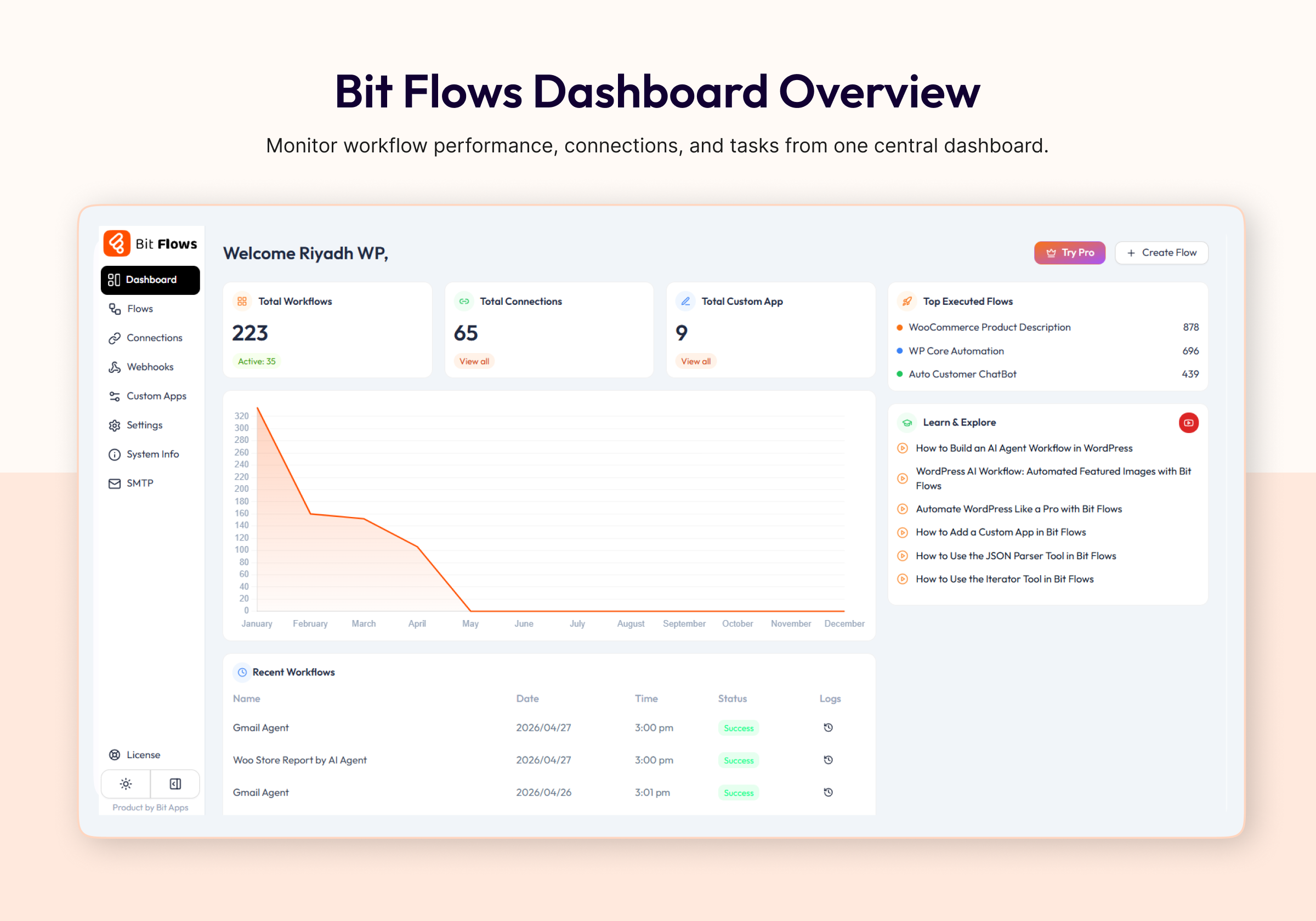
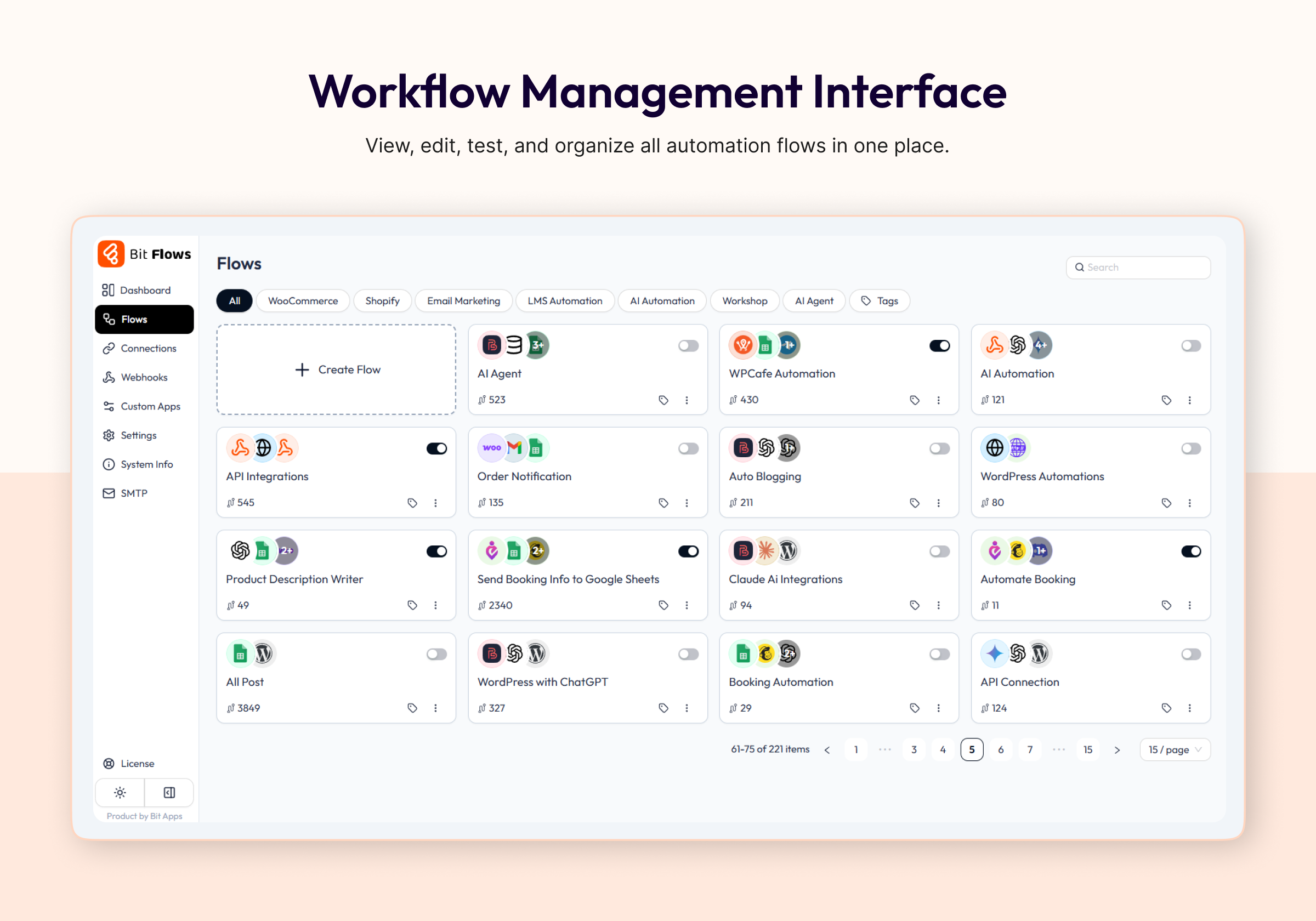
Bit Flows works like a visual workflow automation builder inside WordPress, with native WordPress plugin integrations and external app connections.
Bit Flows can automate tasks across platforms like ChatGPT for content creation, Google Sheets for data, or updates on multiple platforms.
It routes form or order submissions automatically to CRMs, Slack, WhatsApp, Gmail, and more, letting its AI Agent decide the best flow.
With Bit Flows, your WordPress automations can run in the background after setup.
For example, after a form submission or based on any event, the data can be processed and sent to over 320+ platforms.
What You Can Build with Bit Flows
- Run Zapier / n8n-like workflows directly inside WordPress
- Build powerful AI Agents without writing a single line of code
- Connect 320+ apps and services in just minutes
- Automate WordPress, WooCommerce, and SaaS apps from a single platform
- Build AI-driven customer support & HR workflows
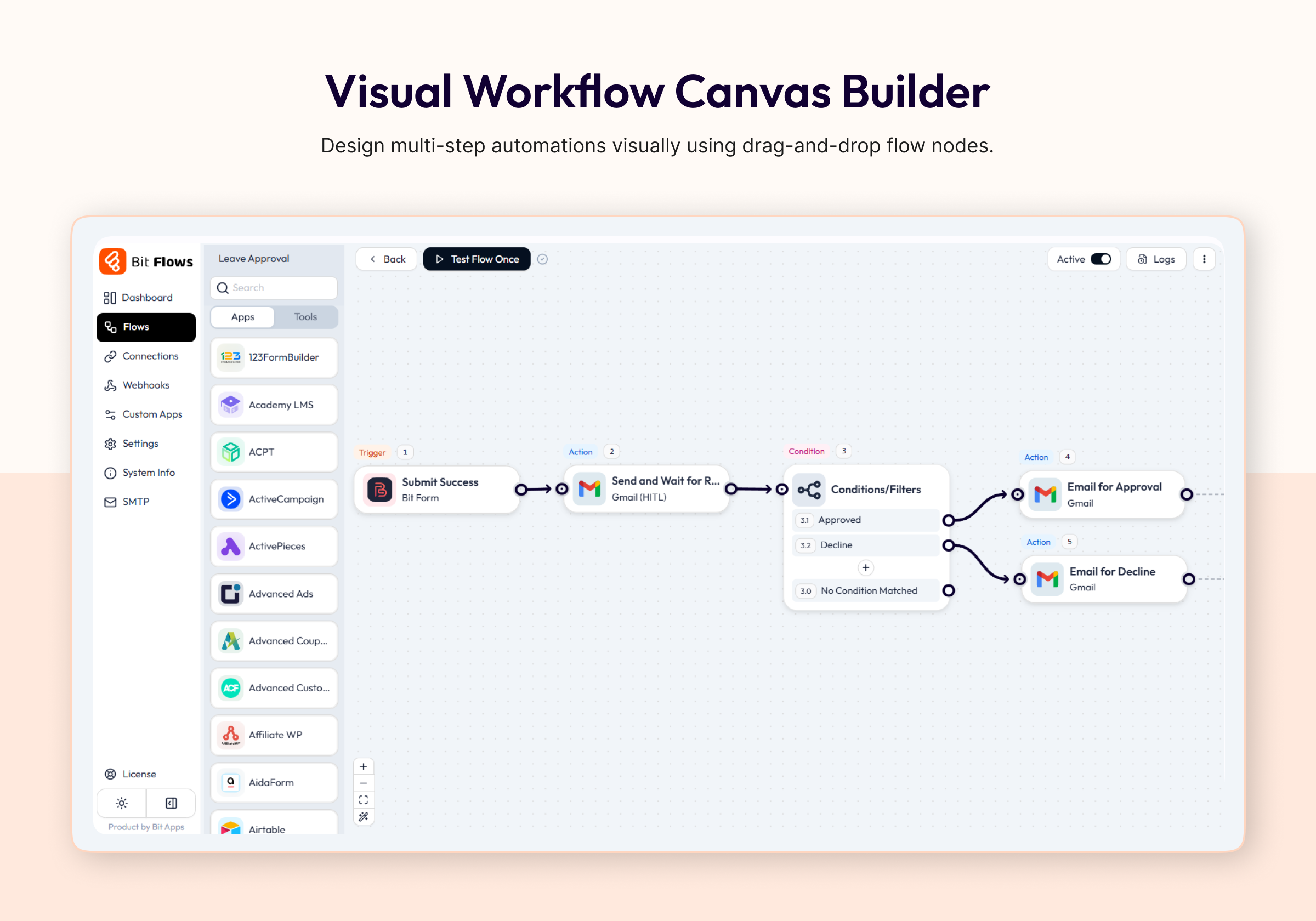
- Add Human in the Loop approval steps for manual review
- Connect MCP-compatible servers inside AI Agent workflows
- Format, parse, and calculate dates with the Date Time tool
- Automate content, emails, CRM, and lead management.
- Add AI decision-making to your real business workflows
🔥 Features & Tools
- AI Agent: A built-in AI assistant that analyzes data, makes decisions, and runs multi-step workflows for you.
- Human in the Loop: Pause a workflow and wait for manual approval or decline before the next step runs.
- MCP Client: Connect MCP-compatible servers inside AI Agent workflows and let your agent call external tools from a configured MCP server.
- Unlimited Workflows and Tasks: Create as many multi-step automations as you want, without limits. Automate every process on your site.
- Drag & Drop Builder: Intuitive visual workflow editor, no coding needed. Just drag steps and link them to automate tasks with ease.
- Multi-step Automation: Build complex automation flows with multiple actions, conditions, and branches.
- Conditional Logic: Automate decision-making in your workflows with powerful if/else logic.
- Schedule, Delay, and Date Time tools: Start workflows at the right time, pause steps when needed, and format or calculate dates inside your automation.
- Repeater / Loop and Iterator: Repeat actions or iterate lists for bulk automated operations effortlessly.
- JSON/XML Parser: Automatically parse and extract data from API responses or webhook payloads.
- Incoming & Outgoing Webhooks: Use standard webhooks with any service. Trigger automation flows from external events.
- Custom App / API Connector: Create custom integrations by integrating any API endpoint and automating data exchange.
- Fail Task Notifications & Logging: Keep detailed logs of each step and get notified on failures or retries.
- Cloud Cron: Run scheduled workflows reliably without depending only on WP cron.
- Deep WordPress and WooCommerce Integration: Works with Elementor, WPForms, Contact Form 7, Fluent Forms, Fluent CRM, WooCommerce, FluentCart, Tutor LMS, LearnDash, and more for AI automation.
- Dark Mode & Quick Testing: Modern interface with a dark theme and instant flow testing.
🔗 Useful Links
🚀Try Full Version Demo | 🚀Docs | 🚀Video Tutorials | 🚀Support | 🚀Facebook Group | 🚀Upgrade to Pro | 🚀Bit Flows Repository
WooCommerce Automation
Bit Flows helps e-commerce businesses optimize operations by automating order and customer workflows.
When an order is placed or a customer registers, Bit Flows can send that data to Google Sheets or your CRM.
You can also automate inventory updates, coupon generation, or email notifications. For example, you can automate follow-ups, inventory checks, and coupon creation instantly.
WordPress Automation
Automating WordPress tasks is now smarter with Bit Flows.
Connect plugins like Elementor, Fluent Forms, Tutor LMS, or Contact Form 7 to your workflows.
For example, when a form is submitted, Bit Flows can create a post, send emails, and update CRM records (e.g. FluentCRM) automatically.
AI Agent for Agentic Workflow Automation
The AI Agent acts as a brain inside your WordPress dashboard. It understands context and goals, making workflows truly agentic. You can use it to analyze form input or support queries and automatically decide the next steps. This turns your site into a smart assistant that can think and act, not just execute fixed rules.
Human in the Loop Approval Workflows
Human in the Loop lets a workflow pause and wait for a real person to approve or decline a request before the flow continues. You can send a review email, then continue the workflow based on the reviewer response.
MCP Client for AI Agent Workflows
The MCP Client lets Bit Flows connect with MCP-compatible servers inside AI Agent workflows. Add the MCP Server URL, choose the connection method, and let the AI Agent access available tools from that server during the workflow.
Content Generation with AI
Bit Flows connects ChatGPT, Gemini, Claude, Deepseek, and Perplexity to generate content automatically. Generate blog posts, marketing copy, or FAQs on demand. For example, feed headlines or keywords into a Bit Flows workflow and let the AI create full articles or social media captions.
Autoblogging with ChatGPT, Gemini, and Claude
Set up an autoblogging workflow using ChatGPT, Gemini, or Claude. When you add a new topic or keyword, Bit Flows can call the AI model to write a draft post and publish it. Integrate images or formatting and go live without manual writing.
Google Sheets Integrations
Track and log data automatically with Google Sheets integrations.
Any form submission, e-commerce order, or user registration can be sent to a spreadsheet for reporting.
CRM Integrations
Bit Flows integrates with popular CRMs like HubSpot, Salesforce, and FluentCRM.
New leads from forms or stores can be added instantly.
Workflow automation and AI help update contacts, track interactions, and keep your CRM in sync across platforms.
Email Marketing Automation
Automate your email campaigns using Bit Flows. Connect form submissions and order leads to email tools like Mailchimp or SendGrid. When someone signs up on your site, Bit Flows can add them to a campaign, send welcome emails, or schedule newsletters.
Webhook Integrations
Use webhooks to integrate any SaaS or custom app. Incoming webhooks trigger flows from external events, and outgoing webhooks send data to any endpoint. This flexibility means you can integrate with services like n8n or any API-driven platform.
Image Generation with Nano Banana and DALL·E
Enhance your content with AI-generated images. Bit Flows’ Image Helper integrates Nano Banana (a lightweight image AI) and DALL·E. You can automatically create visuals for posts or products. For example, generate a featured image based on your blog topic or a custom product graphic using AI, all within your workflow.
WhatsApp, Telegram, Discord, Slack Integrations
Communicate and notify through messaging apps. Bit Flows supports WhatsApp, Telegram, Discord, Slack. Send automated alerts or messages when events occur. For example, get a Slack notification of new orders or send order updates to customers on WhatsApp.
SaaS Integration (Shopify, Mailchimp, JotForm)
Link popular SaaS tools easily. Use Shopify triggers for new orders or sync data with Mailchimp for email marketing. You can also push form entries from JotForm. For example, automatically sync Shopify orders or trigger automation when JotForm entries arrive.
LMS Integrations
Automate your online learning platform with Bit Flows. When a user enrolls or completes a course, automatically update records, send certificates, or email reminders. Bit Flows works with Tutor LMS, LearnDash, and other course plugins.
Form Automation
Turn form submissions into automated processes. When a user submits a form (WPForms, Contact Form 7, Fluent Forms, etc.), Bit Flows can route the data anywhere: email, CRM, Google Sheets, or even trigger the AI Agent to draft a response.
AI Integrations (ChatGPT, Gemini, Deepseek, Perplexity, Claude)
Connect the latest AI models in your workflows. Bit Flows supports ChatGPT, Gemini, Claude, Deepseek, and Perplexity via OpenAI actions. Create workflows that call these AI services for content, analysis, translation, or image generation.
Free Triggers
- Bit Form
- Bit Assist
- Contact Form 7
- WPForms
- Webhook
- WordPress
- WooCommerce
- Elementor Form
Free Actions
- ChatGPT (OpenAI)
- Perplexity
- Claude
- DeepSeek
- Gemini
- Google Sheet
- API Request
- HTTP
- SMTP Mail
- Webhook
- WordPress
- Telegram
- OpenRouter
- Groq
Tools
- AI Agent
- Human in the loop (Pro)
- MCP Client (Pro)
- Condition
- Router
- Iterator
- Repeater/Loop
- Parsers (CSV, XML, JSON)
- Delay, Schedule and Date Time
- Image Helper
Free Features
- Unlimited workflows
- Unlimited tasks
- Multi-step workflows
- Details logs
- Notification of Failed Tasks
- Tasks re-execution
- Custom app with API, Webhook, or WP Action Hook
Available Popular Integrated Platforms
- ACPT
- ActivePieces
- Airtable
- Albato
- Asana
- Automatisch
- AutomatorWP
- Benchmark
- Brevo (Sendinblue)
- ClickUp
- Demio
- Discord
- Drip
- Dropbox
- Elastic Email
- EmailOctopus
- Emailit
- Encharge
- FlowMattic
- Flowlu
- GetGist
- GetResponse
- Gmail
- GoHighLevel
- Google Calendar
- Google Drive
- Google Meet
- Google Tasks
- HubSpot
- Integrately
- JetEngine
- KonnectzIT
- Lemlist
- Line
- MailBluster
- MailerCloud
- MailerPress
- Make
- Microsoft Excel
- n8n
- Newsletter
- Notion
- Rapidmail
- Selzy
- SendFox
- Sperseio
- SyncSpider
- System.io
- Thrive Automator
- Twilio
- Uncanny Automator
- Woodpecker
- WP Fusion
- Zapier
- Zoho Flow
- Zoho Project
- bbPress
- EasyCommerce
- FluentAffiliate
- FormGent
- Nex Forms
- Paymattic
- Profile Builder
- Quill Forms
- SureFeedback
- SureMail
- UserFeedback
- WP Travel Engine
- WP User Frontend
- Academy LMS
- Affiliate WP
- AidaForm
- Amelia Booking
- ARForms
- ARMember
- Asgaros Forum
- Avada Forms
- Beaver Builder
- Bit Social
- Booking Calendar Contact Form
- Breakdance
- Bricks Builder
- BricksForge
- brizy
- CartFlows
- CoBlocks
- Cognito Forms
- Contact Form Email
- Divi Form Builder
- Dokan Multivendor
- eForm
- Easy Digital Downloads
- Essential Addons for Elementor
- Essential Blocks
- Eventin
- The Events Calendar
- Everest Forms
- Fillout
- Fluent Booking
- FluentCart
- Fluent Forms
- FluentSMTP
- Fluent Support
- 123FormBuilder
- FormCraft 3
- Formaloo
- Formester
- Formidable Forms
- Forminator
- forms.app
- Forms.io by 500apps
- Formstack Forms
- GamiPress
- GeoDirectory
- GiveWP
- GoZen Forms
- Google Forms
- Google Sheet
- Gravity Forms
- Groundhogg
- Gutena Forms
- Happyforms
- Hustle
- Involve.me
- JetForm Builder
- Kadence Blocks Form
- Kali Forms
- Klaviyo
- LearnDash
- LifterLMS
- Line
- Mailchimp Forms
- MailerLite Forms
- Mailster
- MakeForms
- MasterStudy LMS
- MemberPress
- MetForm
- MetaBox
- Microsoft Forms
- MightyForms
- Moosend Forms
- New User Approve
- Ninja Forms
- OptinMonster Forms
- Paperform
- Pie Forms
- Piotnet Addon Form
- Piotnet Forms
- Poptics
- Popup Maker
- RafflePress
- Restrict Content
- Shopify
- SiteOrigin Widgets
- SliceWP
- Solid Affiliate
- Spectra
- Squarespace Forms
- StoreEngine
- SureCart
- SureForms
- Survey Monkey
- SurveyNinja
- SurveySparrow
- Tally Forms
- Telegram
- Tidio
- Tripetto
- Tutor LMS
- Typeform
- Ultimate Member
- Unbounce Forms
- Voxel
- WPSubscription
- WooCommerce Bookings
- weForms
- Webflow Forms
- Wispform
- WooCommerce Memberships
- WooCommerce Subscriptions
- Woorise
- wpForo Forum
- WPFunnels
- WP Job Manager
- WS Form
- Wufoo
- Zoho Forms
Some Real-World Use Cases with Bit Flows
- Lead Qualification and Routing with AI Agent
When a WPForms or Elementor form submission comes in, Bit Flows uses an AI Agent to analyze the message and route the lead to the appropriate CRM or Google Sheets. The workflow can automatically send a personalized response via Gmail and qualify the lead without manual effort. - Autoblogging
Automatically generate blog posts with ChatGPT, Gemini, or Claude. Use Bit Flows to publish AI-generated content directly to WordPress on a schedule. - AI-Powered Product Descriptions
When a new WooCommerce product is added, use Bit Flows to call ChatGPT or Gemini and craft a product description. The AI Agent can update the product automatically. - E-commerce Automation
When a new WooCommerce order or Shopify sale occurs, Bit Flows can add the customer to your CRM, update Google Sheets, and send a confirmation email. You can also trigger an AI workflow to generate personalized discounts or related product suggestions automatically. - Customer Support Automation
When a customer submits a support question, Bit Flows can send it to Claude or ChatGPT for a draft reply. The answer can be emailed to the customer and logged in a Google Sheet. Your team is notified on Slack for a final review, automating your support workflow. - Custom App Integration
Use Bit Flows to integrate an external API. For example, integrate a shipping system: Bit Flows can send shipment data to an API and parse the response to update your WooCommerce order status, all automatically.
⭐ ລີວິວຈາກຜູ້ໃຊ້
bubdev – ⭐⭐⭐⭐⭐
ຊິ້ນສ່ວນທີ່ຂາດຫາຍໄປໃນລະບົບອັດຕະໂນມັດຂອງ WordPress
John N – ⭐⭐⭐⭐⭐
ລະບົບອັດຕະໂນມັດທີ່ທົງພະລັງດ້ວຍປັັກອິນ Bit Flows ສຳລັບ WordPress
downtownboogie – ⭐⭐⭐⭐⭐
ວິທີແກ້ໄຂທີ່ດີເລີດສຳລັບລະບົບອັດຕະໂນມັດໃນເວັບໄຊລູກຄ້າຂອງຂ້ອຍ
🎉 ພາບລວມຂອງຜະລິດຕະພັນອື່ນໆທີ່ພວກເຮົາໃຫ້ບໍລິການ :
Bit Form: A powerful WordPress form builder that lets you create multi-step and conversational forms with a smart drag-and-drop builder.
Bit Integrations: A no-code WordPress automation plugin that lets you connect 300+ apps and services to automate your workflows in minutes. With its 3 easy automation methods, you can automate tasks, sync data, and maximize productivity.
Bit Assist: Connect all your customer support channels with a single button. Integrate Floating Chat Widget, WhatsApp, Email, SMS, Telegram, Messenger, and more with Bit Assist.
Bit Social: A social media automation tool that lets you auto-post, schedule, and share instantly across 12+ platforms like Facebook, Instagram, LinkedIn, X, Pinterest, and more with a smart calendar view.
Bit SMTP: Bit SMTP makes sending emails from your WordPress site easy and secure, ensuring they reach the right inbox every time.
Bit File Manager: Bit File Manager is a WordPress plugin for easy file management. Upload, organize, and control from your WordPress dashboard.
Webhook.is: Test your incoming webhook response & send outgoing webhook requests for free.
📢 Join our Bit Apps community & get updates on our plugins.
External Services
Bit Flows only connects to third-party services when explicitly configured by the site administrator. No data is sent without deliberate user action.
For full details on what data is sent, when it is sent, and each service’s Terms of Use and Privacy Policy:
Complete External Services Documentation
ພາບໜ້າຈໍ
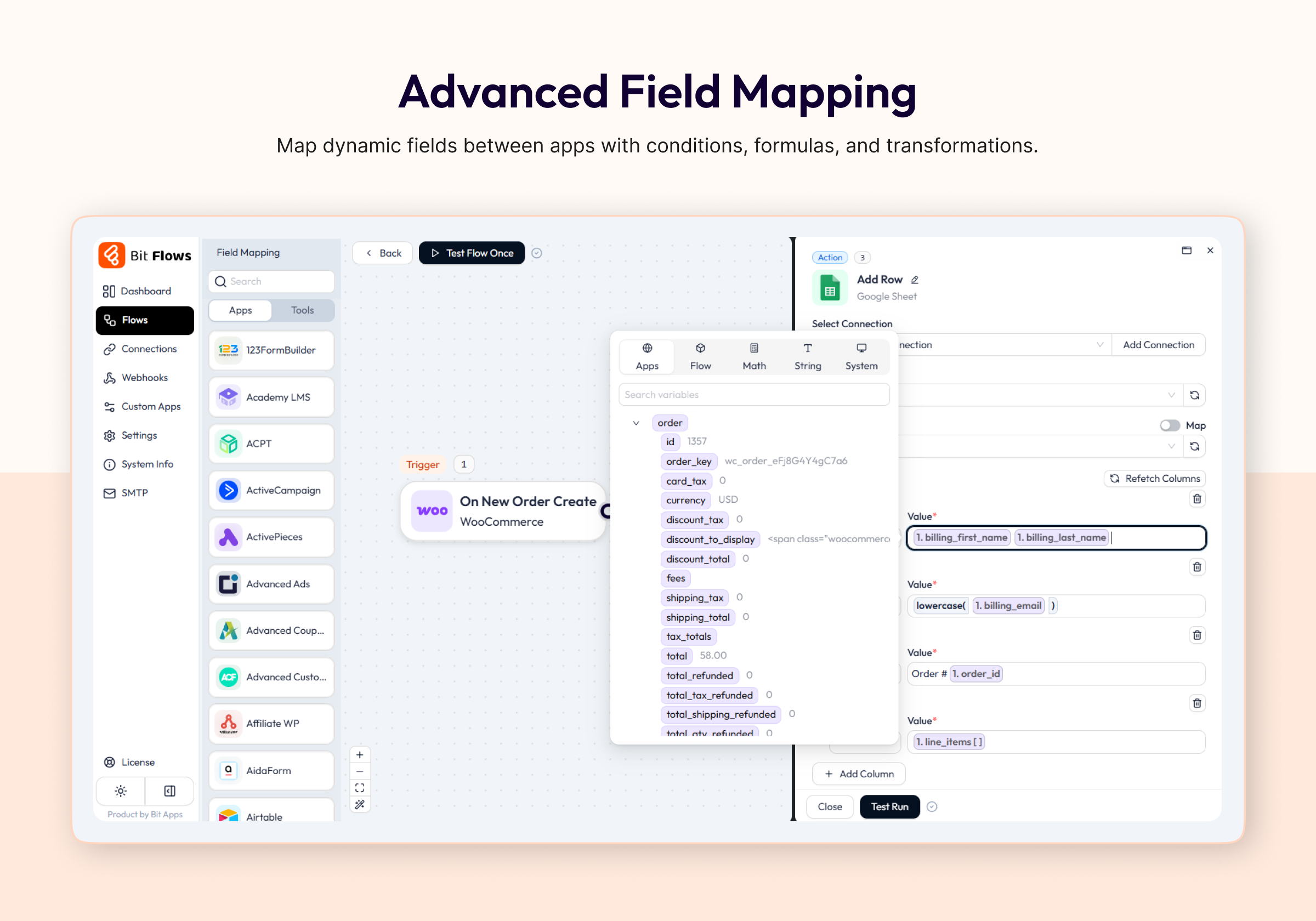
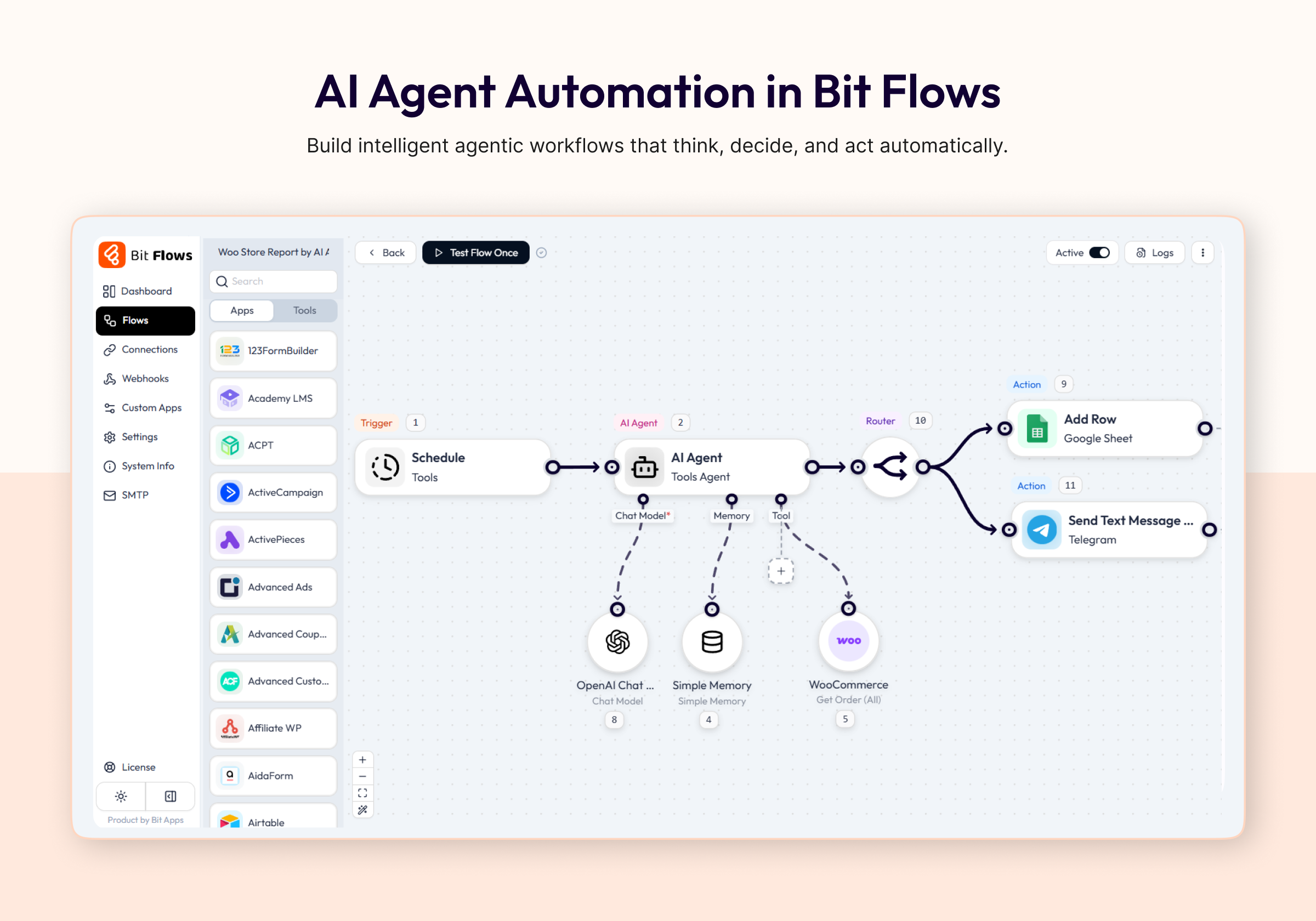
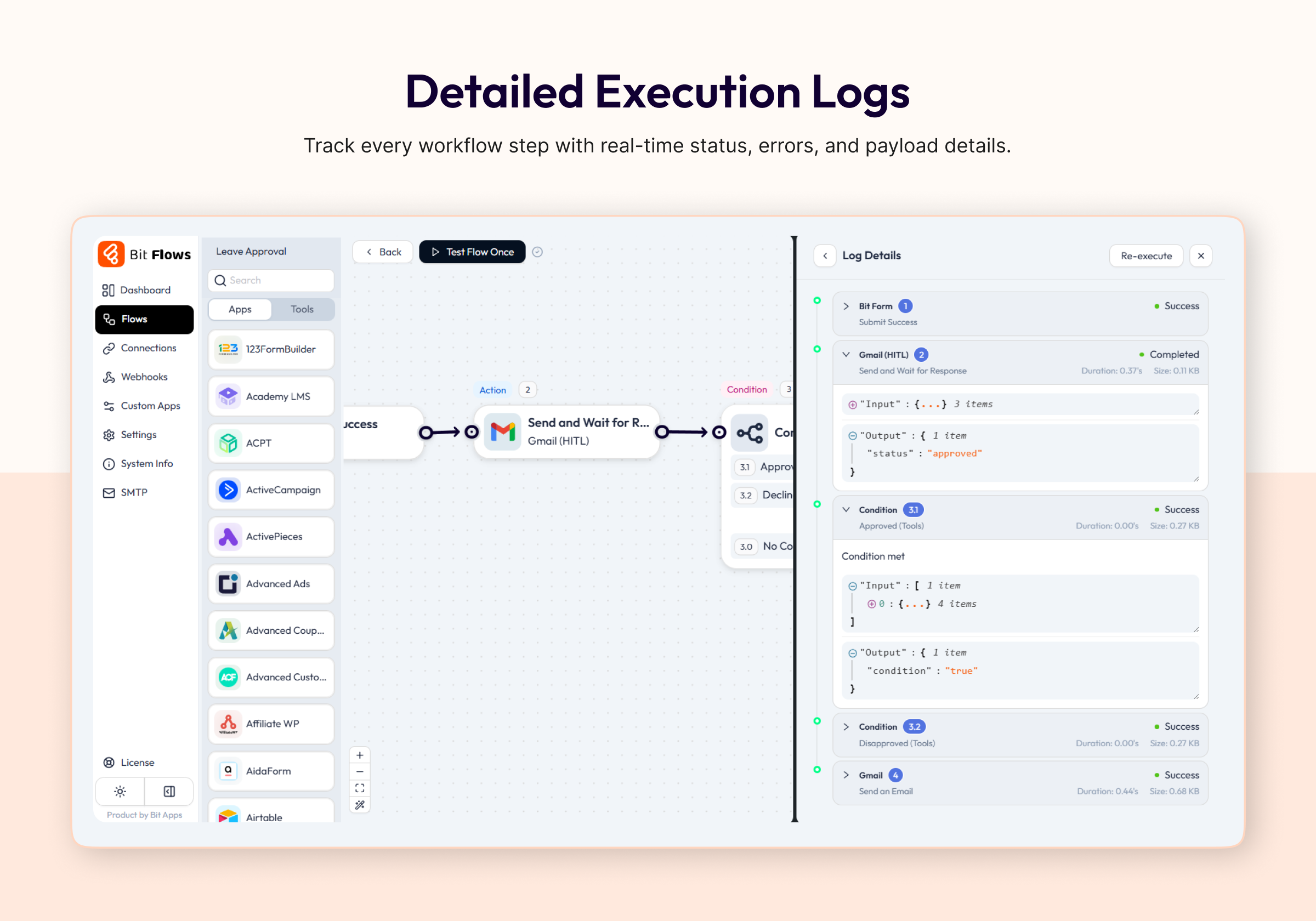
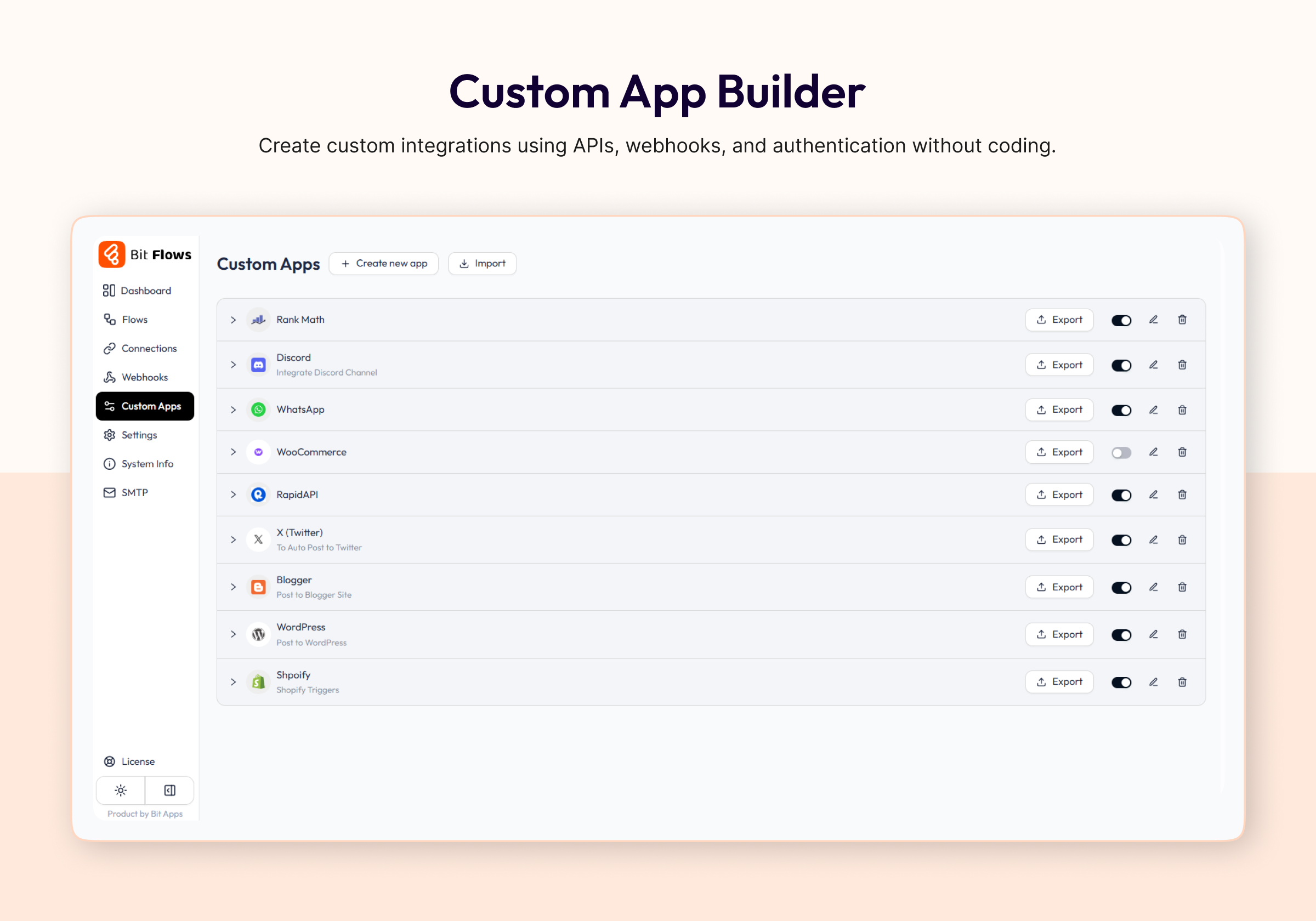
ການຕິດຕັ້ງ
ການຕິດຕັ້ງແບບອັດຕະໂນມັດ
ການຕິດຕັ້ງແມ່ນຟຣີ, ໄວ ແລະ ງ່າຍດາຍ. ພຽງແຕ່ຄົ້ນຫາ Bit Flows ໃນແຜງຄວບຄຸມ WordPress ຂອງທ່ານທີ່ Plugins Add New, ຈາກນັ້ນຕິດຕັ້ງ ແລະ ເປີດໃຊ້ງານ.
ທາງເລືອກແບບຕິດຕັ້ງເອງ
ອີກທາງເລືອກໜຶ່ງ, ທ່ານສາມາດດາວໂຫຼດຟາຍ zip ຂອງປັັກອິນຈາກ bit-flows.com, ອັບໂຫຼດຜ່ານທາງເລືອກ Plugins Add New Upload Plugin, ແລະ ປະຕິບັດຕາມຄຳແນະນຳໃນໜ້າຈໍ.
ຕ້ອງການຄວາມຊ່ວຍເຫຼືອບໍ? ເບິ່ງ ຄູ່ມືການຕິດຕັ້ງ ຂອງພວກເຮົາ.
ຄຳຖາມທີ່ພົບເລື້ອຍ
-
Bit Flows ແມ່ນຫຍັງ?
-
Bit Flows is a WordPress plugin that automates tasks and integrates your site with hundreds of platforms. It lets you create no-code multi-step agentic workflows for forms, e-commerce, and more.
-
How do I automate tasks with Bit Flows?
-
Use the visual drag-and-drop workflow builder to set up triggers (like form submission or order placed) and actions (such as sending email, updating CRM, or calling AI). Bit Flows runs these automations on your site automatically.
-
What is the AI Agent in Bit Flows?
-
The AI Agent is a smart assistant. It uses AI models like ChatGPT, Gemini, or Claude to analyze data and make decisions within a workflow, enabling agentic automation rather than fixed rules.
-
Bit Flows ເໝາະກັບມືໃໝ່ບໍ່?
-
Yes. Bit Flows offers a visual drag-and-drop workflow builder, ready triggers, and simple field mapping. Beginners can start fast, while advanced users can build powerful AI automations.
-
ຂ້ອຍສາມາດສ້າງຂັ້ນຕອນການເຮັດວຽກທີ່ຊັບຊ້ອນໄດ້ບໍ່?
-
Absolutely. Create multi-step workflows with conditions, routers, delays, repeaters, APIs, and AI Agents. Build advanced automation flows without writing code.
-
Bit Flows ແຕກຕ່າງຈາກ Zapier ຫຼື n8n ແນວໃດ?
-
Bit Flows runs inside your WordPress site, so your data stays on your server. Like Zapier or n8n, it offers multi-step workflows, but it adds native WordPress and WooCommerce integrations, plus an AI Agent. There are no per-task fees, since it uses your server’s resources.
-
Can Bit Flows generate content automatically?
-
Yes. With AI integrations (ChatGPT, Gemini, Claude, etc.), Bit Flows can write blog posts, product descriptions, emails, or any text based on prompts. You can automate content generation for faster publishing.
-
Does Bit Flows support form plugins?
-
Yes. It works with WPForms, Contact Form 7, Fluent Forms, and more. You can trigger workflows when forms are submitted to send data to CRMs, email, Google Sheets, or AI services.
-
Where can I learn more about Bit Flows?
-
There are Documentations, a support forum, Live Chat Support, and a Facebook Community group. We also provide Video Tutorials and Ticket Based support.
ການຣີວິວ


ຜູ້ຮ່ວມພັດທະນາ ແລະ ຜູ້ພັດທະນາ
“Bit Flows: AI Agent Automation & Integrations for Forms, CRM, eCommerce, Google Sheets, and More” ແມ່ນຊອຟແວໂອເພັນຊອດ (Open Source). ບຸກຄົນຕໍ່ໄປນີ້ໄດ້ມີສ່ວນຮ່ວມໃນການພັດທະນາປລັກອິນນີ້.
ຜູ້ຮ່ວມພັດທະນາ
“Bit Flows: AI Agent Automation & Integrations for Forms, CRM, eCommerce, Google Sheets, and More” ໄດ້ຖືກແປເປັນ 2 ພາສາທ້ອງຖິ່ນ. ຂໍຂອບໃຈ ທີມງານຜູ້ແປ ສຳລັບການປະກອບສ່ວນຂອງເຂົາເຈົ້າ.
ສົນໃຈຮ່ວມພັດທະນາບໍ່?
ເບິ່ງລະຫັດ, ກວດເບິ່ງ ຄັງເກັບ SVN, ຫຼື ຕິດຕາມ ບັນທຶກການພັດທະນາ ຜ່ານ RSS.
ບັນທຶກການປ່ຽນແປງ
v1.30.0 (Sep 20, 2026)
-
Triggers (56):
- Brilliant Directories (28)
- ElementsKit (13)
- PaymentForm.io (07)
- Pointics (04)
- Flodesk (03)
- Fluent Community (01)
-
Actions (81):
- Brilliant Directories (28)
- Pointics (23)
- Flodesk (15)
- ElementsKit (14)
- OpenAI (01)
-
ການປັບປຸງ:
- Added a Max Tokens option to OpenAI’s Analyze Image action.
- Simplified Webhook trigger setup by removing the instant response selector.
-
ການແກ້ໄຂ:
- Fixed Google Calendar’s Return All option only fetching the first page of calendars and events.
- Fixed Google Calendar’s Update Event action ignoring a mapped Event ID.
- Fixed WordPress Action Hooks’ Add Action trigger firing every flow bound to it instead of only the one whose hook fired.
- Fixed “Test Flow Once > Use Existing Data” failing on an inactive flow.
- Fixed a paused flow run failing to resume after the flow was switched off.
v1.29.0 (Sep 08, 2026)
-
Triggers (36):
- BuddyPress (36)
-
Actions (54):
- BuddyPress (50)
- Salesforce (04)
-
ຟີເຈີ:
- Added an Array tab with 21 functions for filtering, sorting, joining and reshaping a list inline.
- Added the Respond to Webhook tool for sending a custom response from a flow.
-
ການປັບປຸງ:
- Salesforce connections now send PKCE on the OAuth 2 handshake.
-
ການແກ້ໄຂ:
- Fixed a scheduled polling trigger stopping the WordPress cron run.
- Fixed Bit CRM invoice line items not reloading when a saved node was reopened.
- Fixed a console error in the Google Sheet Add Row action.
- Fixed a custom app GET action recording no input in the flow history.
v1.28.2 (Aug 23, 2026)
- Fixes:
- Fixed a fatal error that stopped the plugin from loading on sites whose database table prefix begins with a number.
v1.28.1 (Aug 20, 2026)
-
ການແກ້ໄຂ:
- Fixed the license expiry notice never showing and Check Again not refreshing the Pro update.
- Fixed the license expiry notice putting the plugin name and the remaining days the wrong way round.
-
Security:
- Improved connection security to prevent requests from accessing the server’s internal network.
- We thank security researcher Saif Fadel for responsibly disclosing the issue addressed in this release.
v1.28.0 (Aug 19, 2026)
-
Triggers (26):
- Sensei LMS (15)
- ConvertForce Popup Builder (04)
- Booking Calendar (03)
- Power Coupons for WooCommerce (03)
- Email (IMAP) (01)
-
Actions (52):
- Sensei LMS (18)
- Power Coupons for WooCommerce (12)
- Booking Calendar (10)
- ConvertForce Popup Builder (06)
- Email (IMAP) (06)
-
ຟີເຈີ:
- Bit Flows is now an MCP server, so AI clients like Claude, ChatGPT and Cursor can build and run your flows.
- New Email (IMAP) integration: start flows on new mail, and search, read, move or delete messages.
- Webhooks now support authentication and advanced settings, including IP restrictions.
-
ການປັບປຸງ:
- The minimum required PHP version is now 8.0.
v1.27.0 (Aug 01, 2026)
-
Triggers (79):
- Bit CRM (66)
- FluentPlayer (12)
- Popup Maker (01)
-
Actions (136):
- Bit CRM (88)
- FluentPlayer (36)
- Popup Maker (12)
v1.26.0 (Jul 29, 2026)
-
Actions (07):
- GamiPress (07)
-
ການປັບປຸງ:
- Google Sheets Add Row and Update Row actions and the On Row Added or Updated trigger now return the affected row number for use in later steps.
-
ການແກ້ໄຂ:
- Fixed FluentCRM Create Contact and Create Company Field Map values not persisting after refreshing the flow builder.
- Fixed Tutor LMS Enroll User in Course leaving students on paid courses in a pending state with no access.
v1.25.0 (Jul 21, 2026)
-
ຕົວເປີດການທຳງານ (10):
- WSMS (WP SMS) (05)
- Secure Custom Fields (04)
- Modern Cart (01)
-
ການກະທຳ (47):
- Instasent (17)
- WSMS (WP SMS) (15)
- Secure Custom Fields (08)
- Modern Cart (07)
-
ຟີເຈີ:
- Added the Run Code tool for executing custom PHP inside a flow step.
-
ການປັບປຸງ:
- Improved WhatsApp template messages with dynamic placeholder support.
-
ການແກ້ໄຂ:
- Fixed Gmail MIME header encoding and attachment handling, and hardened attachment fetching against SSRF.
- Fixed Voxel mutating user data when stripping sensitive fields, and handling of empty post type values.
- Fixed WooCommerce ACF meta reads and Bookly class lookup.
- Fixed the updater comparing the required free version before the installed free version was populated.
v1.24.0 (Jul 06, 2026)
-
Triggers (197):
- Zendesk (139)
- Vimeo (17)
- MainWP Dashboard (11)
- Webba Booking Calendar (11)
- MoreConvert Wishlist (09)
- Sender (08)
- MasterStudy LMS (02)
-
Actions (167):
- Sender (34)
- Vimeo (29)
- Zendesk (27)
- Webba Booking Calendar (21)
- MoreConvert Wishlist (20)
- Instagram (11)
- MainWP Dashboard (11)
- X (Twitter) (08)
- MasterStudy LMS (04)
- Privyr (02)
-
ຟີເຈີ:
- Added a Pro badge in the node details header when the Pro plugin is inactive.
-
ການປັບປຸງ:
- Improved Vimeo upload validation, direct URL handling, compression guidance, and retrieval coverage.
- Improved MoreConvert Wishlist and Webba Booking machine loading with parallel fetch calls.
- Improved B2BKing user metadata support.
- Improved GiveWP donation meta fields to flow data
-
ການແກ້ໄຂ:
- Fixed flow builder node cloning and copied node state typing issues.
- Fixed JSON parser handling for empty arrays, empty objects, and invalid JSON.
- Fixed Google Drive parent folder field handling and upload mapping.
- Fixed Discord fetch helper response handling and tab change console errors.
v1.23.0 (Jun 15, 2026)
-
Triggers (57):
- WP ERP (30)
- BookingPress (08)
- WC Affiliate (06)
- wpDataTables (04)
- B2BKing (03)
- Google Sheet (03)
- FormyChat (02)
- IvyForms (01)
-
Actions (85):
- WP ERP (25)
- Google Sheet (14)
- BookingPress (11)
- Bookly (10)
- WC Affiliate (06)
- B2BKing (05)
- MySQL (05)
- FormyChat (04)
- wpDataTables (04)
- IvyForms (01)
-
ຟີເຈີ:
- Added 25 ready made flow templates, browsable by category with search.
-
ການປັບປຸງ:
- Telegram chat ID is now a searchable chat selector.
-
ການແກ້ໄຂ:
- Fixed several custom API request issues, including request body handling and empty URL errors.
- Fixed variable resolution inside function arguments in mix inputs.
v1.22.1 (May 25, 2026)
- Improvements:
- Updated plugin readme.
v1.22.0 (May 25, 2026)
-
Triggers (61):
- Heffl CRM (26)
- weDocs (08)
- Creator LMS (05)
- Zoho CRM (03)
- WPLoyalty (01)
- SureDash (18)
-
Actions (80):
- Asgaros Forum (22)
- Zoho CRM (20)
- Creator LMS (14)
- weDocs (09)
- WPLoyalty (02)
- Heffl CRM (03)
- SureDash (10)
-
ຟີເຈີ:
- Added cURL import for custom app actions.
-
ການແກ້ໄຂ:
- Fixed common-variable nodes inside MixInput function args not resolving correctly.
- Fixed undefined nodeDetails causing tooltip crash in MixInput tags.
v1.21.0 (May 08, 2026)
-
ຕົວເປີດການທຳງານ (101):
- Pipedrive (29)
- Razorpay (68)
- Trello (04)
-
Actions (86):
- Pipedrive (38)
- Trello (32)
- Razorpay (14)
- MailRefine (01)
- Bitly (01)
-
ການແກ້ໄຂ:
- Fixed Amelia appointment status update trigger so status change events are mapped to the correct handler.
v1.20.0 (May 04, 2026)
-
Triggers (46):
- ProfilePress (02)
- FluentSupport (09)
- PeepSo (08)
- WP Table Builder (04)
- Easy Digital Downloads (04)
- Ultimate Affiliate Pro (09)
- Modern Events Calendar (05)
- Fluent PDF Generator (02)
- Tawk.to (03)
-
Actions (61):
- ProfilePress (06)
- FluentSupport (06)
- PeepSo (03)
- WP Table Builder (09)
- Easy Digital Downloads (11)
- Ultimate Affiliate Pro (12)
- Modern Events Calendar (06)
- blueSky (08)
-
ຟີເຈີ:
- Added Sticky Note node to the flow builder — supports markdown rendering inside the visual canvas.
-
ການປັບປຸງ:
- Added field mapping support to Google Calendar and Discord actions.
-
ການແກ້ໄຂ:
- Fixed OpenAI
max_tokensincompatibility with GPT-5 models — now usesmax_completion_tokensautomatically.
- Fixed OpenAI
v1.19.0 (Apr 21, 2026)
-
Triggers (03):
- WP Simple Pay (03)
-
Actions (03):
- Stripe (03)
-
Improvement: Added new fields in Stripe Create Invoice action.
v1.18.0 (Apr 17, 2026)
-
ຟີເຈີ:
- Human in the Loop 🔥 — pause a flow and wait for manual approval via email (Mail & Gmail)
- MCP Client node 🔥 — connect any MCP-compatible server directly inside a flow
- Editable node label — rename any action or trigger node inline in the builder
-
Actions (17):
- Facebook Lead (05) 🌟
- Groq (02)
- Events Manager (02)
- User Registration and Membership (02)
- ProfilePress (06)
-
ຕົວເປີດການທຳງານ (20):
- Facebook Lead (01) 🌟
- WP All Import (03)
- Events Manager (11)
- User Registration and Membership (03)
- ProfilePress (02)
-
ການແກ້ໄຂ:
- Fixed ClickUp assignees not populating correctly
- Fixed Mailchimp field fetching issue
- Improved MixInput tag handling and caret highlight reliability
v1.17.1 (Mar 20, 2026)
-
ການແກ້ໄຂ:
- Fixes an issue where the AI agent could not resolve the correct flow path when conditional or router tools were placed before it in the builder.
v1.17.0 (Mar 12, 2026)
-
ຟີເຈີ:
- Added Date Time tool
-
Actions (66):
- MailWizz (04)
- AITable (05)
- Salesforce (16)
- Monday.com (20)
- ElevenLabs (09)
- Mailster (01)
- Ninja Tables (05)
- WP Courseware (01)
- SureFeedback (01)
- RafflePress (04)
-
Triggers (18):
- Survey Monkey (12)
- Ninja Tables (02)
- RafflePress (02)
- ElevenLabs (02)
- Fixes:
- ແກ້ໄຂບັັກເລັກນ້ອຍ.
v1.16.2 (Feb 26, 2026)
-
ການແກ້ໄຂ:
- ແກ້ໄຂບັນຫາການກວດສອບມາດຕະຖານປັັກອິນ WordPress
v1.16.1 (Feb 19, 2026)
-
ການແກ້ໄຂ:
- ແກ້ໄຂບັນຫາການກວດສອບມາດຕະຖານປັັກອິນ WordPress
- ແກ້ໄຂບັັກເລັກນ້ອຍ ແລະ ປັບປຸງປະສິດທິພາບ
v1.16.0 (Feb 5, 2026)
-
ການກະທຳ (91):
- Google Docs (08)
- AcademyLMS (2)
- Advanced Ads (1)
- Advanced Coupons (2)
- Badgeos (1)
- FunnelKit Automations (4)
- LatePoint (12)
- LearnDash (14)
- LearnDash Achievement (1)
- LearnPress (2)
- BetterMassages (2)
- ClickWhale (4)
- MemberPressCourse (3)
- JetPackCRM (19)
- myCred (5)
- PrestoPlayer (1)
- Teams for WooCommerce Memberships (9)
- Paymattic (1)
-
ຕົວເປີດການທຳງານ (77):
- Advanced Ads (13)
- Advanced Coupons (4)
- Appointment Hour Booking (2)
- FunnelKit Automations (4)
- LatePoint (5)
- LearnPress (3)
- Masteriyo (4)
- BetterMassages (1)
- ClickWhale (4)
- MemberPressCourse (3)
- GravityKit (2)
- JetPackCRM (7)
- ConvertPro (1)
- PrestoPlayer (2)
- Simply Schedule Appointment (3)
- WP Polls (1)
- Thrive Leads (2)
- Teams for WooCommerce Memberships (14)
- Forminator (2)
-
ການແກ້ໄຂ:
- ແກ້ໄຂບັັກອື່ນໆບາງຢ່າງ.
v1.15.1 (Jan 27, 2026)
- ການປັບປຸງ ອັບເດດຊື່ປັັກອິນ ແລະ ແບນເນີ.
v1.15.0 (Jan 26, 2026)
-
ຕອນນີ້ຟຣີແລ້ວ (ກ່ອນໜ້ານີ້ສະເພາະ Pro):
- ຕົວເປີດການທຳງານ WooCommerce, Elementor, ແລະ WPForms
- ການກະທຳຂອງ WhatsApp ແລະ Telegram
- ເຄື່ອງມືຂັ້ນຕອນການເຮັດວຽກທັງໝົດ
-
ການແກ້ໄຂບັັກ:
- ແກ້ໄຂບັນຫາຄວາມຕ້ອງການຮູບພາບ featured image ຂອງໂພສ WordPress
- ແກ້ໄຂການກະທຳ “Get Post” ທີ່ເຮັດວຽກບໍ່ຖືກຕ້ອງ
-
ການກະທຳ (43):
- Google Tasks (5)
- SendFox (8)
- JetEngine (19)
- WPCafe (6)
- SEOPress (5)
-
ຕົວເປີດການທຳງານ (33):
- JetEngine (8)
- WPCafe (7)
- SEOPress (4)
- Bit Social (14)
v1.14.0 (Jan 19, 2026)
-
ຟີເຈີ:
- AI Agent 🔥
- Simple Memory
-
ການກະທຳ (23):
- Gemini Image (1)
- Microsoft Excel (9)
- Zoho Project (7)
- GoHighLevel (6)
v1.13.0 (Dec 23, 2025)
-
ການກະທຳ (121):
- BuddyBoss (20)
- FluentCart (01)
- Advanced Custom Fields (ACF) (08)
- Dropbox (11)
- Google Drive (18)
- Flowlu (40)
- Twilio (06)
- ActiveCampaign (03)
- Sendy (06)
- OpenRouter (03)
- Poptics (05)
-
ຕົວເປີດການທຳງານ (25):
- BuddyBoss (14)
- Advanced Custom Fields (ACF) (03)
- Essential Addons for Elementor (2)
- Poptics (02)
- Sendy (04)
-
ການປັບປຸງ:
- ເພີ່ມ OpenAI request caching ເພື່ອປັບປຸງປະສິດທິພາບ ແລະ ຫຼຸດການຮ້ອງຂໍ API ຊ້ຳໆ.
-
ການແກ້ໄຂ:
- ແກ້ໄຂບັນຫາການຈັດການ request content-type.
= v1.12.3 (Dec 3, 2025)
-
ການແກ້ໄຂ:
- Fixed some integration issues.
= v1.12.2 (Dec 3, 2025)
-
ການແກ້ໄຂ:
- Fixed voxel integration.
= v1.12.1 (Dec 2, 2025)
-
ການແກ້ໄຂ:
- Fixed custom app machine field fetch issue.
v1.12.0 (Nov 30, 2025)
-
ການກະທຳ (74):
- FluentCart (57)
- MailerPress (17)
-
ຕົວເປີດການທຳງານ (20):
- FluentCart (13)
- MailerPress (07)
v1.11.0 (Nov 29, 2025)
-
ການກະທຳ (104):
- FluentBoards (57)
- Google Calendar (18)
- Apify (10)
- EmailIt (03)
- Discord (16)
-
ຕົວເປີດການທຳງານ (35):
- FluentBoards (33)
- Apify (02)
-
ຟີເຈີ:
- ເພີ່ມຟັງຊັນການແປງ toBoolean().
-
ການແກ້ໄຂ:
- ແກ້ໄຂບັັກເລັກນ້ອຍ.
v1.10.0 (Nov 09, 2025)
-
ການກະທຳ (28):
- Google Meet (1)
- Newsletter (12)
- Paid Membership pro (04)
- Airtable (05)
- FluentCRM (3)
- Stripe (3)
-
ຕົວເປີດການທຳງານ (05):
- Newsletter (05)
-
ຟີເຈີ:
- ເປີດຕົວເຄື່ອງມື Image Helper ໃໝ່ ເພື່ອການຈັດການຮູບພາບທີ່ງ່າຍຂຶ້ນ
- ເພີ່ມ MemberPress User Custom Fields ແລ້ວ
-
ການແກ້ໄຂ:
- ແກ້ໄຂບັັກເລັກນ້ອຍ.
v1.9.0 (Oct 26, 2025)
-
ການກະທຳ (215):
- Google Meet(01)
-
ຟີເຈີ:
- ແຊກ nodes ລະຫວ່າງຂັ້ນຕອນການເຮັດວຽກ ເພື່ອຄວາມຍືດຫຍຸ່ນທີ່ຫຼາຍຂຶ້ນ.
- ການຈັດລຽງ node ອັດຕະໂນມັດໃນ visual builder.
- ເຄື່ອງມືຕັ້ງເວລາ: ການຕັ້ງເວລາຂັ້ນສູງສຳລັບລະບົບອັດຕະໂນມັດຕາມເວລາ.
-
ການປັບປຸງ:
- ປັບປຸງ UI/UX ເພື່ອປະສົບການທີ່ລຽບງ່າຍຂຶ້ນ.
-
ການແກ້ໄຂ:
- ແກ້ໄຂບັນຫາກັບການເຊື່ອມຕໍ່ RapidMail.
- ແກ້ໄຂບັນຫາກັບການເຊື່ອມຕໍ່ Stripe.
- ແກ້ໄຂບັນຫາກັບການເຊື່ອມຕໍ່ Selzy
v1.8.0 (Oct 14, 2025)
-
ຕົວເປີດການທຳງານ (17):
- FluentCart (17) 🌟
-
ການແກ້ໄຂ:
- ແກ້ໄຂບັນຫາການແປງນິພົດທາງຄະນິດສາດໃນຟັງຊັນ Math().
v1.7.0 (Oct 08, 2025)
-
ການກະທຳ (215):
- WooCommerce (84) 🌟
- Fluent Community (26)
- Zoom (07)
- Klaviyo (05)
- ACPT (37)
- MailPoet (14)
- SureMembers (02)
- Mail Mint (26)
- WishList Member (14)
-
ຕົວເປີດການທຳງານ (67):
- Zoom (13)
- Fluent Community (16)
- Klaviyo (03)
- Booking Calendar Contact Form (01)
- WPSubscription (04)
- Contact Form Email (01)
- GeoDirectory (01)
- StoreEngine (12)
- Mail Mint (07)
- Breakdance (01)
- Wishlist Member (08)
-
ການແກ້ໄຂ:
- ແກ້ໄຂບັນຫາການດຶງແທັກຂອງ Encharge.
- ແກ້ໄຂບັນຫາການດຶງແທັກຂອງ GetGist.
- ປ່ຽນ HubSpot deal stage field ຈາກຂໍ້ມູນຄົງທີ່ມາເປັນຄ່າແບບໄດນາມິກທີ່ດຶງຜ່ານ API.
v1.6.1 (Sep 16, 2025)
-
ການແກ້ໄຂ:
- ແກ້ໄຂບັນຫາ ActiveCampaign authentication URL endpoint.
v1.6.0 (Sept 09, 2025)
-
ຟີເຈີ:
- Added Node clone functionality.
-
ການກະທຳ (10):
- Gmail (10) 🌟
-
ຕົວເປີດການທຳງານ (55):
- FluentAffiliate (08)
- WooCommerce (01)
- FormGent (10)
- WP User Frontend (05)
- EasyCommerce (31)
-
ການແກ້ໄຂ:
- ແກ້ໄຂບັັກເລັກນ້ອຍ.
v1.5.0 (Aug 25, 2025)
-
ການກະທຳ (47):
- WhatsApp (08) 🌟
- FluentCRM (24)
- ActiveCampaign (14)
- Mail (01)
-
ຕົວເປີດການທຳງານ (12):
- Mailchimp (06)
- ActiveCampaign (01)
- WP User Frontend (02)
- Paid Memberships Pro (01)
- Bricks (01)
- MetForm (01)
-
ການປັບປຸງ:
- ເພີ່ມການຮອງຮັບຟາຍອັບໂຫຼດໃນ Bit Form trigger.
-
ການແກ້ໄຂ:
- ແກ້ໄຂບັັກເລັກນ້ອຍ.
v1.4.1 (Aug 07, 2025)
-
ການແກ້ໄຂ:
- ແກ້ໄຂບັນຫາການທຳງານຂອງ mix input.
v1.4.0 (Aug 05, 2025)
-
ການກະທຳ (101):
- WordPress (101) 🌟
-
ຕົວເປີດການທຳງານ (05):
- WP Travel Engine (3)
- Line (1)
- Tidio (1)
-
ຟີເຈີ:
- CSV: ເພີ່ມໂມດູນ CSV ເພື່ອແປງຟາຍ CSV ເປັນ JSON.
- XML: ເພີ່ມໂມດູນ XML ພ້ອມຮອງຮັບການແປງ ແລະ XPath queries.
-
ການແກ້ໄຂ:
- ແກ້ໄຂ repeater field input ໃຫ້ກົງກັບຮູບແບບ mixed input ຂອງ SuiteDash ແລະ JotForm ເພື່ອຈັບຄ່າ tag ໄດ້.
v1.3.0 (Jul 10, 2025)
-
ການກະທຳ (16)
- Stripe (10): ເພີ່ມຂີດຄວາມສາມາດໃນການປະມວນຜົນການຊຳລະເງິນ
- Line (6): ປັບປຸງຂັ້ນຕອນການສົ່ງຂໍ້ຄວາມ ແລະ ການສື່ສານ
-
ຕົວເປີດການທຳງານ (8)
- Stripe (1): ຮັບຟັງເຫດການ Stripe
- Line (1): ເຊື່ອມຕໍ່ຕົວເປີດການທຳງານຂໍ້ຄວາມສຳລັບ Line
- New User Approve (5): ຂັ້ນຕອນການເຮັດວຽກອັດຕະໂນມັດສຳລັບການອະນຸມັດຜູ້ໃຊ້ໃໝ່
- SureCart (1):
checkout\_confirmationevent added
-
ຟີເຈີໃໝ່
- Smart Field Search: ເພີ່ມຟັງຊັນຄົ້ນຫາຕົວປ່ຽນ ເພື່ອໃຫ້ຄົ້ນຫາ ແລະ ເລືອກ field ໄດ້ງ່າຍຂຶ້ນ
- OpenAI Memory Storage: ຕອນນີ້ສາມາດຈັດເກັບ ແລະ ຮັກສາບໍລິບົດການສົນທະນາຂ້າມການໂຕ້ຕອບ AI ຫຼາຍຄັ້ງໄດ້
- OAuth2 Authorization Types: Added support for
client\_credentialsandPKCEauthorization types
-
ການແກ້ໄຂບັັກ
- ແກ້ໄຂບັນຫາພາສາ ແລະ ການແປ ເພື່ອປະສົບການທີ່ລຽບງ່າຍຂຶ້ນ
v1.2.0 (Jun 22, 2025)
-
ການກະທຳ (14):
- Perplexity AI (2)
- Github (2)
- Slack (5)
- HubSpot (5)
-
ຕົວເປີດການທຳງານ (42):
- WooCommerce Subscriptions (23)
- Amelia Booking (14)
- Paymattic (5)
-
ການແກ້ໄຂ:
- ແກ້ໄຂການຈັດການຄ່າ boolean ໃນ mix-input JSON ໃຫ້ຖືກຕ້ອງ
v1.1.0 (Jun 05, 2025)
-
ການກະທຳ (4):
- Claude (2) 🌟
- Gemini (2)
-
ຕົວເປີດການທຳງານ (16):
- WooCommerce Membership (15) 🌟
- Avada Forms (1)
-
ຟີເຈີ:
- Export/Import for Custom Apps – ສຳຮອງຂໍ້ມູນ, ແບ່ງປັນ, ຫຼື ຍ້າຍ custom apps ຂອງທ່ານໄດ້ຢ່າງງ່າຍດາຍ ດ້ວຍຟັງຊັນ export/import ໃໝ່.
-
ການປັບປຸງ:
- Raw Body Support for API – ຄວບຄຸມການໂທ API ຂາອອກຂອງທ່ານໄດ້ຢ່າງເຕັມທີ່ ດ້ວຍການຮອງຮັບ raw body ສຳລັບການຈັດຮູບແບບຄຳຮ້ອງຂໍແບບກຳນົດເອງ.
- Dynamic URL for Custom Apps – ໃສ່ {{field}} placeholders ເຂົ້າໃນ custom app URL ຂອງທ່ານໄດ້ຢ່າງງ່າຍດາຍ ເພື່ອສ້າງ endpoint ແບບໄດນາມິກ.
- Test Run Response View – ເບິ່ງ ແລະ ກວດສອບການຕອບຮັບ API ໄດ້ທັນທີພາຍໃນ nodes ເພື່ອການແກ້ໄຂບັັກ ແລະ ກວດສອບຂັ້ນຕອນການເຮັດວຽກທີ່ໄວຂຶ້ນ.
-
ການແກ້ໄຂ:
- ແກ້ໄຂຟັງຊັນການເພີ່ມຜູ້ຕິດຕໍ່ເຂົ້າລາຍຊື່ຂອງ Brevo.
- ແກ້ໄຂບັນຫາການເອີ້ນ hook ຊ້ຳຊ້ອນຂອງ SureCart.
v1.0.1 (May 18, 2025)
-
ການກະທຳ (15):
- Notion (8)
- DeepSeek (3)
- Brevo (4)
-
ຕົວເປີດການທຳງານ (21):
- WooCommerce (21) 🌟
-
ຟີເຈີ:
- ✨ ທົດລອງແລ່ນ: ດຳເນີນການ node ໃດກໍໄດ້ທັນທີ ເພື່ອກວດສອບການຕັ້ງຄ່າ ແລະ ຈັບເອົາການຕອບຮັບ.
- ⚡️ ທົດສອບ Flow: ຕອນນີ້ທ່ານສາມາດໃຊ້ຂໍ້ມູນທີ່ມີຢູ່ເພື່ອດຳເນີນຂັ້ນຕອນການເຮັດວຽກທີ່ສົມບູນໄດ້ຕາມຕ້ອງການ ໂດຍບໍ່ຕ້ອງລໍຖ້າຕົວເປີດການທຳງານຈາກພາຍນອກ.
-
ການປັບປຸງ:
- SureCart: ເພີ່ມຂໍ້ມູນລູກຄ້າ & ຂໍ້ມູນ checkout custom fields ແລ້ວ.
v0.9.1 (May 4, 2025)
-
ຕົວເປີດການທຳງານ (10):
- FluentSMTP (2)
- SureMail (6)
- bbPress (1)
- SureFeedback (1)
-
ການກະທຳ (15):
- OpenAI (7) 🌟
- Telegram (8)
v0.8.1 (April 16, 2025)
-
ຕົວເປີດການທຳງານ (101):
- WordPress (92) 🌟
- Profile Builder (6)
- NEX-Forms (1)
- Quill Forms (1)
- UserFeedback (1)
- ປັບປຸງຄວາມປອດໄພ.
- ປັບປຸງປະສິດທິພາບການເຊື່ອມຕໍ່ (ໂຫຼດ hooks ຕາມເງື່ອນໄຂ).
v0.7.0 (Mar 29, 2025)
-
ຕົວເປີດການທຳງານ (24):
- Easy Digital Download (11)
- LifterLMS (8)
- MemberPress (5)
- ແກ້ໄຂບັັກ ແລະ ການປັບປຸງອື່ນໆ
v0.6.0 (Mar 22, 2025)
-
ຟີເຈີ:
- Cloud based cron (ບໍ່ພາດທຸກໜ້າວຽກອີກຕໍ່ໄປ)
-
ຕົວເປີດການທຳງານ (54):
- Voxel (38 ເຫດການໃໝ່)
- WP Job Manager (11 ເຫດການໃໝ່)
- eForm (1 ເຫດການໃໝ່)
- SureMember (3 ເຫດການໃໝ່)
- RafflePress (1 ເຫດການໃໝ່)
-
ການກະທຳ (23):
- SuiteDash (14 ເຫດການໃໝ່)
- Omnisend (9 ເຫດການໃໝ່)
-
ແກ້ໄຂ:
- ບັນຫາການຢືນຢັນຕົວຕົນ OAuth
- ບັນຫາການເຊື່ອມຕໍ່ Gravity Forms
- ແກ້ໄຂບັັກອື່ນໆບາງຢ່າງ
- ບັນຫາໃບອະນຸຍາດ Multisite
v0.5.0 (Mar 4, 2025)
- ແກ້ໄຂ: ແກ້ໄຂບັນຫາທີ່ Custom Apps ບໍ່ສະແດງພາຍໃນ flow builder
- ແກ້ໄຂ: ແກ້ໄຂບັັກອື່ນໆບາງຢ່າງ
v0.4.0 (Mar 1, 2025)
-
ຕົວເປີດການທຳງານ (16):
- LearnDash (9 ເຫດການໃໝ່)
- GamiPress (5 ເຫດການໃໝ່)
- CoBlocks (1 ເຫດການໃໝ່)
- Meta Box (1 ເຫດການໃໝ່)
-
ການກະທຳ (9):
- Woodpecker (5 ເຫດການໃໝ່)
- Demio (4 ເຫດການໃໝ່)
-
ຟີເຈີ:
- ເພີ່ມ 11 hash function ໃໝ່,
sha1,sha224,sha256,sha3-224,sha3-256,sha3-384,sha3-512,sha384,sha512,ripemd160,snefru256
- ເພີ່ມ 11 hash function ໃໝ່,
- ແກ້ໄຂ: ບັນຫາການປະມວນຜົນ Conditional Logic
- ແກ້ໄຂ: ບັນຫາການເຊື່ອມຕໍ່ Fluent CRM
- ແກ້ໄຂ: ແກ້ໄຂບັັກອື່ນໆບາງຢ່າງ
v0.3.0 (Feb 12, 2025)
-
ຕົວເປີດການທຳງານໃໝ່ (7)
- ARForms
- Kadence
- Popup Maker
- WS Form
- Kali Forms
- WPFunnels
- Brizy
- ຟີເຈີ: ຟັງຊັນການແປງໃໝ່
toBoolean() - ແກ້ໄຂ: ຟັງຊັນການແປງ
toNumber()
v0.2.0 (Feb 5, 2025)
- ການປັບປຸງ: ການເຊື່ອມຕໍ່ Lemlist
- ການປັບປຸງ: ການເຊື່ອມຕໍ່ Drip
- ການປັບປຸງ: ການເຊື່ອມຕໍ່ Rapid mail
- ແກ້ໄຂບັັກບາງຢ່າງ
- ແກ້ໄຂບັນຫາ Basic Auth
v0.1.0 (Jan 5, 2025)
- ເປີດຕົວລຸ້ນ Beta ທຳອິດ