
ຄຳອະທິບາຍ
Absolutely NO javascript.The stacked styleshow when clicking the current image would revert back to the default image when moving from one image to the next.
So this version uses an entirely different method and has the current image fixed even when clicking elsewhere on the page. Animation in Firefox, Opera, Safari and Chrome.
ພາບໜ້າຈໍ
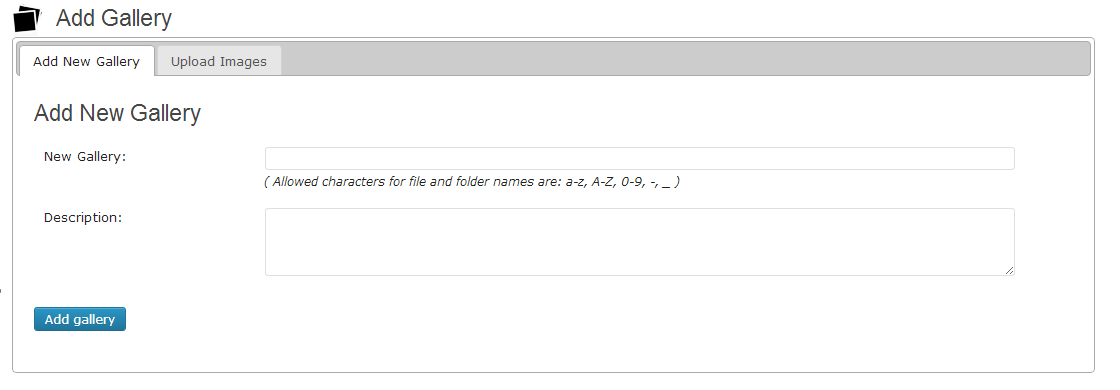
Create Gallery using Add gallery tab

Upload multiple images in selected gallery

Go to your post/page and use TinyMCE button for adding GSS to page/post content.

Gallery Stacked slider Preview
ການຕິດຕັ້ງ
-
Upload the gallery-stacked-slideshow folder to the /wp-content/plugins/ directory.
-
Go to the Plugins page of your WordPress administration area and activate the plugin.
-
Create your Gallery by clicking on Stacked Gallery in your administration menu and selecting Add Gallery. Create a gallery for Gallery stack slider.
-
After create a gallery. upload images for that particular gallery using tab Upload Images
-
Go to your post/page and use TinyMCE button for adding GSS to page/post content.
for demo please click here
ການຣີວິວ
ບໍ່ມີການຣີວິວສຳລັບປລັກອິນນີ້.
ຜູ້ຮ່ວມພັດທະນາ ແລະ ຜູ້ພັດທະນາ
“Gallery Stacked Slideshow” ແມ່ນຊອຟແວໂອເພັນຊອດ (Open Source). ບຸກຄົນຕໍ່ໄປນີ້ໄດ້ມີສ່ວນຮ່ວມໃນການພັດທະນາປລັກອິນນີ້.
ຜູ້ຮ່ວມພັດທະນາ
ແປ “Gallery Stacked Slideshow” ເປັນພາສາຂອງເຈົ້າ.
ສົນໃຈຮ່ວມພັດທະນາບໍ່?
ເບິ່ງລະຫັດ, ກວດເບິ່ງ ຄັງເກັບ SVN, ຫຼື ຕິດຕາມ ບັນທຶກການພັດທະນາ ຜ່ານ RSS.
ບັນທຶກການປ່ຽນແປງ
2.0
change code