Title: Simple Sticky TOC
Author: pavlobondarchuk
Published: 10 ສິງຫາ 2025
Last modified: 10 ສິງຫາ 2025
---
ຄົ້ນຫາປລັກອິນ
ປລັກອິນນີ້ **ຍັງບໍ່ທັນໄດ້ຮັບການທົດສອບກັບ WordPress 3 ເວີຊັນຫຼັກຫຼ້າສຸດ**. ມັນອາດຈະ
ບໍ່ໄດ້ຮັບການເບິ່ງແຍງ ຫຼື ສະໜັບສະໜູນອີກຕໍ່ໄປ ແລະ ອາດມີບັນຫາການເຮັດວຽກຮ່ວມກັນເມື່ອ
ໃຊ້ກັບ WordPress ເວີຊັນທີ່ໃໝ່ກວ່າ.

# Simple Sticky TOC
ໂດຍ [pavlobondarchuk](https://profiles.wordpress.org/bonddesign/)
[ດາວໂຫຼດ](https://downloads.wordpress.org/plugin/simple-sticky-toc.1.0.1.zip)
* [ລາຍລອຽດ](https://lo.wordpress.org/plugins/simple-sticky-toc/#description)
* [ການຣີວິວ](https://lo.wordpress.org/plugins/simple-sticky-toc/#reviews)
* [ການຕິດຕັ້ງ](https://lo.wordpress.org/plugins/simple-sticky-toc/#installation)
* [ການພັດທະນາ](https://lo.wordpress.org/plugins/simple-sticky-toc/#developers)
[ການຊ່ວຍເຫຼືອ](https://wordpress.org/support/plugin/simple-sticky-toc/)
## ຄຳອະທິບາຍ
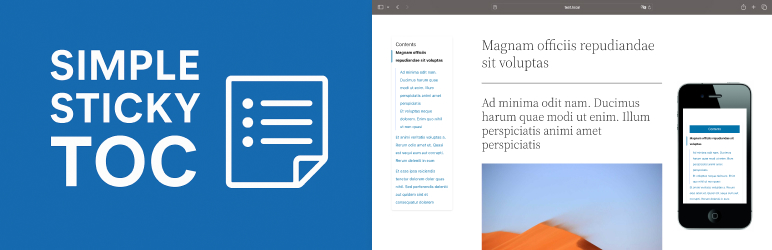
Simple Sticky TOC automatically generates a sticky table of contents for single
posts or pages by parsing ``, ``, and `` tags. It is lightweight, mobile-
friendly, and works without jQuery.
**Features:**
– Automatically detects and anchors h2–h4 headings – Sticky TOC with
vertical layout on desktop – Sticky toggleable TOC on mobile – Built-in RTL support(
positioning + layout) – Option to disable TOC on individual posts – Option to customize
TOC layout from your theme – Auto-generated anchor IDs for headings – Clean CSS,
pure JavaScript, no jQuery
### Theme Override Support
To override the default markup or styles:
1. Copy the default template files from the plugin:
2. * `frontend/partials/toc-template.php`
* `assets/css/toc.css`
* `assets/js/toc.js`
3. Paste them into your theme inside the following folder:
4. * `your-theme/simple-sticky-toc/`
Supported override files:
* `simple-sticky-toc/toc-template.php` – custom TOC markup
* `simple-sticky-toc/toc.css` – custom styles
* `simple-sticky-toc/toc.js` – custom JS behavior
## ພາບໜ້າຈໍ
[⌊Sticky TOC on desktop⌉⌊Sticky TOC on desktop⌉[
Sticky TOC on desktop
[⌊Toggleable TOC on mobile⌉⌊Toggleable TOC on mobile⌉[
Toggleable TOC on mobile
[⌊Admin panel for depth control⌉⌊Admin panel for depth control⌉[
Admin panel for depth control
[⌊TOC layout in RTL mode⌉⌊TOC layout in RTL mode⌉[
TOC layout in RTL mode
## ການຕິດຕັ້ງ
1. Upload the plugin folder to the `/wp-content/plugins/` directory.
2. Activate the plugin through the ‘Plugins’ menu in WordPress.
3. The TOC will appear automatically above your post content.
## ຄຳຖາມທີ່ພົບເລື້ອຍ
### Can I choose which heading levels are used?
Yes. Go to **Settings BNDDSGN_Simple Sticky TOC** and select the depth (h2, h2–
h3, or h2–h4).
### Can I disable TOC on some posts?
Yes, there’s a checkbox in the post editor sidebar to disable it per-post.
### Can I change the layout or style?
Yes, copy `toc-template.php`, `toc.css`, or `toc.js` into your theme folder (`simple-
sticky-toc/`) and customize freely.
### Is this plugin compatible with RTL sites?
Yes, it automatically adjusts alignment and layout.
### Does it work with block themes (FSE)?
Yes.
## ການຣີວິວ
ບໍ່ມີການຣີວິວສຳລັບປລັກອິນນີ້.
## ຜູ້ຮ່ວມພັດທະນາ ແລະ ຜູ້ພັດທະນາ
“Simple Sticky TOC” ແມ່ນຊອຟແວໂອເພັນຊອດ (Open Source). ບຸກຄົນຕໍ່ໄປນີ້ໄດ້ມີສ່ວນຮ່ວມ
ໃນການພັດທະນາປລັກອິນນີ້.
ຜູ້ຮ່ວມພັດທະນາ
* [ pavlobondarchuk ](https://profiles.wordpress.org/bonddesign/)
[ແປ “Simple Sticky TOC” ເປັນພາສາຂອງເຈົ້າ.](https://translate.wordpress.org/projects/wp-plugins/simple-sticky-toc)
### ສົນໃຈຮ່ວມພັດທະນາບໍ່?
[ເບິ່ງລະຫັດ](https://plugins.trac.wordpress.org/browser/simple-sticky-toc/), ກວດເບິ່ງ
[ຄັງເກັບ SVN](https://plugins.svn.wordpress.org/simple-sticky-toc/), ຫຼື ຕິດຕາມ
[ບັນທຶກການພັດທະນາ](https://plugins.trac.wordpress.org/log/simple-sticky-toc/) ຜ່ານ
[RSS](https://plugins.trac.wordpress.org/log/simple-sticky-toc/?limit=100&mode=stop_on_copy&format=rss).
## ບັນທຶກການປ່ຽນແປງ
#### 1.0.1
* Unified unique prefixes for all plugin functions, classes, constants, and options
to prevent conflicts.
* Updated Contributors field to `bonddesign`.
* Updated Stable tag to match the release version.
* Removed macOS hidden files (`.DS_Store`, `__MACOSX`) from the distribution package.
#### 1.0.0
* Initial release
* Auto-injects sticky TOC from headings (h2–h4)
* Responsive layout with sticky toggle button on mobile
* Per-post disable option
* Customizable template, CSS, and JS via theme override
* RTL support for layout and direction
* Clean structure (no jQuery)
## ຂໍ້ມູນກຳກັບ (Meta)
* ເວີຊັນ **1.0.1**
* ອັບເດດຫຼ້າສຸດເມື່ອ **1 ປີ ທີ່ຜ່ານມາ** ທີ່ຜ່ານມາ
* ການຕິດຕັ້ງທີ່ໃຊ້ງານຢູ່ **ໜ້ອຍກວ່າ 10**
* ເວີຊັນ WordPress ** 5.0 ຫຼື ສູງກວ່າ **
* ທົດສອບເຖິງເວີຊັນ **6.8.8**
* ເວີຊັນ PHP ** 7.2 ຫຼື ສູງກວ່າ **
* ພາສາ
* [English (US)](https://wordpress.org/plugins/simple-sticky-toc/)
* ແທັກ
* [anchor](https://lo.wordpress.org/plugins/tags/anchor/)[headings](https://lo.wordpress.org/plugins/tags/headings/)
[sticky](https://lo.wordpress.org/plugins/tags/sticky/)[table of contents](https://lo.wordpress.org/plugins/tags/table-of-contents/)
[toc](https://lo.wordpress.org/plugins/tags/toc/)
* [ມຸມມອງຂັ້ນສູງ](https://lo.wordpress.org/plugins/simple-sticky-toc/advanced/)
## ການໃຫ້ຄະແນນ
ຍັງບໍ່ມີການສົ່ງຄຳວິຈານເທື່ອ.
[ການທົບທວນຂອງທ່ານ](https://wordpress.org/support/plugin/simple-sticky-toc/reviews/#new-post)
[ເບິ່ງທັງໝົດ ການຣີວິວ](https://wordpress.org/support/plugin/simple-sticky-toc/reviews/)
## ຜູ້ຮ່ວມພັດທະນາ
* [ pavlobondarchuk ](https://profiles.wordpress.org/bonddesign/)
## ການຊ່ວຍເຫຼືອ
ມີຄຳຖາມ ຫຼື ຕ້ອງການຄວາມຊ່ວຍເຫຼືອບໍ່?
[ເບິ່ງຟໍຣັມການຊ່ວຍເຫຼືອ](https://wordpress.org/support/plugin/simple-sticky-toc/)