

ຄຳອະທິບາຍ
Use spoilers to hide some content on the page using shortcode. On the settings page, you can specify the color of the spoiler.
How to use
Example: [spoiler]Spoiler content[/spoiler]
Example: [spoiler title="Show spoiler"]Spoiler content[/spoiler]
Translations
You can translate Simple Spoiler on translate.wordpress.org.
ພາບໜ້າຈໍ

Manage color settings 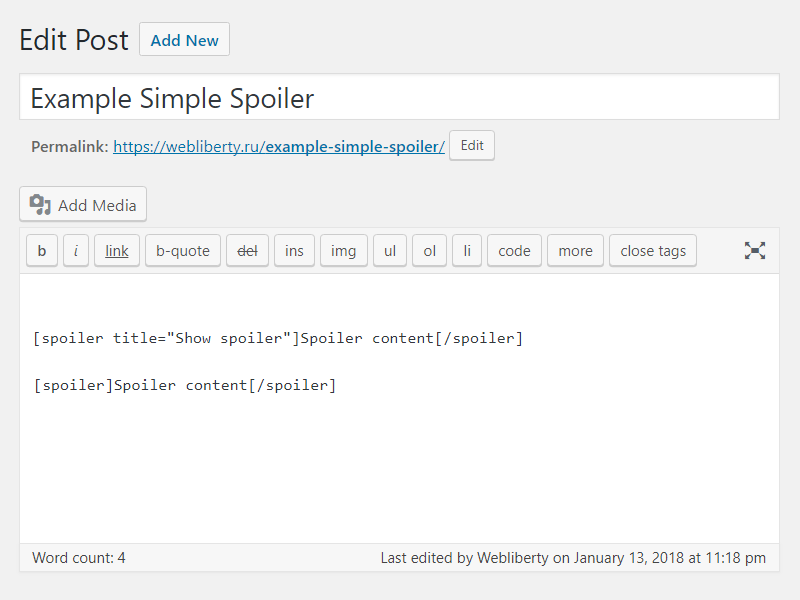
Use of shortcodes in HTML editor 
Preview spoilers in page content
ການຕິດຕັ້ງ
- Upload folder
simple-spoilerto the/wp-content/plugins/directory; - Activate the plugin through the ‘Plugins’ menu in WordPress;
- Place shortcode in your content.
ຄຳຖາມທີ່ພົບເລື້ອຍ
-
How do I can customize design of the spoiler?
-
To change color layout of a spoiler, please, go to options page.
ການຣີວິວ

15 ພຶດສະພາ 2021
Thank you for developing this plugin. I wanted something simple with minimal configuration and this shortcode and control over the colors is wonderful. Thank you.

13 ເມສາ 2020
1 ການຕອບກັບ
Легко поддается дополнительной стилизации.
Есть необходимая документация по CSS.
Отличная техподдержка, реагирует мгновенно.
Спасибо.

12 ເມສາ 2020
в середині спойлера не працють інші теги

9 ເມສາ 2020
2 ການຕອບກັບ
Спасибо за плагин и быструю техподдержку!

3 ມີນາ 2019
Great.

31 ທັນວາ 2018
Задумка хорошая, но не увидел кнопку в редакторе. Каждый раз в ручную прописывать, это прошлый век.
ຜູ້ຮ່ວມພັດທະນາ ແລະ ຜູ້ພັດທະນາ
“Simple Spoiler” ແມ່ນຊອຟແວໂອເພັນຊອດ (Open Source). ບຸກຄົນຕໍ່ໄປນີ້ໄດ້ມີສ່ວນຮ່ວມໃນການພັດທະນາປລັກອິນນີ້.
ຜູ້ຮ່ວມພັດທະນາ
“Simple Spoiler” ໄດ້ຖືກແປເປັນ 6 ພາສາທ້ອງຖິ່ນ. ຂໍຂອບໃຈ ທີມງານຜູ້ແປ ສຳລັບການປະກອບສ່ວນຂອງເຂົາເຈົ້າ.
ແປ “Simple Spoiler” ເປັນພາສາຂອງເຈົ້າ.
ສົນໃຈຮ່ວມພັດທະນາບໍ່?
ເບິ່ງລະຫັດ, ກວດເບິ່ງ ຄັງເກັບ SVN, ຫຼື ຕິດຕາມ ບັນທຶກການພັດທະນາ ຜ່ານ RSS.
ບັນທຶກການປ່ຽນແປງ
1.5
- Fixed Cross Site Scripting (XSS) vulnerability.
- Improved code performance and security.
1.4
- Fixed Unauthenticated Arbitrary Shortcode Execution vulnerability in comments.
1.3
- Fixed Cross Site Scripting (XSS) vulnerability.
1.2
- Added support spoiler shortcode for comments.
- Added settings for change spoiler border color.
1.1
- Fix undefined constant ‘title’.
1.0
- Initial release.