
ຄຳອະທິບາຍ
ເວັບໄຊ WordPress ສ່ວນໃຫຍ່ໃຊ້ປລັກອິນ 20–40 ຕົວ. ນັ້ນໝາຍເຖິງ 20–40 ສິ່ງທີ່ເຮັດໃຫ້ເວັບໄຊຂອງທ່ານຊ້າ, ຕີກັນເອງ ແລະ ຕ້ອງໄດ້ອັບເດດທຸກອາທິດ.
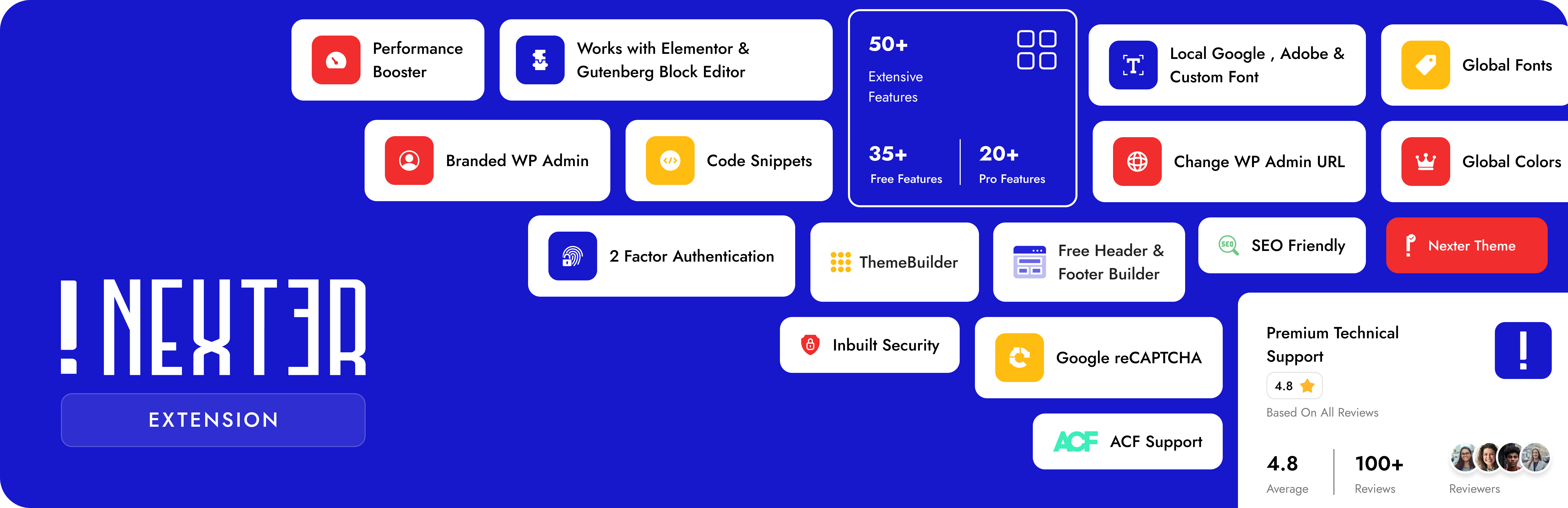
Nexter Extension ແກ້ໄຂບັນຫານັ້ນ. ໜຶ່ງປລັກອິນ. 50+ ຄຸນສົມບັດ. ທຸກໂມດູນສາມາດເປີດ/ປິດໄດ້ — ຈະບໍ່ມີຫຍັງໂຫຼດຂຶ້ນມາຍົກເວັ້ນແຕ່ທ່ານຕ້ອງການມັນ. Vanilla JS ແທ້ 100%, ບໍ່ມີ jQuery.
ມັນແມ່ນປລັກອິນ WordPress ໜຶ່ງດຽວທີ່ຈັດການ SEO, ຄວາມປອດໄພ, ປະສິດທິພາບ, ການສົ່ງອີເມວ, ການອອກແບບທີມ, ການຈັດການໂຄດ, ແລະ ທຳຄວາມສະອາດແຜງແອັດມິນ ຂອງທ່ານ — ລວມຢູ່ໃນບ່ອນດຽວ, ເລີ່ມຕົ້ນນຳໃຊ້ໄດ້ຟຣີ.
👉 ເວັບໄຊ | ຄຸນສົມບັດທັງໝົດ | Nexter SEO | ຟຣີ vs Pro | ລາຄາ | ເອກະສານອ້າງອີງ | ແຜນງານ | ຊ່ວຍເຫຼືອ | ຊ່ວຍເຫຼືອພຣີມຽມ | AI ແຊັດ
🔍 Nexter SEO — SEO, Schema & ການຄົ້ນຫາ AI ໃນຕົວສຳລັບ WordPress
ຈັດການ SEO ໃນໜ້າເວັບ, ໂຄງສ້າງ schema, ແຜນຜັງເວັບໄຊ XML, ການປ່ຽນເສັ້ນທາງ ແລະ ການຄົ້ນຫາ AI ຈາກປລັກອິນດຽວ. Nexter SEO ແມ່ນຊຸດເຄື່ອງມື WordPress SEO ທີ່ສົມບູນ ແລະ ເບົາ ທີ່ຝັງຢູ່ໃນ Nexter Extension — ເລີກໃຊ້ປລັກອິນ SEO ແຍກຂອງທ່ານໄດ້ເລີຍ, ບໍ່ມີນ້ຳໜັກໜ້າເວັບເພີ່ມເຕີມ ແລະ ບໍ່ມີບັນຫາປລັກອິນຕີກັນ. ຟຣີ 100%.
- ກວດສອບ SEO ຂອງເວັບໄຊ — ສະແກນເວັບໄຊຂອງທ່ານເພື່ອຫາບັນຫາເທິງໜ້າເວັບ ແລະ ເຕັກນິກ, ພ້ອມຄະແນນສຸຂະພາບ 0-100 ແລະ ລາຍຊື່ສິ່ງທີ່ຕ້ອງແກ້ໄຂອັນດັບຕົ້ນໆ.
- ເທັມເພລດຫົວຂໍ້ Meta & ຄຳອະທິບາຍ — ຕັ້ງຄ່າເທັມເພລດຫົວຂໍ້ ແລະ ຄຳອະທິບາຍ meta ທົ່ວເວັບໄຊ ພ້ອມຕົວປ່ຽນແບບໄດນາມິກ ແລະ ຕົວຢ່າງການຄົ້ນຫາເທິງ Google ແບບສົດ.
- ໂຊຊຽວ / Open Graph — ຄວບຄຸມວິທີທີ່ໜ້າເວັບຂອງທ່ານສະແດງເມື່ອຖືກແບ່ງປັນ, ພ້ອມຮູບພາບເລີ່ມຕົ້ນສຳລັບການແບ່ງປັນ ແລະ ກາດຂອງ Facebook ພ້ອມ X (Twitter).
- ຕົວສ້າງ Schema — ເພີ່ມຂໍ້ມູນແບບໂຄງສ້າງ 18 ປະເພດ (ບົດຄວາມ, ສິນຄ້າ, ໜ້າຄຳຖາມທີ່ພົບເລື້ອຍ, ວິທີການ, ທຸລະກິດທ້ອງຖິ່ນ, ກິດຈະກຳ, ສູດອາຫານ, ວິດີໂອ ແລະ ອື່ນໆ) ພ້ອມຕົວປ່ຽນແບບໄດນາມິກ ແລະ ເງື່ອນໄຂການສະແດງຜົນ. ບໍ່ຕ້ອງຂຽນໂຄດ.
- ແຜນຜັງເວັບໄຊ XML — ສ້າງແຜນຜັງເວັບໄຊ XML, ພ້ອມດ້ວຍທາງເລືອກສຳລັບແຜນຜັງຮູບພາບ, ວິດີໂອ, ຂ່າວ ແລະ HTML, ພ້ອມລາຍຊື່ຍົກເວັ້ນ.
- ຕົວແກ້ໄຂ Robots & Robots.txt — ຕັ້ງຄ່າກົດລະບຽບ index, follow ແລະ archive ແຍກຕາມປະເພດ ແລະ ແກ້ໄຂໄຟລ໌ robots.txt ສະເໝືອນຂອງທ່ານໄດ້ໂດຍກົງຈາກແຜງຄວບຄຸມ.
- ດັດຊະນີທັນທີ (IndexNow) — ຍູ້ URL ໃໝ່ ແລະ ທີ່ອັບເດດແລ້ວໄປຍັງເຄື່ອງຈັກຊອກຫາທີ່ຮອງຮັບ IndexNow ໃນທັນທີ, ແບບອັດຕະໂນມັດ ຫຼື ເຮັດຫຼາຍອັນພ້ອມກັນ.
- LLMs.txt ສຳລັບການຄົ້ນຫາ AI — ສ້າງໄຟລ໌ LLMs.txt ເພື່ອໃຫ້ເຄື່ອງຈັກ AI ເຊັ່ນ ChatGPT, Perplexity ແລະ Google AI ສາມາດຊອກຫາ ແລະ ອ້າງອີງເນື້ອຫາຂອງທ່ານໄດ້.
- ການຢັ້ງຢືນເວັບໄຊ — ຢັ້ງຢືນເວັບໄຊຂອງທ່ານກັບ Google, Bing, Pinterest ແລະ Facebook ໃນບ່ອນດຽວ.
- ການປ່ຽນເສັ້ນທາງ & ຕົວຕິດຕາມ 404 — ສ້າງການປ່ຽນເສັ້ນທາງ 301, 302 ແລະ ອື່ນໆ ພ້ອມການຈັບຄູ່ທີ່ຍືດຫຍຸ່ນ, ແລະ ບັນທຶກ URL ທີ່ເພພັງເພື່ອແກ້ໄຂ.
- SEO ຮູບພາບ — ເພີ່ມຂໍ້ຄວາມ alt ອັດຕະໂນມັດຈາກຊື່ໄຟລ໌ ຫຼື ຫົວຂໍ້ (ບໍ່ຈຳເປັນຕ້ອງໃຊ້ AI) ແລະ ປ່ຽນເສັ້ນທາງໜ້າໄຟລ໌ແນບໄປຫາໂພສຫຼັກຂອງມັນ.
- ນຳເຂົ້າ / ສົ່ງອອກ — ຍ້າຍການຕັ້ງຄ່າ SEO ທັງໝົດຂອງທ່ານລະຫວ່າງເວັບໄຊດ້ວຍໄຟລ໌ JSON ພຽງໄຟລ໌ດຽວ.
🏗️ ຕົວສ້າງທີມ — ຟຣີສຳລັບ Elementor & Gutenberg
ສ້າງສ່ວນຫົວ, ສ່ວນທ້າຍ, ໜ້າ 404, ເທັມເພລດໂພສດ່ຽວ ແລະ ໜ້າຄັງເກັບໂພສ ດ້ວຍວິດເຈັດ Elementor ຫຼື ບລັອກ Gutenberg — ຟຣີທັງໝົດ, ບໍ່ຈຳເປັນຕ້ອງມີຕົວສ້າງໜ້າເວັບແບບພຣີມຽມ.
ເຮັດວຽກຮ່ວມກັບ Astra, Hello Elementor, GeneratePress, Kadence, Blocksy, OceanWP, Neve ແລະ Bricks Builder ໄດ້.
- ຕົວສ້າງສ່ວນຫົວ (Header) — ອອກແບບສ່ວນຫົວແບບຕິດໜຶບ, ໂປ່ງໃສ, ຫຼື ຕາມເງື່ອນໄຂ ດ້ວຍການຄວບຄຸມຈາກຕົວສ້າງໜ້າເວັບໄດ້ເຕັມທີ່. ບໍ່ຕ້ອງຂຽນໂຄດ.
- ຕົວສ້າງສ່ວນທ້າຍ (Footer) — ສ້າງຮູບແບບສ່ວນທ້າຍໃດກໍໄດ້ — ແບບຫຼາຍຄໍລຳ, ວິດເຈັດ, ບລັອກ — ບໍ່ມີຂໍ້ຈຳກັດດ້ານເທັມເພລດ.
- ແຖບ Breadcrumbs — ເມນູນຳທາງ breadcrumb ທີ່ມີໂຄງສ້າງສຳລັບ SEO ພ້ອມການຄວບຄຸມການອອກແບບໄດ້ເຕັມທີ່.
- ຕົວສ້າງໜ້າ 404 — ໜ້າ 404 ທີ່ອອກແບບເອງໄດ້ ເຊິ່ງຊ່ວຍໃຫ້ຜູ້ເຂົ້າຊົມຍັງຢູ່ໃນເວັບໄຊຂອງທ່ານແທນທີ່ຈະກົດອອກ.
- ເທັມເພລດໂພສດ່ຽວ & ຄັງເກັບໂພສ — ຮູບແບບສະເພາະສຳລັບແຕ່ລະປະເພດໂພສ, ໝວດໝູ່, ແທັກ, ຫຼື ປະເພດໂພສທີ່ກຳນົດເອງ.
- ເງື່ອນໄຂການສະແດງຜົນ — ສະແດງ/ເຊື່ອງເທັມເພລດຕາມໜ້າເວັບ, ບົດບາດຜູ້ໃຊ້, ອຸປະກອນ, ສະຖານະການເຂົ້າສູ່ລະບົບ ແລະ ອີກກວ່າ 50 ເງື່ອນໄຂ (Pro).
💻 ໂຄດສະນິບເປັດ — ຕົວຈັດການ PHP, CSS, JS & HTML
ເພີ່ມ PHP, CSS, JavaScript, ແລະ HTML ທີ່ກຳນົດເອງໃສ່ WordPress ໂດຍບໍ່ຕ້ອງແຕະຕ້ອງ functions.php ຫຼື ສ້າງ child theme. ໂຄດສະນິບເປັດທັງໝົດຈະເຮັດວຽກເປັນໄຟລ໌ຄົງທີ່ — ບໍ່ມີການສອບຖາມຖານຂໍ້ມູນເພີ່ມເຕີມ, ໄວກວ່າປລັກອິນຈັດການຊຸດໂຄດ WordPress ໂຕອື່ນ.
- ໂຄດສະນິບເປັດ PHP, HTML, CSS & JS — ຈັດການໂຄດທັງສີ່ປະເພດພ້ອມການກວດສອບໄວຍະກອນແບບສົດ. ລະບົບປ້ອງກັນການເພພັງອັດຕະໂນມັດຈະຢຸດໂຄດທີ່ຜິດພາດບໍ່ໃຫ້ເຮັດເວັບໄຊຂອງທ່ານພັງ.
- ການປະມວນຜົນແບບອີງໃສ່ໄຟລ໌ — ຊຸດໂຄດຈະຖືກຄອມພາຍເປັນໄຟລ໌ຄົງທີ່, ບໍ່ແມ່ນການຄົ້ນຫາໃນຖານຂໍ້ມູນ — ເປັນຂໍ້ໄດ້ປຽບດ້ານຄວາມໄວທີ່ເໜືອກວ່າປລັກອິນຈັດການໂຄດແບບເດີມໆ.
- 22+ ກົດລະບຽບການໂຫຼດຕາມເງື່ອນໄຂ — ໂຫຼດໂຄດສະເພາະໃນໜ້າ, ປະເພດໂພສ, ບົດບາດຜູ້ໃຊ້, ອຸປະກອນ, ໜ້າ WooCommerce, EDD ຫຼື MemberPress ທີ່ກຳນົດເທົ່ານັ້ນ.
- ການກຳນົດເວລາ (Pro) — ຕັ້ງວັນທີເລີ່ມຕົ້ນ/ສິ້ນສຸດສຳລັບຊຸດໂຄດໃດກໍໄດ້. ເໝາະສຳລັບປ້າຍໂຄສະນາຕາມເທດສະການ ແລະ ສະຄຣິບທີ່ມີກຳນົດເວລາ.
- ການຈັດວາງອັດສະລິຍະ (Pro) — ຝັງໂຄດໄວ້ກ່ອນ/ຫຼັງອົງປະກອບ HTML ສະເພາະ, ຫຼັງຈາກ X ຄຳ, ຕາມເປີເຊັນຂອງເນື້ອຫາ, ຫຼື ຜ່ານ shortcode.
- ນຳເຂົ້າ / ສົ່ງອອກ & ຕິດແທັກ — ຍ້າຍຊຸດໂຄດລະຫວ່າງເວັບໄຊໃນຄລິກດຽວ. ຕິດແທັກ ແລະ ຂຽນຄຳອະທິບາຍໃນຄັງຊຸດໂຄດທັງໝົດຂອງທ່ານ.
🖼️ ຕົວປັບແຕ່ງຮູບພາບ — WebP, AVIF & ບີບອັດຫຼາຍຮູບພ້ອມກັນ
ຕົວປັບແຕ່ງຮູບພາບ wordpress ທີ່ສົມບູນແບບໃນຕົວ — ປ່ຽນຮູບແບບ, ບີບອັດ ແລະ ປັບແຕ່ງຮູບພາບເປັນຈຳນວນຫຼາຍໂດຍບໍ່ຕ້ອງໃຊ້ API key, ບັນຊີພາຍນອກ ຫຼື ຈ່າຍລາຍເດືອນ. ທຸກຢ່າງເຮັດວຽກເທິງເຊີບເວີຂອງທ່ານເອງ.
- ແປງເປັນ WebP — ແປງໄຟລ໌ JPG/PNG ທີ່ອັບໂຫຼດເປັນ WebP ອັດຕະໂນມັດ. ໄຟລ໌ນ້ອຍລົງສູງສຸດ 35%, ຄຸນນະພາບບໍ່ຫຼຸດລົງ.
- ຮອງຮັບ AVIF — ຮູບແບບຍຸກໃໝ່, ຂະໜາດນ້ອຍກວ່າ JPEG ສູງສຸດ 50%. ມີລະບົບແປງເປັນ AVIF ໃນຕົວໂດຍບໍ່ມີຄ່າໃຊ້ຈ່າຍເພີ່ມ.
- ບີບອັດຮູບພາບຈຳນວນຫຼາຍພ້ອມກັນ — ບີບອັດທັງຄັງສື່ຂອງທ່ານພາຍໃນຄັ້ງດຽວ. ບໍ່ຕ້ອງມານັ່ງກົດເທື່ອລະຮູບ.
- ປັບຂະໜາດອັດຕະໂນມັດຕອນອັບໂຫຼດ — ຫຍໍ້ຮູບທີ່ມີຂະໜາດໃຫຍ່ເກີນໄປອັດຕະໂນມັດຕອນອັບໂຫຼດ ແລະ ລຶບຕົ້ນສະບັບຖິ້ມເພື່ອປະຢັດພື້ນທີ່ດິດສ໌.
- ບໍ່ຕ້ອງໃຊ້ API Key. ບໍ່ຕ້ອງມີບັນຊີ. ບໍ່ມີຄ່າລາຍເດືອນ. — ພຽງແຕ່ເປີດໃຊ້ໂມດູນ, ມັນກໍເຮັດວຽກທັນທີ.
⚡ ປະສິດທິພາບ WordPress & ປັບປຸງຄວາມໄວໜ້າເວັບ
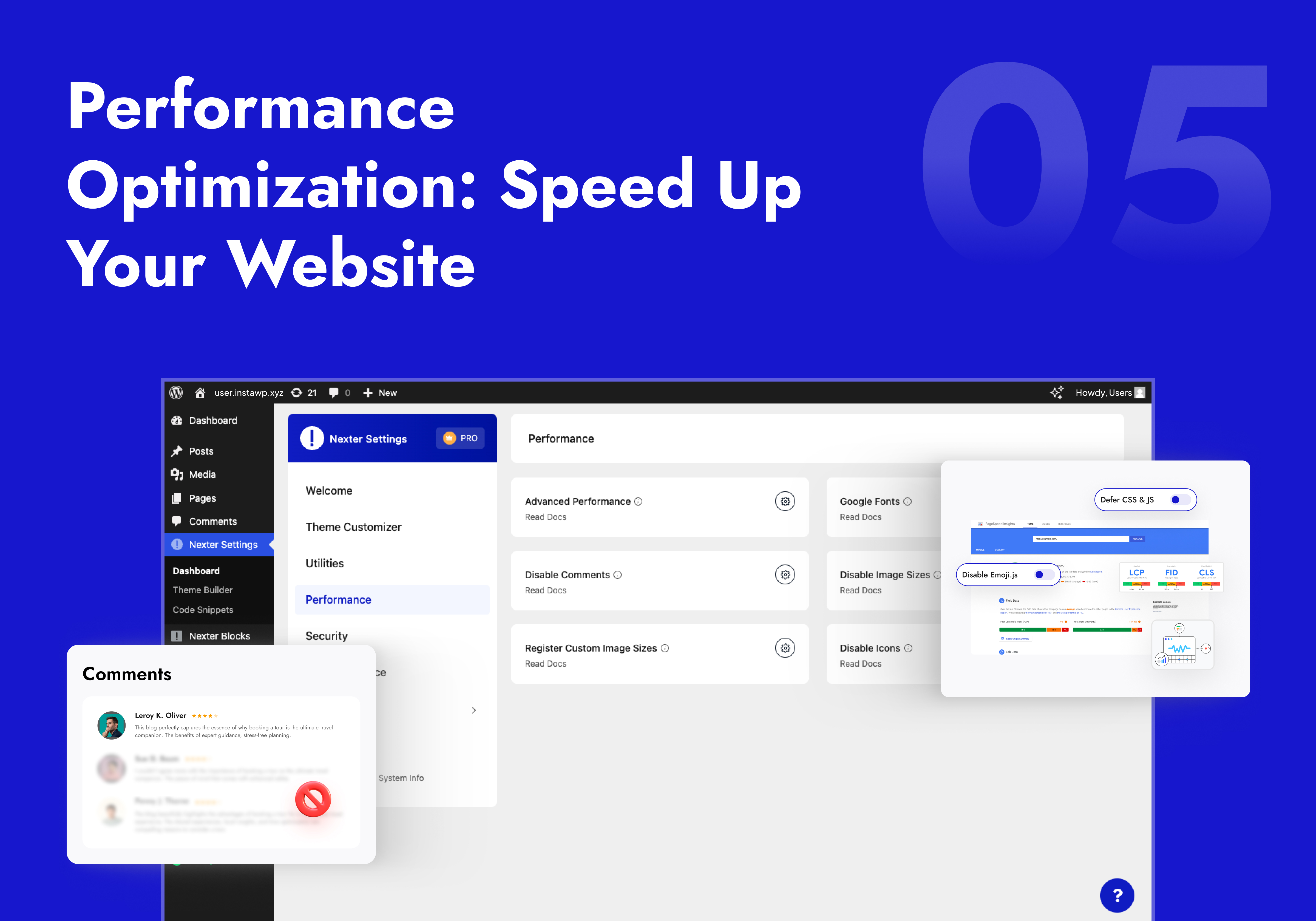
ສະວິດເປີດ/ປິດ ປັບປຸງຄວາມໄວ WordPress ທີ່ລະອຽດ — ປິດສະເພາະສິ່ງທີ່ເວັບໄຊຂອງທ່ານບໍ່ຕ້ອງການ. ບໍ່ມີສະວິດແບບເປີດໝົດ/ປິດໝົດ ທີ່ອາດເຮັດໃຫ້ລະບົບເພພັງ.
- ປິດສະຄຣິບທີ່ບໍ່ຈຳເປັນ — ສະວິດປິດແຍກສຳລັບສະຄຣິບອີໂມຈິ, ການຝັງ (Embeds), Dashicons, Pingbacks, ລິ້ງຟີດ, ແທັກ Shortlink ແລະ ອື່ນໆ — ແຕ່ລະອັນແຍກກັນຊັດເຈນ.
- ຊະລໍໂຫຼດ CSS & JS — ຊະລໍການໂຫຼດສະໄຕລ໌ຊິດ ແລະ ສະຄຣິບທີ່ບໍ່ສຳຄັນ ເພື່ອປັບປຸງ First Contentful Paint ແລະ ຄະແນນການໂຫຼດໜ້າເວັບ.
- ໂຮສ Google Fonts ເອງ — ໂຮສ Google Fonts ໃນເຊີບເວີຂອງທ່ານເອງ. ຕັດການຮ້ອງຂໍໄປຫາ Google ພາຍນອກ ແລະ ເຮັດໃຫ້ເວັບໄຊຂອງທ່ານສອດຄ່ອງກັບ GDPR.
- ຄວບຄຸມ Heartbeat — ຫຼຸດຄວາມຖີ່ ຫຼື ປິດ WordPress Heartbeat API — ເຊິ່ງເປັນສາເຫດທົ່ວໄປທີ່ເຮັດໃຫ້ CPU ເຮັດວຽກໜັກເທິງແຊຣ໌ໂຮສຕິງ.
- ຄວບຄຸມສະບັບແກ້ໄຂ (Revision) — ຈຳກັດຈຳນວນສະບັບແກ້ໄຂໂພສເພື່ອປ້ອງກັນຖານຂໍ້ມູນບວມສຳລັບເວັບໄຊທີ່ມີເນື້ອຫາຫຼາຍ.
- ປິດຄຳເຫັນ — ປິດຄຳເຫັນ WordPress ທັງເວັບໄຊ ຫຼື ແຍກຕາມປະເພດໂພສ. ລຶບສະຄຣິບຄຳເຫັນທັງໝົດອອກຈາກໜ້າເວັບ.
- ປິດຂະໜາດຮູບພາບທີ່ບໍ່ໄດ້ໃຊ້ & ໄອຄອນ Elementor — ຢຸດການສ້າງຮູບຫຍໍ້ ແລະ ການໂຫຼດ Font Awesome ໃນໜ້າທີ່ບໍ່ໄດ້ໃຊ້ມັນ.
🔒 ປລັກອິນຄວາມປອດໄພ WordPress — ເພີ່ມຄວາມໜາແໜ້ນ, ປ້ອງກັນການເຂົ້າສູ່ລະບົບ & ອື່ນໆອີກ
ປລັກອິນຄວາມປອດໄພ WordPress ຫຼາຍຊັ້ນ ພ້ອມສະວິດເປີດ/ປິດແຍກຕ່າງຫາກ. ຄອບຄຸມຄຸນສົມບັດການປົກປ້ອງການເຂົ້າສູ່ລະບົບ ແລະ ການເພີ່ມຄວາມປອດໄພທີ່ໃຊ້ຫຼາຍທີ່ສຸດ ໂດຍບໍ່ຕ້ອງເພີ່ມລະບົບຮັກສາຄວາມປອດໄພໜັກໆເຂົ້າໃນທຸກການໂຫຼດໜ້າເວັບ.
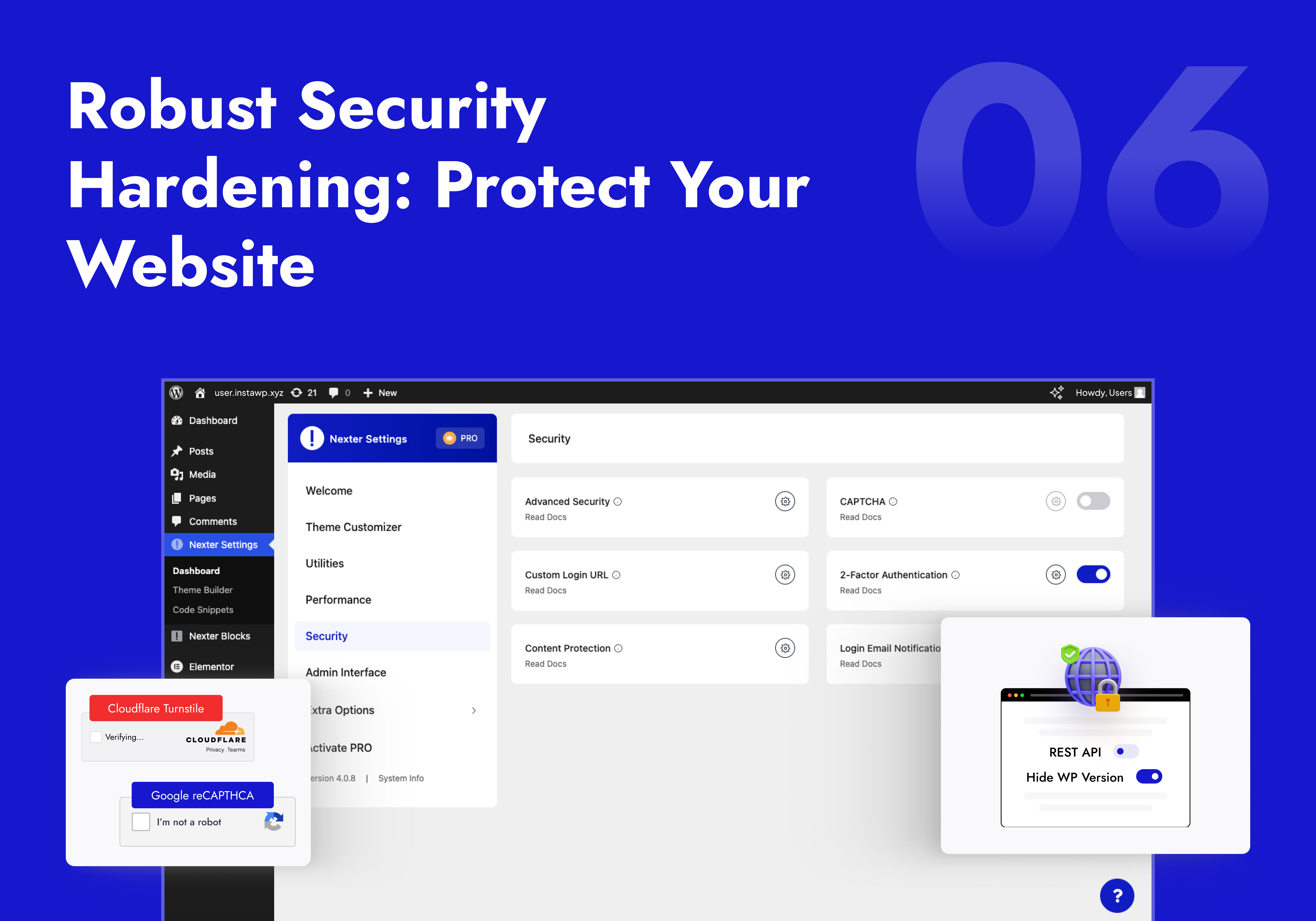
- ການເພີ່ມຄວາມປອດໄພ — ປິດການນຳໃຊ້ XML-RPC, ເຊື່ອງເວີຊັນ WP, ລຶບລິ້ງ REST API ອອກຈາກສ່ວນຫົວ, ບລັອກຕົວແກ້ໄຂໄຟລ໌, ເພີ່ມ XSS headers ແລະ ອື່ນໆ — ແຕ່ລະອັນມີສະວິດເປີດ/ປິດແຍກກັນ.
- ຈຳກັດການພະຍາຍາມເຂົ້າສູ່ລະບົບ (ຟຣີມຽມ) — ບລັອກການໂຈມຕີແບບ brute-force ໂດຍການລັອກ IP ຫຼັງຈາກເຂົ້າສູ່ລະບົບລົ້ມເຫຼວຫຼາຍຄັ້ງ. ບໍ່ຈຳເປັນຕ້ອງໃຊ້ປລັກອິນປ້ອງກັນ brute force ແຍກ.
- ປ້ອງກັນສະແປມດ້ວຍ CAPTCHA — ເພີ່ມ Google reCAPTCHA v2/v3 ຫຼື Cloudflare Turnstile ໃນໜ້າເຂົ້າສູ່ລະບົບ, ລົງທະບຽນ, ຄຳເຫັນ, ຣີເຊັດລະຫັດຜ່ານ ແລະ ການຊຳລະເງິນຂອງ WooCommerce.
- ການຢືນຢັນຕົວຕົນແບບສອງຂັ້ນຕອນ (2FA) (Pro) — ການຢືນຢັນສອງຂັ້ນຕອນຜ່ານອີເມວ ພ້ອມການບັງຄັບໃຊ້ຕາມບົດບາດ. ປ່ຽນແທນປລັກອິນ 2FA ແຍກຕ່າງຫາກໄດ້ເລີຍ.
- ປ່ຽນ URL ເຂົ້າສູ່ລະບົບ WP Admin — ຍ້າຍໜ້າເຂົ້າສູ່ລະບົບຂອງທ່ານຈາກ wp-login.php ປົກກະຕິໄປເປັນ URL ທີ່ກຳນົດເອງ. ຢຸດການສະແກນຂອງບັອດອັດຕະໂນມັດໄດ້ຢ່າງເດັດຂາດ.
- ແຈ້ງເຕືອນການເຂົ້າສູ່ລະບົບທາງອີເມວ (Pro) — ຮັບການແຈ້ງເຕືອນທາງອີເມວທຸກຄັ້ງທີ່ມີການເຂົ້າສູ່ລະບົບ ພ້ອມຕົວກັ່ນຕອງຕາມບົດບາດ ແລະ ເນື້ອຫາອີເມວທີ່ກຳນົດເອງໄດ້.
- ປົກປ້ອງເນື້ອຫາ (Pro) — ປິດການຄລິກຂວາ, ການເລືອກຂໍ້ຄວາມ, ການລາກຮູບພາບ, ການກັອບປີ້-ວາງ ແລະ ການເຂົ້າເຖິງຄອນໂຊນຂອງນັກພັດທະນາ.
- ອັບໂຫຼດ SVG — ອະນຸຍາດໃຫ້ບົດບາດທີ່ເຊື່ອຖືໄດ້ອັບໂຫຼດໄຟລ໌ SVG ພ້ອມການທຳຄວາມສະອາດອັດຕະໂນມັດ. ການອັບໂຫຼດໄອຄອນທີ່ສະອາດ, ບໍ່ມີຄວາມສ່ຽງຈາກໂຄດອັນຕະລາຍ.
- ຕິດຕາມການເຂົ້າສູ່ລະບົບລ່າສຸດ & ການລົງທະບຽນ — ເບິ່ງວັນທີເຂົ້າສູ່ລະບົບລ່າສຸດ ແລະ ວັນທີລົງທະບຽນຂອງຜູ້ໃຊ້ທຸກຄົນໄດ້ໂດຍກົງໃນຕາຕະລາງຜູ້ໃຊ້.
🍪 Cookie Consent: Consent Logic, Script Blocking & Records
Collect, store and honour visitor cookie consent. Turn it on under Nexter > Security > Privacy > Cookie Consent. The banner design, preferences modal and cookie declaration are built with the free Cookie Consent blocks in Nexter Blocks; this module runs the logic behind them.
- Categories & Cookies: Start from a preset, then manage your cookie categories and the cookies listed in each.
- Prior Script Blocking: Hold scripts from known non-essential vendors until a visitor decides. Inline snippets and some embeds may need to be tagged by hand, so check your site after setup.
- Consent Records: Log each consent decision with configurable IP handling and retention, including when a visitor withdraws consent.
- Google Consent Mode v2: Send consent signals to Google tags with one toggle.
- Compliance Check: Run a live report on your setup and see what still needs attention.
- Privacy & Cookie Policy Links: Add your Privacy Policy and Cookie Policy URLs so visitors can read them from the banner.
Cookie Consent gives you the tools to collect and record consent. Review your setup against the privacy laws that apply to your site.
📧 WordPress SMTP ອີເມວ
ແກ້ໄຂບັນຫາອີເມວ WordPress ຕົກໄປຢູ່ກ່ອງຈົດໝາຍຂີ້ເຫຍື້ອໃນບໍ່ຈັກນາທີ. ດ້ວຍ ປລັກອິນ WordPress smtp ທີ່ຝັງມາໃນຕົວ ຈະສົ່ງຟອມຕິດຕໍ່, ການແຈ້ງເຕືອນການສັ່ງຊື້ ແລະ ການຣີເຊັດລະຫັດຜ່ານຜ່ານຜູ້ໃຫ້ບໍລິການອີເມວແທ້ — ເພື່ອໃຫ້ແນ່ໃຈວ່າພວກມັນໄປຮອດຜູ້ຮັບແທ້ໆ.
- Gmail SMTP — ເຊື່ອມຕໍ່ Google Workspace ຫຼື Gmail ຜ່ານ OAuth ຫຼື ລະຫັດຜ່ານແອັບ.
- Mailgun, SendGrid & SMTP ກຳນົດເອງ — ເຮັດວຽກຮ່ວມກັບຜູ້ໃຫ້ບໍລິການໃດກໍໄດ້: Brevo, Amazon SES, Postmark, Mailchimp Mandrill ຫຼື SMTP ຂອງໂຮສຂອງທ່ານ.
- ເຄື່ອງມືທົດສອບອີເມວ — ສົ່ງອີເມວທົດສອບຈາກພາຍໃນແຜງຕັ້ງຄ່າເພື່ອຢືນຢັນການຈັດສົ່ງກ່ອນທີ່ທ່ານຈະໃຊ້ງານຈິງ.
🔧 ອຸປະກອນເສີມ WordPress — ປ່ຽນແທນປລັກອິນທີ່ໃຊ້ສະເພາະທາງໄດ້ນັບສິບຕົວ
- ອັບໂຫຼດຟອນກຳນົດເອງ — ອັບໂຫຼດຟອນ TTF, WOFF, WOFF2 ແລະ ຟອນແບບແປຜັນ (variable fonts). ນຳໃຊ້ໃນຕົວສ້າງໜ້າເວັບໃດກໍໄດ້ໂດຍບໍ່ຕ້ອງໃຊ້ປລັກອິນຟອນກຳນົດເອງແຍກ.
- ການລວມເຂົ້າກັບ Adobe Fonts — ເຊື່ອມຕໍ່ Adobe Creative Cloud ຂອງທ່ານຜ່ານໄອດີໂປຣເຈັກ ແລະ ໂຫຼດຟອນ Typekit ໃດກໍໄດ້ໃນ WordPress.
- ປ່ຽນເສັ້ນທາງ 404 (ຟຣີມຽມ) — ປ່ຽນເສັ້ນທາງໜ້າ 404 ທີ່ເພພັງທັງໝົດໄປຫາໜ້າຫຼັກຂອງທ່ານອັດຕະໂນມັດ (ຟຣີ) ຫຼື URL ໃດໆທີ່ກຳນົດເອງ (Pro).
- ເຮັດສຳເນົາໂພສ & ໜ້າເວັບ — ກັອບປີ້ໂພສ ຫຼື ໜ້າເວັບໃດໜຶ່ງພ້ອມຮັກສາຮູບແບບ ແລະ ເມຕາເດຕາໄວ້ຄົບຖ້ວນ. ບໍ່ຈຳເປັນຕ້ອງໃຊ້ປລັກອິນເຮັດສຳເນົາໂພສແຍກຕ່າງຫາກ.
- ປ່ຽນແທນຂໍ້ຄວາມ & URL ຈຳນວນຫຼາຍ — ຄົ້ນຫາ ແລະ ປ່ຽນແທນຂໍ້ຄວາມໃດໆທົ່ວທັງຖານຂໍ້ມູນຂອງທ່ານໃນຄລິກດຽວ. ສິ່ງຈຳເປັນຫຼັງຈາກຍ້າຍໂດເມນ.
- ສ້າງຮູບຫຍໍ້ໃໝ່ — ສ້າງຮູບຫຍໍ້ຂອງຮູບພາບທັງໝົດໃໝ່ຫຼັງຈາກປ່ຽນຂະໜາດຮູບ. ບໍ່ຕ້ອງໃຊ້ປລັກອິນເພີ່ມ.
- ຕົວຈັດການຍ້ອນກັບ (Rollback) — ດາວເກຣດປລັກອິນໃດໜຶ່ງກັບໄປຫາເວີຊັນກ່ອນໜ້າໄດ້ທັນທີ ຖ້າການອັບເດດໃໝ່ເຮັດໃຫ້ເກີດການຕີກັນ.
- ຕົວສະຫຼັບບົດບາດແອັດມິນ — ສະຫຼັບລະຫວ່າງບົດບາດຜູ້ໃຊ້ WordPress ໃດໆກໍໄດ້ໂດຍບໍ່ຕ້ອງອອກຈາກລະບົບ. ເໝາະສຳລັບການທົດສອບສິດການເຂົ້າເຖິງ.
- ປິດການນຳໃຊ້ Gutenberg — ຄືນຄ່າ Classic Editor ໃນປະເພດໂພສສະເພາະໂດຍບໍ່ຕ້ອງໃຊ້ປລັກອິນເພີ່ມ.
- ໂໝດ WP Debug — ເປີດ/ປິດ WP_DEBUG ຈາກແຜງຄວບຄຸມຂອງທ່ານ. ບໍ່ຕ້ອງແກ້ໄຂໄຟລ໌ wp-config.php.
- ລຳດັບໂພສເນື້ອຫາ — ລາກແລ້ວວາງເພື່ອຈັດລຽງໂພສ ແລະ ໜ້າເວັບໃໝ່. ບໍ່ຕ້ອງຂຽນໂຄດ, ບໍ່ຕ້ອງໃຊ້ custom fields.
- ເບິ່ງຕົວຢ່າງສາທາລະນະສຳລັບຮ່າງ (Pro) — ແບ່ງປັນລິ້ງເບິ່ງຕົວຢ່າງສຳລັບໂພສທີ່ຍັງບໍ່ໄດ້ເຜີຍແຜ່ໂດຍບໍ່ຈຳເປັນຕ້ອງເຂົ້າສູ່ລະບົບ.
- ປ່ຽນແທນສື່ (Pro) — ປ່ຽນໄຟລ໌ໃດໆກໍໄດ້ໂດຍບໍ່ຕ້ອງປ່ຽນ URL ຂອງມັນ ຫຼື ເຮັດໃຫ້ລິ້ງທີ່ມີຢູ່ແລ້ວເພພັງ.
- ຈັດລຽງລຳດັບໝວດໝູ່ (Pro) — ລາກແລ້ວວາງເພື່ອຈັດລຽງໝວດໝູ່, ແທັກ ແລະ ອະນຸກົມວິທານ (Taxonomy) ອື່ນໆໃໝ່ໃນໜ້າບ້ານ.
🎨 ປັບແຕ່ງແອັດມິນ WordPress & ທຳຄວາມສະອາດແຜງຄວບຄຸມ
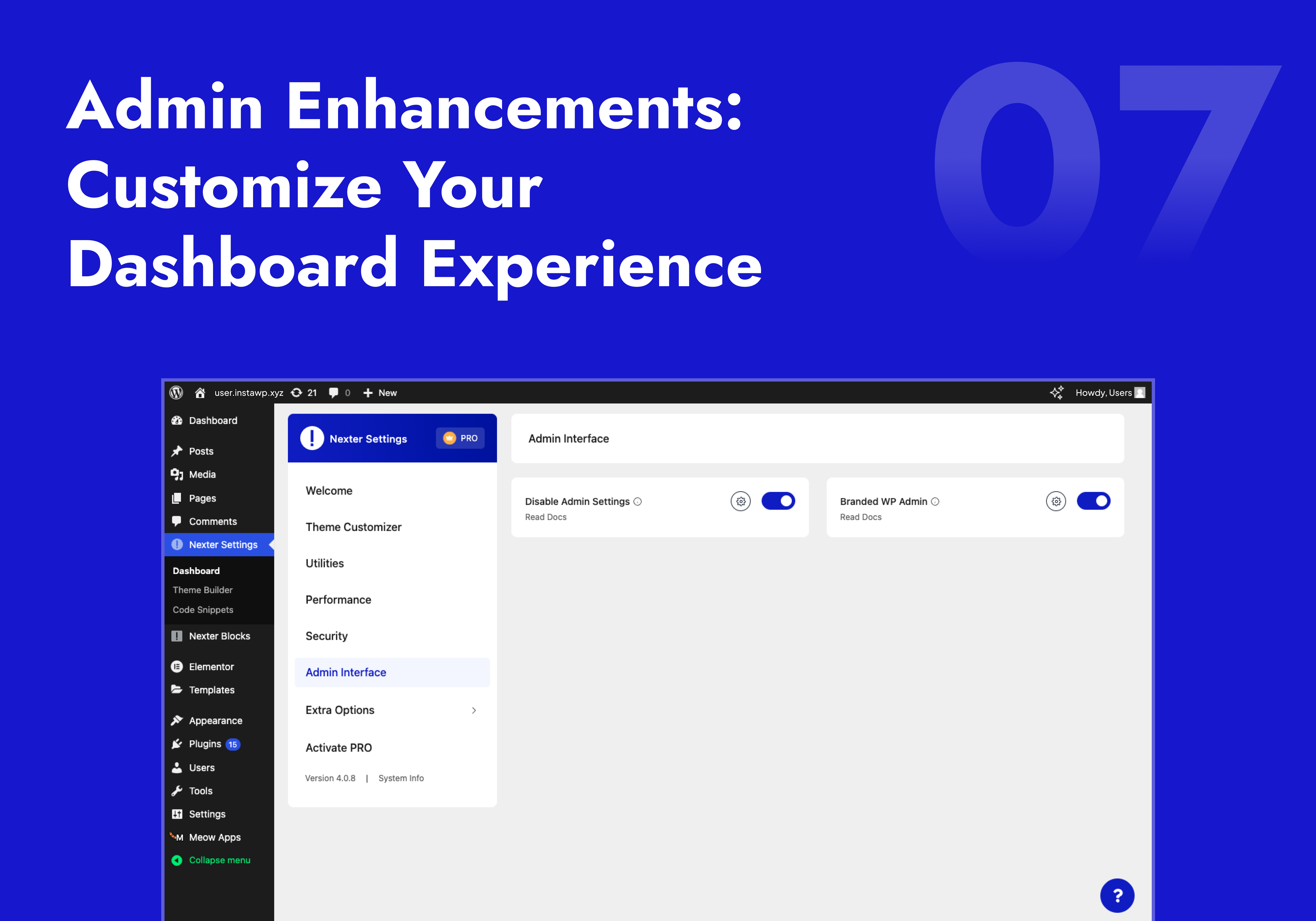
- ໜ້າແອັດມິນແບບມີແບຣນ / ສ້າງແບຣນເອງໃຫ້ WordPress (Pro) — ປ່ຽນໜ້າເຂົ້າສູ່ລະບົບຂອງ WordPress ໃຫ້ເປັນໂລໂກ້ ແລະ ສີຂອງເອເຈນຊີຂອງທ່ານ. ປ່ຽນໜ້າແອັດມິນ WordPress ໃຫ້ເປັນແບຣນຂອງທ່ານເຕັມຮູບແບບສຳລັບເວັບໄຊລູກຄ້າ.
- ຕົວຈັດການເມນູແອັດມິນ (Pro) — ຈັດລຽງໃໝ່, ປ່ຽນຊື່, ຫຼື ເຊື່ອງລາຍການເມນູແຖບດ້ານຂ້າງຕາມບົດບາດຂອງຜູ້ໃຊ້. ສະແດງໃຫ້ລູກຄ້າເຫັນສະເພາະສິ່ງທີ່ພວກເຂົາຕ້ອງການເທົ່ານັ້ນ.
- Elementor ບໍ່ມີໂຄສະນາ — ເຊື່ອງປ້າຍໂຄສະນາອັບເກຣດ, ປັອບອັບ AI ແລະ ປຸ່ມຂາຍສິນຄ້າຂອງ Elementor ທັງໝົດອອກຈາກໜ້າແກ້ໄຂ. ພື້ນທີ່ເຮັດວຽກສະອາດຂຶ້ນ, ມີສະມາທິໃນການແກ້ໄຂ.
- ອະນາໄມແຖບແອັດມິນ — ລຶບລາຍການໃດໆອອກຈາກແຖບເຄື່ອງມື WordPress ເຊັ່ນ: ໂລໂກ້ WP, ຊື່ເວັບໄຊ, ຕົວນັບຄຳເຫັນ, ຄຳທັກທາຍ Howdy, ເມນູຍ່ອຍປລັກອິນ ແລະ ອື່ນໆ — ແຕ່ລະອັນມີສະວິດເປີດ/ປິດແຍກກັນ.
- ປິດແຈ້ງເຕືອນແອັດມິນ & ວິດເຈັດແຜງຄວບຄຸມ — ເຊື່ອງການເຕືອນອັບເດດ, ແຈ້ງເຕືອນປລັກອິນ, ສະຫຼຸບໂດຍຫຍໍ້, ຮ່າງດ່ວນ, ແຜງຕັ້ງຄ່າ WooCommerce ແລະ ຂ່າວສານ WordPress — ສາມາດເລືອກປິດແຍກກັນໄດ້.
- ເມນູແອັດມິນກວ້າງຂຶ້ນ — ຂະຫຍາຍແຖບດ້ານຂ້າງເພື່ອໃຫ້ປ້າຍເມນູທີ່ຍາວສະແດງໄດ້ເຕັມທີ່ໂດຍບໍ່ຖືກຕັດ.
- ສະແດງປລັກອິນທີ່ເປີດນຳໃຊ້ກ່ອນ (Pro) — ປັກໝຸດປລັກອິນທີ່ກຳລັງເປີດນຳໃຊ້ໄວ້ເທິງສຸດຂອງລາຍການປລັກອິນເພື່ອການເຂົ້າເຖິງທີ່ໄວຂຶ້ນ.
- ອະນາໄມໂປຣໄຟລ໌ຜູ້ໃຊ້ (Pro) — ລຶບຊ່ອງຂໍ້ມູນທີ່ບໍ່ຈຳເປັນອອກຈາກໂປຣໄຟລ໌ຜູ້ໃຊ້ ເພື່ອໃຫ້ຫຼັງບ້ານເບິ່ງສະອາດຕາຂຶ້ນສຳລັບລູກຄ້າ.
🔁 ນຳເຂົ້າ / ສົ່ງອອກ ການຕັ້ງຄ່າ
ສົ່ງອອກການຕັ້ງຄ່າ WordPress Customizer ເຕັມຮູບແບບ ແລະ ການຕັ້ງຄ່າ Nexter Extension ທັງໝົດຂອງທ່ານເປັນໄຟລ໌ — ຈາກນັ້ນນຳເຂົ້າໃນເວັບໄຊໃດກໍໄດ້ທັນທີ. ບໍ່ຕ້ອງຕັ້ງຄ່າໃໝ່ສຳລັບເອເຈນຊີທີ່ຈັດການເວັບໄຊລູກຄ້າຫຼາຍເວັບ.
⚡ ອັບເກຣດເປັນ Nexter Extension Pro
🏆 ຜະລິດຕະພັນ WordPress ອື່ນໆຂອງພວກເຮົາ
- The Plus Addons ຂອງ Elementor — 120+ ວິດເຈັດ Elementor. ເຂົ້າກັນໄດ້ຢ່າງລົງຕົວກັບຕົວສ້າງທີມຟຣີຂອງ Nexter Extension.
- Nexter Blocks — 90+ ບລັອກສຳລັບ Gutenberg. ບໍ່ມີ jQuery. ສ້າງມາເພື່ອຄວາມໄວ.
- NexterWP Theme — ທີມເລີ່ມຕົ້ນທີ່ເບົາທີ່ສຸດ ແລະ ໄວທີ່ສຸດສຳລັບ Elementor ແລະ Gutenberg. ບໍ່ມີ jQuery.
- UiChemy – ຈາກ Figma ເປັນ WordPress — ແປງການອອກແບບໃນ Figma ໃຫ້ເປັນໜ້າ Elementor ທີ່ໃຊ້ງານໄດ້ຈິງ ດ້ວຍປລັກອິນ Figma ຟຣີ.
- WDesignKit — 1000+ ເທັມເພລດ WordPress, ຕົວສ້າງວິດເຈັດ, ຕົວແປງບລັອກ, ແລະ ພື້ນທີ່ຈັດເກັບຂໍ້ມູນເທິງຄລາວ.
ບໍລິການພາຍນອກ
Nexter Extension ອາດຈະເຊື່ອມຕໍ່ກັບບໍລິການພາຍນອກດ້ານລຸ່ມນີ້ ສະເພາະເມື່ອຄຸນສົມບັດທີ່ກ່ຽວຂ້ອງຖືກເປີດນຳໃຊ້ເທົ່ານັ້ນ:
-
api.posimyth.com — ການວິເຄາະການນຳໃຊ້. ຖືກປິດໄວ້ເປັນຄ່າເລີ່ມຕົ້ນ; ການສົ່ງແບບຟອມຄຳຕິຊົມຕອນປິດການໃຊ້ງານກໍຈະສົ່ງຂໍ້ມູນນີ້ເຊັ່ນກັນ, ບວກກັບອີເມວແອັດມິນຂອງທ່ານ ຖ້າທ່ານໝາຍຕິກໃສ່ກ່ອງຕິດຕໍ່. ເງື່ອນໄຂ · ຄວາມເປັນສ່ວນຕົວ · ສິ່ງທີ່ຖືກແບ່ງປັນ
-
store.posimyth.com — ໃບອະນຸຍາດລຸ້ນ Pro, ຄັງເທັມເພລດ, ການສະໝັກຮັບຈົດໝາຍຂ່າວ. ເງື່ອນໄຂ · ຄວາມເປັນສ່ວນຕົວ
-
api.wdesignkit.com, etemplates.wdesignkit.com — ເທັມເພລດ ແລະ ຮູບຕົວຢ່າງ. ເງື່ອນໄຂ · ຄວາມເປັນສ່ວນຕົວ
-
api.indexnow.org — ສົ່ງ URL ຂອງໂພສເມື່ອທ່ານບັນທຶກ, ເພື່ອແຈ້ງໃຫ້ເຄື່ອງຈັກຊອກຫາຮັບຮູ້. ເງື່ອນໄຂ
-
api.openai.com — ເນື້ອຫາ AI, ໂດຍໃຊ້ API key ຂອງທ່ານເອງ. ເງື່ອນໄຂ · ຄວາມເປັນສ່ວນຕົວ
-
generativelanguage.googleapis.com — ເນື້ອຫາ AI, ໂດຍໃຊ້ API key ຂອງທ່ານເອງ. ເງື່ອນໄຂ · ຄວາມເປັນສ່ວນຕົວ
-
fonts.googleapis.com, fonts.gstatic.com, google.com/recaptcha, accounts.google.com, oauth2.googleapis.com — ຟອນທີ່ໂຮສເອງ, CAPTCHA, SMTP OAuth. ເງື່ອນໄຂ · ຄວາມເປັນສ່ວນຕົວ
-
typekit.com, use.typekit.net — Adobe Fonts, ໂດຍໃຊ້ໄອດີໂປຣເຈັກຂອງທ່ານເອງ. ເງື່ອນໄຂ · ຄວາມເປັນສ່ວນຕົວ
-
challenges.cloudflare.com — Turnstile CAPTCHA, ໂດຍໃຊ້ຄີເວັບໄຊຂອງທ່ານເອງ. ເງື່ອນໄຂ · ຄວາມເປັນສ່ວນຕົວ
-
api.wordpress.org, themes.svn.wordpress.org — ການຄົ້ນຫາ ແລະ ການດາວໂຫຼດຂອງຕົວຈັດການຍ້ອນກັບ (Rollback). ຄວາມເປັນສ່ວນຕົວ
ພາບໜ້າຈໍ

ການຕິດຕັ້ງ
- ໄປທີ່ ປລັກອິນ ເພີ່ມໃໝ່ ໃນແຜງຄວບຄຸມ WordPress ຂອງທ່ານ
- ຄົ້ນຫາ Nexter Extension ແລະ ຄລິກຕິດຕັ້ງດຽວນີ້
- ເປີດໃຊ້ງານປລັກອິນ
- ໄປທີ່ Nexter Extensions ແລະ ເປີດໃຊ້ຄຸນສົມບັດທີ່ທ່ານຕ້ອງການ
ຄຳຖາມທີ່ພົບເລື້ອຍ
-
Nexter Extension ເຮັດວຽກກັບທີມ WordPress ທັງໝົດບໍ່?
-
ແມ່ນແລ້ວ. ເຂົ້າກັນໄດ້ຢ່າງສົມບູນກັບ Astra, Kadence, Blocksy, GeneratePress, OceanWP, Neve, Hello Elementor, Bricks, ແລະ ທຸກທີມມາດຕະຖານຂອງ WordPress. ຕົວສ້າງທີມເຮັດວຽກຮ່ວມກັບ Elementor, Gutenberg ແລະ Bricks Builder. ໂຄດສະນິບເປັດເຮັດວຽກກັບທຸກທີມໂດຍບໍ່ກ່ຽວກັບຕົວແກ້ໄຂ.
-
Nexter Extension ມີ SEO ລວມມາໃຫ້ນຳບໍ່? ຂ້ອຍຍັງຈຳເປັນຕ້ອງໃຊ້ Yoast ຫຼື Rank Math ຢູ່ບໍ່?
-
ດຽວນີ້ Nexter Extension ລວມມີ Nexter SEO ເຊິ່ງເປັນຊຸດເຄື່ອງມື SEO ທີ່ສົມບູນໃນຕົວ: ການກວດສອບເວັບໄຊ, ເທັມເພລດຫົວຂໍ້ meta ແລະ ຄຳອະທິບາຍ, ຕົວສ້າງ schema 18 ປະເພດ, ແຜນຜັງເວັບໄຊ XML, ຕົວແກ້ໄຂ robots.txt, ການປ່ຽນເສັ້ນທາງ, ຕົວຕິດຕາມ 404, SEO ສຳລັບຮູບພາບ ແລະ ການຢັ້ງຢືນເວັບໄຊ. ສຳລັບເວັບໄຊສ່ວນໃຫຍ່ ມັນສາມາດປ່ຽນແທນປລັກອິນ SEO ແຍກ ເຊັ່ນ Yoast ຫຼື Rank Math ໄດ້ເລີຍ ໂດຍບໍ່ເພີ່ມນ້ຳໜັກໃຫ້ໜ້າເວັບ. ມັນ ຟຣີ 100%. ສຳຫຼວດ Nexter SEO
-
Nexter SEO ສາມາດໃຊ້ກັບການຄົ້ນຫາແບບ AI (ChatGPT, Perplexity, Google AI) ໄດ້ຫຼືບໍ່?
-
ແມ່ນແລ້ວ. Nexter SEO ສ້າງໄຟລ໌ LLMs.txt ແລະ ໂຄງສ້າງ JSON-LD ເພື່ອໃຫ້ເຄື່ອງຈັກຊອກຫາ AI ເຊັ່ນ ChatGPT, Perplexity ແລະ Google AI ສາມາດຄົ້ນພົບ ແລະ ອ້າງອີງເນື້ອຫາຂອງທ່ານ. ມັນຍັງຮອງຮັບ Instant Indexing (IndexNow) ເພື່ອສົ່ງ URL ໃໝ່ ແລະ ທີ່ອັບເດດແລ້ວ ໄປຍັງເຄື່ອງຈັກຊອກຫາທີ່ຮອງຮັບໃນທັນທີທີ່ທ່ານເຜີຍແຜ່.
-
ຕົວປັບແຕ່ງຮູບພາບຕ້ອງການ API key ບໍ່?
-
ບໍ່ຕ້ອງໃຊ້ API key. ບໍ່ຕ້ອງມີບັນຊີພາຍນອກ. ບໍ່ມີຄ່າທຳນຽມຕໍ່ຮູບ. ຕົວປັບແຕ່ງຮູບພາບ (ເພີ່ມເຂົ້າໃນ v4.6.0) ຈະບີບອັດຮູບພາບໃນເຊີບເວີຂອງທ່ານເອງ. ການປ່ຽນເປັນ WebP ແມ່ນຟຣີ. ການປ່ຽນເປັນ AVIF ມີໃຫ້ໃນລຸ້ນ Pro. ການປັບແຕ່ງແບບຫຼາຍຮູບພ້ອມກັນສາມາດເຮັດໄດ້ກັບທັງຄັງສື່ຂອງທ່ານພາຍໃນຄລິກດຽວ.
-
ມີຄຸນສົມບັດຄວາມປອດໄພອັນໃດແດ່?
-
ການເພີ່ມຄວາມປອດໄພ (ປິດການນຳໃຊ້ XML-RPC, ເຊື່ອງເວີຊັນ WP, ການປ້ອງກັນ XSS, ຄວາມປອດໄພ iFrame, ຄຸກກີ້ທີ່ປອດໄພ), 2FA (Pro), Google reCAPTCHA & Cloudflare Turnstile CAPTCHA, ຈຳກັດການເຂົ້າສູ່ລະບົບ, ກຳນົດ URL ເຂົ້າສູ່ລະບົບແອັດມິນເອງ, ການເຮັດຄວາມສະອາດໄຟລ໌ SVG ທີ່ອັບໂຫຼດ, ແລະ ການປົກປ້ອງເນື້ອຫາ. ເບິ່ງຄຸນສົມບັດຄວາມປອດໄພທັງໝົດ
-
SMTP ເຮັດວຽກກັບ Gmail ໄດ້ບໍ່?
-
ແມ່ນແລ້ວ. ຮອງຮັບ Gmail SMTP, Mailgun, SendGrid, ແລະ ເຊີບເວີ SMTP ແບບກຳນົດເອງທີ່ມີ SSL/TLS. ລວມມີເຄື່ອງມືທົດສອບອີເມວໃນຕົວເພື່ອຢືນຢັນວ່າການເຊື່ອມຕໍ່ຂອງທ່ານເຮັດວຽກໄດ້.
-
ໂຄດສະນິບເປັດຖືກເກັບໄວ້ໃນຖານຂໍ້ມູນຫຼືບໍ່?
-
ບໍ່. ຊຸດໂຄດທັງໝົດເຮັດວຽກເປັນໂຄດທີ່ອີງໃສ່ໄຟລ໌ — ບໍ່ແມ່ນການຄົ້ນຫາໃນຖານຂໍ້ມູນ. ນີ້ໝາຍຄວາມວ່າບໍ່ມີການດຶງຂໍ້ມູນຈາກຖານຂໍ້ມູນໃນທຸກໆການໂຫຼດໜ້າເວັບ, ການປະມວນຜົນໄວຂຶ້ນ ແລະ ປະສິດທິພາບທີ່ສະອາດກວ່າໃນຂະນະທີ່ເວັບໄຊຂອງທ່ານໃຫຍ່ຂຶ້ນ.
-
ມັນຮອງຮັບ GDPR ສຳລັບ Google Fonts ຫຼືບໍ່?
-
ແມ່ນແລ້ວ. ຄຸນສົມບັດ Self-Host Google Fonts ຈະດາວໂຫຼດຟອນລົງໃນເຊີບເວີຂອງທ່ານເອງ ແລະ ໃຫ້ບໍລິການຈາກໃນເຄື່ອງ — ຕັດການຮ້ອງຂໍ HTTP ທັງໝົດໄປຫາ CDN ຂອງ Google. ນີ້ແມ່ນການແກ້ໄຂທາງເຕັກນິກທີ່ຖືກຕ້ອງສຳລັບການປະຕິບັດຕາມ GDPR ໃນ EU.
-
Yes. Enable Cookie Consent under Nexter > Security > Privacy. It handles cookie categories, prior script blocking, consent records, Google Consent Mode v2 and a Compliance Check report. Design the banner, preferences button and cookie declaration table with the free Cookie Consent blocks in Nexter Blocks. Read the docs
-
ຂ້ອຍສາມາດລຶບແບຣນອອກ (White-label) ສຳລັບເວັບໄຊລູກຄ້າໄດ້ບໍ່?
-
ແມ່ນແລ້ວ. Branded Admin Interface (Pro) ໃຫ້ທ່ານເພີ່ມໂລໂກ້ ແລະ ສີແບຣນຂອງທ່ານໃນໜ້າເຂົ້າສູ່ລະບົບ WP. Admin Menu Organizer (Pro) ໃຫ້ທ່ານຈັດລຽງ, ປ່ຽນຊື່ ແລະ ເຊື່ອງລາຍການເມນູເພື່ອໃຫ້ແຜງຄວບຄຸມຂອງລູກຄ້າເບິ່ງສະອາດຕາ. ເມື່ອລວມກັບ Elementor Ad-Free, ລູກຄ້າຈະເຫັນພຽງແຕ່ສິ່ງທີ່ທ່ານຕ້ອງການໃຫ້ພວກເຂົາເຫັນ.
-
ຕົວສ້າງທີມເຮັດວຽກຮ່ວມກັບ Elementor ແລະ Gutenberg ໄດ້ຫຼືບໍ່?
-
ແມ່ນແລ້ວ — ສາມາດໃຊ້ທັງສອງຢ່າງພ້ອມກັນໃນເວັບໄຊດຽວກັນໄດ້. ກຳນົດສ່ວນຫົວທີ່ສ້າງດ້ວຍ Elementor ໃຫ້ພາກສ່ວນໜຶ່ງ ແລະ ສ່ວນທ້າຍທີ່ສ້າງດ້ວຍ Gutenberg ໃຫ້ອີກພາກສ່ວນໜຶ່ງ. ກົດລະບຽບການສະແດງຜົນຊ່ວຍໃຫ້ທ່ານຄວບຄຸມໄດ້ຢ່າງຊັດເຈນວ່າເທັມເພລດໃດໂຫຼດຢູ່ໃສ. ເຂົ້າກັນໄດ້ຢ່າງສົມບູນກັບ CSS ຂອງເທັມເພລດ Elementor 4.0 (ຕັ້ງແຕ່ v4.5.3).
-
ການເປີດໃຊ້ທຸກໂມດູນຈະເຮັດໃຫ້ເວັບໄຊຂອງຂ້ອຍຊ້າລົງບໍ່?
-
ບໍ່. ແຕ່ລະໂມດູນສາມາດເປີດປິດແຍກກັນໄດ້. ໂມດູນທີ່ຖືກປິດຈະບໍ່ໂຫຼດ CSS ແລະ JavaScript ໃດໆເລີຍ ໃນໜ້າບ້ານ (frontend). ປລັກອິນທັງໝົດເຮັດວຽກເທິງ Vanilla JS ໂດຍບໍ່ເພິ່ງພາ jQuery. ສະເພາະສິ່ງທີ່ທ່ານເປີດນຳໃຊ້ເທົ່ານັ້ນຈຶ່ງຈະຖືກໂຫຼດ.
-
ເປັນຫຍັງປລັກອິນນີ້ຈຶ່ງແຍກອອກຈາກທີມ Nexter?
-
ເພື່ອໃຫ້ສອດຄ່ອງກັບຂໍ້ແນະນຳການສົ່ງທີມຂອງ WordPress.org, ເຊິ່ງກຳນົດໃຫ້ຄຸນສົມບັດຕ່າງໆ ເຊັ່ນ register_post_type() ຕ້ອງມາຈາກປລັກອິນແທນທີ່ຈະເປັນທີມ. ອ່ານເພີ່ມເຕີມກ່ຽວກັບຂໍ້ແນະນຳປລັກອິນ WordPress
-
ຂ້ອຍຈະລາຍງານຊ່ອງໂຫວ່ດ້ານຄວາມປອດໄພໄດ້ແນວໃດ?
-
ຜ່ານໂຄງການລາຍງານຊ່ອງໂຫວ່ຂອງ Patchstack: ລາຍງານຊ່ອງໂຫວ່
-
ມີລຸ້ນ Pro ບໍ່?
-
ຂ້ອຍສາມາດຮ້ອງຂໍຄຸນສົມບັດໃໝ່ໄດ້ຢູ່ໃສ?
ການຣີວິວ


ຜູ້ຮ່ວມພັດທະນາ ແລະ ຜູ້ພັດທະນາ
“Nexter Extension – ຄວາມປອດໄພ, ປະສິດທິພາບ, ໂຄດສະນິບເປັດ & ຊຸດເຄື່ອງມືເວັບໄຊ” ແມ່ນຊອຟແວໂອເພັນຊອດ (Open Source). ບຸກຄົນຕໍ່ໄປນີ້ໄດ້ມີສ່ວນຮ່ວມໃນການພັດທະນາປລັກອິນນີ້.
ຜູ້ຮ່ວມພັດທະນາ


“Nexter Extension – ຄວາມປອດໄພ, ປະສິດທິພາບ, ໂຄດສະນິບເປັດ & ຊຸດເຄື່ອງມືເວັບໄຊ” ໄດ້ຖືກແປເປັນ 3 ພາສາທ້ອງຖິ່ນ. ຂໍຂອບໃຈ ທີມງານຜູ້ແປ ສຳລັບການປະກອບສ່ວນຂອງເຂົາເຈົ້າ.
ແປ “Nexter Extension – ຄວາມປອດໄພ, ປະສິດທິພາບ, ໂຄດສະນິບເປັດ & ຊຸດເຄື່ອງມືເວັບໄຊ” ເປັນພາສາຂອງເຈົ້າ.
ສົນໃຈຮ່ວມພັດທະນາບໍ່?
ເບິ່ງລະຫັດ, ກວດເບິ່ງ ຄັງເກັບ SVN, ຫຼື ຕິດຕາມ ບັນທຶກການພັດທະນາ ຜ່ານ RSS.
ບັນທຶກການປ່ຽນແປງ
ເບິ່ງບັນທຶກການປ່ຽນແປງສະບັບເຕັມໄດ້ທີ່ roadmap.nexterwp.com
V4.8.1
29 October 2026
– Fixed : Code Snippets : on multisite, only a Super Admin can now create, import or run snippets; site administrators no longer can.
– Fixed : Cookie Consent : the consent-record endpoint now rejects cross-site requests and checks the module switch and rate limit before accepting a write, so consent-log records can no longer be forged.
– Fixed : Dashboard : Theme Builder and Code Snippets strings in the lazily loaded dashboard screens now pick up translations kept in custom locations such as Loco Translate.
V4.8.0
28 October 2026
– Added : Cookie Consent : collect, store and honour visitor cookie consent, with prior script blocking of non-essential vendors until a visitor decides, consent-record logging with configurable IP handling and retention, Google Consent Mode v2 integration, and a live Compliance Check report.
– Fixed : Content SEO : the meta description fallback no longer executes shortcodes on a page with no excerpt, which was causing shortcode-rendered content (e.g. FluentCart’s customer dashboard navigation) to duplicate on the front end.
– Fixed : Theme Builder : the dashboard screen loaded from the theme now registers its translatable strings under the correct text domain, so theme-side dashboard translations load as expected.
– Fixed : Code Snippets : the Import Snippets drop zone now has proper padding around its text.
– Fixed : Code Snippets : the Cloud Library “Import Pre-Made Code Snippets” popup and other lazily loaded dashboard screens now show their translations; strings in the dashboard’s split build chunks were never loaded before.
– Fixed : SVG Upload : the role names in “roles allowed to upload SVG” are now shown in the site language.
– Fixed : Disable Gutenberg : long translated labels in the Only On / Except On / All Types switch now wrap inside their segment instead of overflowing it.
– Fixed : Admin Menu : the arrow on the “Get Nexter Pro” menu item no longer overlaps longer translated labels.
V4.7.14
23 October
– Improved : New Dashboard : refreshed the admin dashboard’s UI with clearer visual hierarchy, more consistent spacing and iconography, and more legible controls across every tab.
– Improved : Translations : every translatable string with a placeholder in the dashboard now carries a translators comment, so generating the translation file no longer warns about them.
– Improved : Code Snippets : the “MemberPress not installed” notice now uses the same confirmation dialog design as the WooCommerce notice, for a consistent look across eCommerce plugin checks.
– Improved : Code Snippets : the Location picker and Conditions tab’s selected checkmark and tooltip no longer overlap, and all four condition tabs are evenly spaced.
– Improved : Theme Builder : White Label’s “Hide WDesignKit Integration” toggle and the WDesignKit import option are no longer limited to Pro.
– Improved : Theme Builder : the “Set Display Conditions” panel is now wider (800px) so multiselect fields are no longer cut off.
– Compatibility : Abilities (MCP) : each ability file now stops early when the WordPress Abilities API (WordPress 6.9+) is not available, so sites on older WordPress versions never call wp_register_ability().
– Fixed : Theme Builder : “Edit conditions” no longer appears for Section-type templates, since sections don’t support display conditions.
– Fixed : Theme Builder : creating a Sections-type template no longer shows both a “Next” and a “Create” button at once.
– Fixed : Theme Builder : closing the create/edit template popup before it finishes loading, or choosing an archive/singular condition type with no matching post type, no longer throws a console error.
V4.7.13
15 October 2026
– Improved : Nexter SEO : the Site Audit no longer checks Theme Builder templates (headers, footers, sections) or other builder and template types, so they stop appearing under Orphan pages and Thin content. Post types you exclude from the sitemap are skipped by the audit too, and developers can adjust the list with the nexter_seo_audit_excluded_post_types filter.
– Improved : Nexter SEO : the category base and WooCommerce base options now flush rewrite rules once per request instead of once per category or product term, so bulk imports no longer rebuild the rules for every term.
– Improved : SMTP Email : the mail server’s certificate is now verified by default, so a server that only pretends to be your mail host can no longer receive your SMTP login and your mail. Sites that already had SMTP set up are kept as they were, with self-signed certificates still allowed, and see a notice explaining the change. A site that needs self-signed certificates can use the allow_self_signed setting, the NEXTER_SMTP_ALLOW_SELF_SIGNED constant or the nxt_smtp_allow_self_signed filter.
– Improved : Dashboard : keyboard users can now see which control has focus on buttons, switches and the upgrade and install pop-up buttons, focus rings and some borders have more contrast, and pop-up dialogs move focus into the dialog, keep Tab inside it and make the rest of the admin inert while it is open.
– Improved : internal security hardening from a full code audit: the Theme Builder visitor-IP display condition is documented as non-authoritative, a browser-detection header read is now sanitized, duplicating a post no longer unserializes its meta without restricting which classes may be instantiated, the plugin/theme installer’s wordpress.org lookups try JSON before falling back to a restricted unserialize, and the SEO settings, import and post/term REST endpoints now validate and sanitize every parameter against its declared schema. No user-facing behaviour changes.
– Fixed : Theme Builder : importing a template no longer ends in a fatal error. Importing now needs the manage options permission, which the Editor role did not have by design, and a template can only be exported by someone who can edit it.
– Fixed : Theme Builder : a widget that throws an error no longer leaves the page’s main query switched, a template with no post no longer causes an error, and the preview link for an Author Archive template now works.
– Fixed : Theme Builder : a template made for one specific page no longer loses to an All Pages template just because it is older, and templates saved without a logged-in user (WP-CLI, importer, cron) now refresh the cached template list.
– Fixed : Theme Builder : editing a template’s display conditions no longer drops saved Specific Pages/Posts; only the first 20 of each type were loaded, so the rest vanished and were lost on save.
– Fixed : Display Conditions : the Specific Pages and Archives pickers no longer crash on an empty request.
– Fixed : Display Conditions : the pickers no longer show other users’ private and draft posts, or the full user list, to Contributors.
– Fixed : Image Optimisation : converting an image now requires permission to edit that image, so an Author can no longer convert or overwrite someone else’s.
– Fixed : Image Optimisation : deleting an image from the Media Library now also deletes its converted copies and backups. Before, they stayed downloadable from the optimizer folder and piled up on disk, and the delete check can no longer be tricked by a path containing …
– Fixed : SVG Upload : SVGs added through importers, demo kits and WP-CLI are no longer rejected as an invalid upload, and the PHP 8 deprecation notice shown on every upload is gone.
– Fixed : Captcha : Cloudflare Turnstile now refuses login, registration, password reset and comment forms that arrive without a token, not only the ones with a wrong token.
– Fixed : Local Google Fonts : only real fonts.googleapis.com links are downloaded, and the original link is kept, with a 15-minute pause, when a download fails instead of leaving the fonts missing.
– Fixed : WP Debug Mode : switching it on and off now edits wp-config.php safely. It no longer adds a second define on setups like Docker or Bedrock, sets WP_DEBUG_DISPLAY so visitors do not see PHP errors, finds a wp-config.php one folder above the site, and no longer ends in an error page when the file is not writable.
– Fixed : Code Snippets : the safety check no longer switches off ordinary snippets, such as loops that contain a break, code that calls get_permalink(), or file writes to a path built in the code.
– Fixed : Replace URL : now also replaces the JSON-escaped URLs that Elementor and other builders store, and handles serialized objects, so a domain change no longer leaves old images and links behind.
– Fixed : Nexter SEO : a post marked noindex is now dropped from the sitemap straight away instead of staying for up to 12 hours.
– Fixed : Nexter SEO : the XML sitemap now lists every language on sites using Polylang. Only the default language was included, so posts and pages under /fr/ or /en/ were missing. All languages are now listed with their hreflang alternates, and the sitemap rebuilds as soon as the plugin is updated or a language is added.
– Fixed : Nexter SEO : llms.txt now lists posts and tags in every language on sites using Polylang, the same gap already fixed on the XML sitemap. Only the default language was included before; pages were unaffected since they’re chosen by hand.
– Fixed : Nexter SEO : with the WooCommerce base removal on, product, product category and product tag links no longer return 404 on permalink structures other than Post name, nested categories included.
– Fixed : View Admin Role Switcher : an account demoted through WordPress’s bulk role change, the REST API or the single-user edit screen could regain its former Administrator role through the switcher’s own restore link; the cleanup now runs on every role change, not only on a profile save.
– Fixed : Advance Security : Remove Meta Generator now works on block themes such as Twenty Twenty-Five, and no longer closes another plugin’s output buffer.
– Fixed : Disable Comments : the comments REST routes are now really closed, and existing comments are hidden on block themes too.
– Fixed : Post Revision Control : the revision limit and the post-type setting now take effect. Before, a post edited 8 times kept 8 revisions with the limit set to 3.
– Fixed : Content Post Order : reordering no longer empties caches shared with other sites on the server, and a visitor’s own ?orderby= sort is respected.
– Fixed : Disable Admin Settings : sites that already define a remove_core_updates() function no longer get a Cannot redeclare error on every admin page.
– Fixed : Dashboard : the What’s New feed is cleaned before it is shown.
– Fixed : Translations : the plugin’s translation files are now loaded from the right folder.
– Fixed : Login Limiter : a wrong two-factor code is now counted against the visitor’s IP address, so it counts toward the lockout.
– Fixed : Adobe Fonts : saving now changes only its own setting, checks the kit ID, and reports success when the kit is cleared. SMTP also no longer shows a warning when its saved values have no type.
– Fixed : Post Duplicator : the number of copies is capped at 50, adjustable with the nxt_duplicate_post_max_copies filter, and a user who cannot publish now gets a pending copy instead of a published one.
V4.7.11
05 October 2026
– Improved : Nexter SEO : Site Audit findings now list the pages they are about, each with a view and an edit link; the CSV and JSON exports carry the same per-item detail.
– Fixed : Custom Login URL : the hidden login address now works on Plain permalinks. The address the plugin generated opened the home page instead of the login form, leaving no way in.
– Fixed : View Admin Role Switcher : switching back to your own account no longer breaks when the feature is turned off or an unrelated profile save clears the stored role, and the Switch back button now also appears on the front end.
– Fixed : Nexter SEO : the post-import check no longer reports a correct import as failed; it now checks only the fields the import actually wrote, against the value that was stored.
– Fixed : Code Snippets : a PHP snippet could break admin screens and JSON replies, such as the Site Audit, by printing text into them. Snippet output is now discarded during REST and JSON requests, so snippets that register REST routes still work.
– Fixed : Image Optimisation : AVIF and WebP copies are now served through a picture element, so Safari on iPhone and iPad and search-engine crawlers no longer receive the original JPG or PNG.
– Fixed : Nexter SEO : No Index, No Follow, No Archive and Exclude from Sitemap now save for a post type that only exists in admin screens, such as Complianz’s, and an unrelated save no longer erases them.
– Fixed : Translations : the translator notes on the SEO import check message and the Search & Replace result message now stay attached to their text in the built files.
V4.7.10
22 September 2026
– Added : Nexter SEO : the Yoast import now brings across your Organization name and logo into Nexter’s Organization schema, so your site identity in search results survives the migration. Anything you had already set there is kept.
– Added : Nexter SEO : Rank Math’s custom robots.txt rules are now imported, so paths you blocked from crawlers stay blocked after the migration. Your own robots.txt is never replaced.
– Added : Nexter SEO : WooCommerce URL bases can now be removed — separate toggles under Advanced shorten /product/, /product-category/ and /product-tag/ URLs, the old URLs are redirected, and a product or term whose slug is already used by a page or post keeps its original URL instead of taking one that is in use.
– Added : Nexter SEO : the Rank Math and AIOSEO import previews now list the source plugin’s 404 log as “will be skipped” instead of dropping it with no notice.
– Added : Nexter SEO : an Advanced setting to strip the /category/ base from category URLs (e.g. /category/news/ /news/).
– Added : Nexter SEO : an admin notice offering one-click migration when Yoast, Rank Math, SureRank or All in One SEO is detected active alongside Nexter SEO.
– Added : Nexter SEO : Import from Yoast SEO, Rank Math, SureRank and All in One SEO — a new “Migrate From Other SEO Plugins” tab detects your existing SEO data, previews exactly what would change, then imports it in resumable batches. Anything you already set in Nexter SEO is kept rather than replaced, and the other plugin’s own data is never deleted.
– Added : Nexter SEO : Per-page schema type is now carried across during the import, and redirects keep their matching mode including regex.
– Added : Nexter SEO : Redirections now support a Regex match type, with $1 backreferences in the destination.
– Compatibility : Nexter SEO : All in One SEO (Lite and Pro) import reads its own database tables, respects per-post “use default” robots and Twitter-mirrors-Facebook settings, and brings across Pro term SEO and redirects — case- and slash-insensitive ones keep matching the same way.
– Compatibility : Nexter SEO : Rank Math PRO — when a post carries several schemas the one marked primary is imported, and schema templates, Local SEO locations and redirect categories are listed in the preview rather than silently dropped.
– Compatibility : Nexter SEO : SureRank Business redirects are now imported, with “Contains” and “Ends With” rules kept matching exactly as they do in SureRank.
– Improved : SMTP Email : the “SMTP Password” field now shows a tooltip explaining that, for providers like Brevo, SendGrid and Mailgun, this value is an API key rather than an account password.
– Improved : Nexter SEO : the migration preview now warns before you start if the redirects being imported contain a loop, and tells you how many are over the redirect-rule limit. The preview works this out by running the same import in a no-write mode, so it and the import can never disagree.
– Improved : Nexter SEO : importing categories and tags from Yoast is dramatically faster on large sites, and no longer slows down the further it gets. Picking the next batch used to check every term one at a time, and then still had to read back every term already imported, so a big catalogue crawled towards the end. Each batch now asks only about the terms it is about to take.
– Improved : Nexter SEO : the migration preview now names each setting in plain language instead of showing the raw database key, with the key kept underneath for developers.
– Improved : Nexter SEO : the migration preview now recommends a backup and states plainly that the import writes to your database and cannot be undone from that screen.
– Improved : Nexter SEO : the migration preview now warns about every value it would leave alone, not just titles and descriptions. Canonical URLs, social fields, schema type and your robots settings are all counted, with robots listed separately so a page you deliberately kept out of search is easy to spot.
– Improved : Nexter SEO : the migration preview now tells you when the other plugin has per-author SEO settings, which Nexter has no field for and does not import. Previously those were lost with nothing said.
– Improved : Nexter SEO : the migration preview now says when settings will be flattened rather than changing them silently — the per-post-type and per-taxonomy templates that become one site-wide pair, the per-language settings on a Polylang or WPML site, and Yoast’s Organization name and logo.
– Improved : Nexter SEO : the “already running” message now says how long the lock has left and points to Reset markers, instead of only suggesting a page reload.
– Improved : Nexter SEO : each llms.txt number setting now explains what it does, including a warning on Freshness Window that any value above 0 leaves older content out.
– Improved : Nexter SEO : The import shows the current step, retries a batch that hits a temporary error, lists anything that did not finish, and checks the imported values afterwards.
– Improved : Nexter SEO : Importing another plugin’s per-type noindex choices adds to the ones you already set instead of replacing them, and the preview shows the combined result.
– Improved : Translations : the translation template now points at the real source files instead of the compiled bundles, so translators can see where each string actually lives and the file no longer changes on every build.
– Fixed : SMTP Email : Custom SMTP no longer forces the From address to the SMTP username on providers like Brevo, SendGrid and Mailgun, where the username is an API-key-style value rather than a sendable address. The configured “From Email” is now used as long as it is set; the username is only used as the From address for Yandex, which requires the match, or as a last-resort fallback when no From Email was configured.
– Fixed : Nexter SEO : social cards on category and tag pages now use the archive title and description templates, the same ones the page’s own title uses. They were using the post templates, so the card and the page disagreed on any site that had customised the two differently.
– Fixed : Nexter SEO : an “@” followed by a word is no longer deleted from titles and descriptions. Any @word was being treated as a template variable and then removed, so “Follow @posimyth for updates” rendered as “Follow for updates” and email addresses lost their domain. Only real variable names are expanded now, and never inside an email address.
– Fixed : Code Snippets : a snippet created or updated through the AI assistant can no longer be saved to a placement that never runs. A placement name the runtime did not recognise was stored as given, so the snippet saved cleanly and then did nothing; unrecognised names now fall back to the same default the dashboard uses, and spelling variants like “front_end” or “site-header” are understood.
– Fixed : dismissing an admin notice with the “x” now sticks. Four notices — the Nexter SEO suggestion, “Nexter Blocks installed”, and both Image Optimization notices — wrote their security token into the page in a way browsers read incorrectly, so the dismissal was rejected and the notice returned on every single admin page load.
– Fixed : Nexter SEO : a SureRank site that never changed its author or date archive setting no longer has those archives switched back on by the import. SureRank ships them off and Nexter ships them on, and only an explicitly saved value was being read.
– Fixed : Nexter SEO : importing from All in One SEO no longer redirects author or date archives away when they were only meant to be hidden from search engines. “Show in search results: off” now becomes a noindex, as it does in AIOSEO.
– Fixed : Nexter SEO : the Yoast import now reads social profiles from where Yoast has stored them since version 20, instead of only the older per-network fields. Profiles added recently were being dropped and ones removed years ago brought back.
– Fixed : Nexter SEO : the Yoast import now brings across the home page’s social card. The title, description and image were read from the place Yoast kept them before version 14, so on any current Yoast site the home page card came over empty.
– Fixed : Nexter SEO : the imported Organization name and logo now land on a site that has no Organization schema row. The import wrote into an existing row only, so on those sites it quietly did nothing even though the preview said the identity would be brought across. The row is now created from the shipped default when there isn’t one, and a name or logo you had already typed is still never replaced.
– Fixed : translators’ notes now reach the translation files correctly. Some notes sat too far from the text they described and were dropped during extraction, and a few phrases used in more than one place carried conflicting notes, so only one of them survived. Affected the theme builder display conditions, the SMTP PHP version notice, Image Optimization messages, the SEO schema fields and the template importer’s invalid post type error.
– Fixed : Nexter SEO : the Pro white label now applies to the migration screen as well. Every message on it — the preview notes, the progress counts and the check afterwards — said “Nexter SEO” no matter what you had rebranded the plugin to, while the rest of the SEO screens used your own name.
– Fixed : Nexter SEO : the migration preview now tells you when a Yoast or Rank Math site has its own title and description templates for other post types and taxonomies. Nexter keeps one pair for posts and one for archives, so those templates are not brought across — the preview names each affected type instead of leaving you to discover it. All in One SEO already listed this.
– Fixed : Nexter SEO : a Yoast redirect whose response code Nexter cannot serve is now skipped and listed in the preview, instead of being quietly turned into a 301.
– Fixed : Regenerate Thumbnails : regeneration no longer stops with a fatal error. It called WordPress’s metadata filter with one argument missing, which crashed any correctly written plugin listening on it — including Nexter’s own SVG Upload — and took the whole batch down with it, for JPEG, PNG and WebP alike.
– Fixed : Image Optimization : thumbnails no longer 404 or show blank in the Media Library when an image’s full size was optimised but its thumbnails were not. Each size is now resolved on its own: the optimised copy when there is one, otherwise the normal WordPress thumbnail. Image URLs that another plugin or a CDN has already changed are left alone.
– Fixed : Nexter SEO : “Reset markers” now also removes the values the import itself wrote, so re-running an import picks up anything that changed in the other plugin. Values you set yourself are kept. Previously the reset cleared only the markers, and the re-run found Nexter’s fields already filled and changed nothing.
– Fixed : Nexter SEO : an import that is cut short no longer treats its own half-written values as yours when it resumes. It now records what it wrote, so it corrects its own work and still never overwrites a value you set.
– Fixed : Nexter SEO : two imports of the same source can no longer start at once and import the same batch twice. The lock now uses a database-level guarantee instead of one that could be defeated by a stale cache, which was most likely on sites with a persistent object cache.
– Fixed : Nexter SEO : the migration preview no longer shows a server error page when one row in the other plugin’s data cannot be read. It now explains what happened and lets you continue, the same way the import itself already did.
– Fixed : Nexter SEO : starting an import on a site with no data from the chosen plugin now reports that clearly, instead of reporting a finished import that did nothing.
– Fixed : Nexter SEO : imported Regex redirects now match. A pattern anchored at the start, such as ^old-path/(.*)$, never matched the incoming request, so every one of them silently fell through to a 404.
– Fixed : Nexter SEO : redirects now work on a subdirectory Multisite subsite. The subsite’s own path segment was part of every request, which no imported rule accounted for.
– Fixed : Nexter SEO : importing redirects now respects the 2,000-rule limit and reports how many rules were left out, instead of writing an unbounded list that the front end then walks on every request. The imported rules are also checked for redirect loops.
– Fixed : Security : Nexter SEO : data read from another SEO plugin’s own database tables and options can no longer create PHP objects while it is being imported.
– Fixed : Nexter SEO : schema values in Hindi, Japanese, Arabic and other non-Latin scripts are now stored as readable text instead of escaped codes, so a site migration’s search-replace and database searches find them.
– Fixed : activating any plugin through an older WP-CLI (before 2.12) no longer aborts the command while Nexter Extension is active. The plugin did activate, but the script stopped with a fatal type error and anything queued after it never ran.
– Fixed : Nexter SEO : the SureRank import now reads SureRank’s grouped settings, so page title, meta description, canonical URL, the Facebook and X fields and the schema type all come across. Previously only the robots flags did.
– Fixed : Nexter SEO : text holding a literal percent sign, such as “Save 50%-70% today”, is no longer partly deleted when it is imported from Rank Math or SureRank.
– Fixed : Nexter SEO : canonical URLs and social image URLs with percent-encoded characters, such as /caf%C3%A9/, are now imported exactly as they are instead of being corrupted.
– Fixed : Nexter SEO : Rank Math sites that kept author or date archives switched on no longer lose them to the import. Rank Math stores “enabled” as the word “off”, which was being read as “disabled”.
– Fixed : Nexter SEO : a Rank Math date-archive noindex is now imported only when Rank Math was actually applying it, instead of every time its prefilled default was present.
– Fixed : Nexter SEO : Nexter now steps aside when SureRank is also active, so a page no longer renders two canonical tags and two conflicting og:title values.
– Fixed : Nexter SEO : the Yoast import reads the Pinterest verification code from the option Yoast actually stores it in, so the Pinterest domain claim survives the migration.
– Fixed : Nexter SEO : the Yoast import no longer counts a noindexed category or tag twice in its “fields written” total.
– Fixed : Nexter SEO : the post-import check now reports a failure when it could not read anything, covers categories and tags as well as posts, includes the robots settings, and compares the imported values rather than only checking that something is there.
– Fixed : Nexter SEO : the llms.txt Freshness Window now keeps content that was recently updated, not only recently published, so evergreen pages and maintained posts are no longer dropped from the file.
– Fixed : Nexter SEO : the “Settings that change” import preview no longer overflows the page when an “After import” value is a long JSON blob; it is now truncated with an ellipsis and the full value on hover, same as long text values.
– Fixed : Nexter SEO : title, description, canonical URL and social text copied in from Yoast, Rank Math, AIOSEO and SureRank are now sanitized at write time instead of relying only on output-side escaping.
– Fixed : Nexter SEO : No Index / No Follow / No Archive and “Exclude from Sitemap” now save for post types like Complianz’s that aren’t marked “public” but still have live front-end URLs.
– Fixed : Nexter SEO : the post editor’s Social tab now previews the featured image when no image override is set, instead of always previewing the default social image.
– Fixed : Nexter SEO : removed the Advanced “Noindex Attachments” toggle, which never actually noindexed anything. Attachment pages are …