
ຄຳອະທິບາຍ
This plugin enables you to have an overview over the amount of words you’re reading on someones blog. It’s a simple, Drag n’ Droppable, easy to install little box with following fields:
- words (words you actually selected)
- amount last words
- time needed (the amount of time needed to read)
- words per second
- average words per second
to change it’s position at start: edit wordcount.css
-top: 50px; -right:5px;
thanks a lot to Peter-Paul Koch for the Drag-Drop script!
that’s it – enjoy!
ພາບໜ້າຈໍ
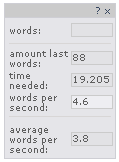
WordCount in action
ການຕິດຕັ້ງ
- Upload the WordCount-files to the
/wp-content/plugins/directory - Activate the plugin through the ‘Plugins’ menu in WordPress
Should work with most themes, as long as wp_footer for hooking exists, that’s all!
ການຣີວິວ
ບໍ່ມີການຣີວິວສຳລັບປລັກອິນນີ້.
ຜູ້ຮ່ວມພັດທະນາ ແລະ ຜູ້ພັດທະນາ
“WordCount” ແມ່ນຊອຟແວໂອເພັນຊອດ (Open Source). ບຸກຄົນຕໍ່ໄປນີ້ໄດ້ມີສ່ວນຮ່ວມໃນການພັດທະນາປລັກອິນນີ້.
ຜູ້ຮ່ວມພັດທະນາ
ແປ “WordCount” ເປັນພາສາຂອງເຈົ້າ.
ສົນໃຈຮ່ວມພັດທະນາບໍ່?
ເບິ່ງລະຫັດ, ກວດເບິ່ງ ຄັງເກັບ SVN, ຫຼື ຕິດຕາມ ບັນທຶກການພັດທະນາ ຜ່ານ RSS.