
ຄຳອະທິບາຍ
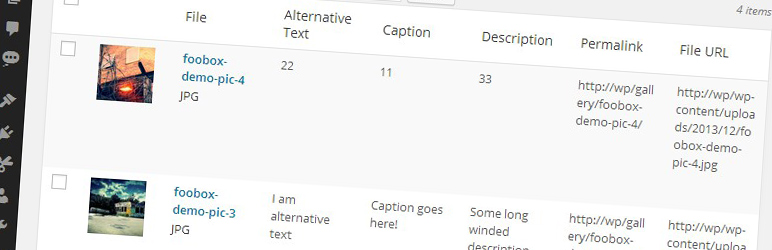
Displays extra columns (Alternative Text, Caption, Description, Permalink and File URL) in the media library view. You can choose to hide or show these new columns using the Screen Options dropdown on the media library page.
There are no settings for this plugin. Simply activate and enjoy!
Read more about why we made this plugin over at fooplugins.com
ພາບໜ້າຈໍ

New columns in the media library
ການຕິດຕັ້ງ
- Upload the plugin folder to your
/wp-content/plugins/folder - Activate the plugin through the ‘Plugins’ menu in WordPress
- Goto the Media Library page to see the new columns
ຄຳຖາມທີ່ພົບເລື້ອຍ
- How do I use this plugin?
-
Simply activate it and enjoy new columns in your media library.
ການຣີວິວ

21 ທັນວາ 2016
needs a field for title.
WP uses title for the title of the attachment page. It’s automatically set to be the filename minus “.jpg”. This makes for ugly attachment pages.
ຜູ້ຮ່ວມພັດທະນາ ແລະ ຜູ້ພັດທະນາ
“Better Media Library Fields” ແມ່ນຊອຟແວໂອເພັນຊອດ (Open Source). ບຸກຄົນຕໍ່ໄປນີ້ໄດ້ມີສ່ວນຮ່ວມໃນການພັດທະນາປລັກອິນນີ້.
ຜູ້ຮ່ວມພັດທະນາ

ແປ “Better Media Library Fields” ເປັນພາສາຂອງເຈົ້າ.
ສົນໃຈຮ່ວມພັດທະນາບໍ່?
ເບິ່ງລະຫັດ, ກວດເບິ່ງ ຄັງເກັບ SVN, ຫຼື ຕິດຕາມ ບັນທຶກການພັດທະນາ ຜ່ານ RSS.
ບັນທຶກການປ່ຽນແປງ
1.0.0
- Initial Relase. First version.