
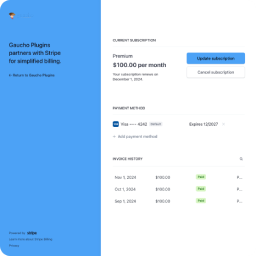
ຄຳອະທິບາຍ
Need a branded way for Stripe customers to access the Stripe Customer Portal from your WordPress site? Login for Stripe Customer Portal adds a secure login page on your domain, sends one-time magic links by email, and redirects customers to Stripe’s hosted billing portal to manage subscriptions and payment methods.
🔐 STRIPE CUSTOMER PORTAL ON YOUR SITE
Connect your Stripe account and give customers a login page on your WordPress site instead of sending them directly to Stripe.
✉️ MAGIC-LINK EMAIL AUTHENTICATION
Customers enter their email address and receive a secure login link valid for 1 hour — no passwords to manage on your site.
🧩 CUSTOM LOGIN PAGE OR SHORTCODE
Define a custom URL slug for your portal login page (e.g.
yourwebsite.com/customer-portal/) or embed the form anywhere with[login-stripe-customer-portal].
🎛️ CONTROL WHO CAN LOG IN
Optionally restrict access to existing Stripe customers only, or allow new customers to register through the flow.
↩️ CUSTOM POST-LOGOUT REDIRECT
After customers log out of the Stripe Customer Portal, redirect them back to a URL you configure in the plugin settings.
✅ PERFECT FOR:
- SaaS and subscription businesses using Stripe Billing.
- Membership sites that use the Stripe Customer Portal for self-service billing.
- Agencies hosting client sites that need a branded Stripe portal login experience.
- WordPress stores that want customers to update payment methods without support tickets.
📕 DOCUMENTATION | 🆘 SUPPORT FORUM
Roadmap:
- Built-in styling settings for the login form (use custom CSS today).
- Additional customization options for the login endpoint and emails.
GAUCHO PLUGINS PORTFOLIO
Payment Page: Start accepting payments in a beautiful payment form in less than 60 seconds
Split Pay Plugin: Split WooCommerce payments across multiple connected Stripe accounts.
Login for Stripe Customer Portal: Create an Account login area for your Stripe customers.
Gyta Buyback: Create a trade-in / buyback business using WooCommerce.
Version Info: Show WP, PHP, MySQL & Web Server Versions in the WP-Admin Dashboard.
China Payments Plugin: Accept WeChat Pay and Alipay payments from Chinese customers.
Blocked in China: Check if your website is available in the Chinese mainland.
Speed in China: Check your website’s speed in the Chinese mainland.
External Services
This plugin connects to the following external services.
Stripe (api.stripe.com)
This plugin uses your Stripe Secret API key to authenticate customers and generate secure links to the Stripe Customer Portal. Customer email addresses are sent to Stripe when a user requests a login link. Stripe hosts the Customer Portal where customers manage billing information.
Freemius (api.freemius.com, freemius.com)
This plugin includes the Freemius SDK for license and update management. Data is sent to Freemius only when you opt in through the Freemius connect screen.
ພາບໜ້າຈໍ

Settings page to configure Stripe API key, redirect URL, and customer portal slug 
Login form example – users can enter email and generate a login link 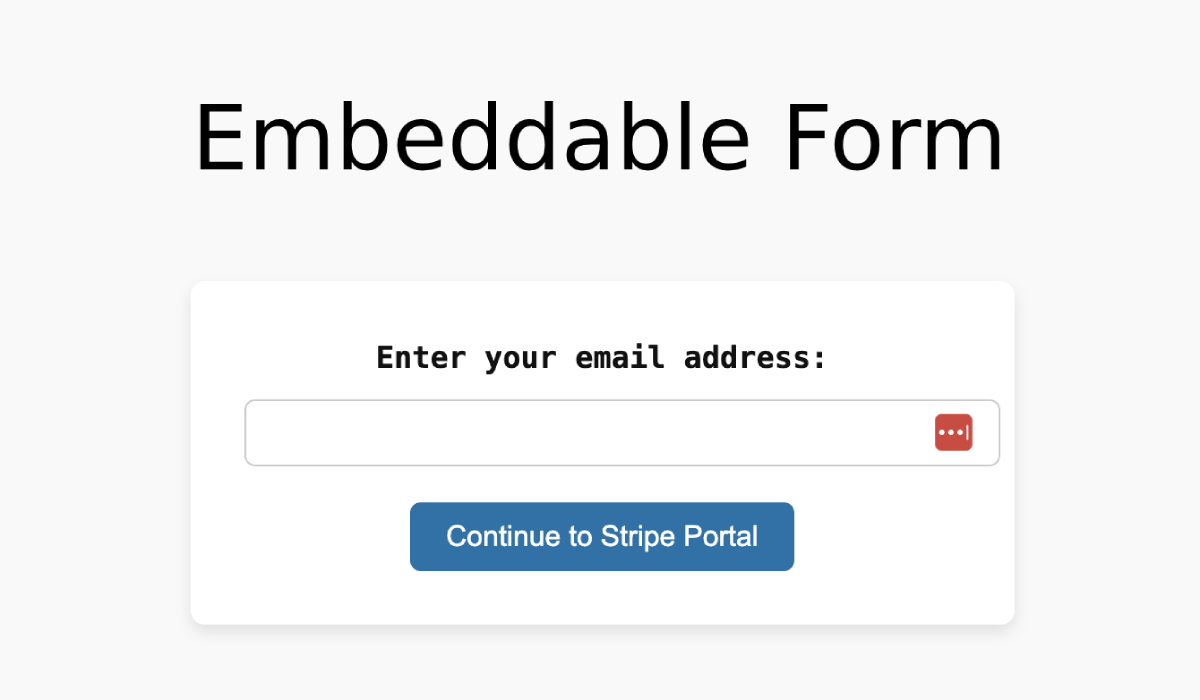
Embeddable Stripe Customer Portal login form based on shortcode 
Confirmation message after submitting the email form 
Email including temporary login link for Stripe Customer Portal
ການຕິດຕັ້ງ
- Upload the plugin files to the
/wp-content/plugins/directory or install the plugin through the WordPress plugins screen. - Activate the plugin through the ‘Plugins’ screen in WordPress.
- Navigate to “Stripe Portal” in the WordPress admin menu to configure the plugin settings.
- Enter your Stripe Secret API Key, customize the endpoint slug, and set your desired redirect URL.
ຄຳຖາມທີ່ພົບເລື້ອຍ
-
What does this plugin do?
-
This plugin allows you to provide a customer login page for Stripe’s Customer Portal directly from your WordPress site. It enables customers to access and manage their Stripe billing details securely.
-
How do I get my Stripe Secret API key?
-
Log into your Stripe Dashboard, and under “Developers” > “API keys”, you will find the option to copy your Secret API key.
-
Can I customize the login page?
-
Yes, the plugin allows you to customize the endpoint URL for the login page. You can define this under the settings. Styling settings are coming soon, but for now you can use custom CSS.
-
Is the Stripe Customer Portal still hosted by Stripe?
-
Yes. This plugin provides the login page on your WordPress site. After authentication, customers are redirected to Stripe’s hosted Customer Portal to manage billing, subscriptions, and payment methods.
-
How does the magic link login work?
-
Customers enter their email address on your login page. The plugin uses the Stripe API to send a secure, time-limited login link to that email address. The link is valid for 1 hour.
-
Can I embed the login form on any page?
-
Yes. Use the shortcode
[login-stripe-customer-portal]to embed the login form on any page or post. -
Can I restrict login to existing Stripe customers only?
-
Yes. You can optionally restrict access to existing customers or allow new customers to register through the login flow. Configure this in the plugin settings.
-
Does this plugin replace Stripe Billing or WooCommerce?
-
No. It adds a WordPress login entry point for the Stripe Customer Portal. Your Stripe products, subscriptions, and billing logic remain in Stripe.
-
Where can I find documentation?
-
Setup guides and changelog notes are available in our documentation.
-
Where can I get support?
-
Post in the WordPress.org support forum for help with the free plugin.
ການຣີວິວ

ຜູ້ຮ່ວມພັດທະນາ ແລະ ຜູ້ພັດທະນາ
“Login for Stripe Customer Portal | Stripe Billing Login Page | Magic Link Customer Account” ແມ່ນຊອຟແວໂອເພັນຊອດ (Open Source). ບຸກຄົນຕໍ່ໄປນີ້ໄດ້ມີສ່ວນຮ່ວມໃນການພັດທະນາປລັກອິນນີ້.
ຜູ້ຮ່ວມພັດທະນາ


ສົນໃຈຮ່ວມພັດທະນາບໍ່?
ເບິ່ງລະຫັດ, ກວດເບິ່ງ ຄັງເກັບ SVN, ຫຼື ຕິດຕາມ ບັນທຶກການພັດທະນາ ຜ່ານ RSS.
ບັນທຶກການປ່ຽນແປງ
1.0.6
Security & privacy
- Fix: the Redirect URL setting is now persisted correctly. The 1.0.5 settings form emitted the input under a corrupted name attribute, so saving the Redirect URL silently failed and customers were always returned to the default endpoint.
- Fix: magic-link URLs now use the configured Customer Portal slug instead of a hardcoded
/customer-portalpath. Renaming the endpoint no longer breaks outstanding login emails. - Fix: namespaced
catch (Exception $e)clauses around the Stripe SDK calls resolved to the nonexistent classLSCP\Exceptionand never matched. Any Stripe failure now surfaces a graceful “Please try again later” message instead of a WSOD. - Hardening: stored magic-link tokens are now SHA-256 hashed at rest. A database snapshot no longer exposes unredeemed login links.
- Hardening: per-email + per-IP rate limiter (5 requests / 10 minutes) on the magic-link form prevents the page from being abused as a mail relay or as an email-enumeration oracle against your Stripe customer list.
- Hardening: the form response is now constant for valid, invalid, and unknown email addresses, and the wording is mode-aware. When “Only allow existing Stripe customers to login” is unchecked (default) the message is “A login link is on its way” — no longer the misleading “If your email address is registered…” wording, which implied gatekeeping that did not exist in that mode.
- Hardening: settings page now explicitly checks
manage_optionsbefore rendering, and everywp_die()message is HTML-escaped. - Hardening: Stripe Secret Key input renders a fixed-length mask. The field no longer leaks the real key length via “view source”.
- Hardening: Customer Portal Slug is length-capped (max 64 chars) so a pasted megabyte string can’t bloat the rewrite engine.
- Hardening: shortcode forms now render with per-instance unique
idattributes. Embedding the shortcode multiple times on the same page no longer produces duplicate IDs that break<label for>binding, HTML5 validation, and screen-reader navigation. - Privacy: plugin uninstall now cleans up every option and transient (registered via Freemius’s
after_uninstallhook so the uninstall feedback survey still fires). The Stripe Secret Key no longer lingers inwp_optionsafter the plugin is uninstalled. - Privacy: GDPR personal-data exporter and eraser are registered with WordPress Privacy Tools (Tools Export Personal Data / Erase Personal Data).
UX
- Settings page description for the “Only allow existing Stripe customers to login” toggle now explicitly notes that unchecking it (the default) auto-creates a Stripe customer the first time a magic link is redeemed for a new email.
- Magic-link form input now uses
<label for>,autocomplete="email", andrequiredattributes for screen-reader and password-manager compatibility.
Reliability & ops
- New daily WP-Cron sweep removes expired magic-link tokens and rate-limit counters. WordPress’s built-in transient GC is lazy and can leave expired rows in
wp_optionsindefinitely on low-traffic sites. - New WP-CLI commands:
wp lscp purge-tokens,wp lscp limiter-reset <email>,wp lscp send <email>,wp lscp config. - Full payments-grade test suite — 250 PHPUnit tests, 18,690 assertions, property-based fuzz on the token store, token-entropy distribution check, concurrent-redemption race test, slug path-traversal hardening, email-header injection hardening, multi-instance shortcode ID uniqueness, mode-aware confirmation message.
Compatibility & internal
- Bumps minimum PHP from 7.0 to 7.4 (PHP 7.0/7.1/7.2/7.3 are end-of-life).
- Backwards-compatible public class surface — every public method on
LSCP\Pluginfrom 1.0.x is preserved. - Plugin refactored into focused units (
Settings,TokenStore,TokenGC,StripeGateway,Mailer,RateLimiter,PortalController,FormRenderer,RewriteEndpoint,Shortcode,Privacy,Cli,Uninstall,DocsHelper).
1.0.5
- Added contextual documentation links on the Stripe Portal settings page.
See our full changelog in our documentation.