
ຄຳອະທິບາຍ
View WPListCal plugin information using the JSON API plugin with this simple WordPress plugin.
After installing and activating you can use the upcomming events in your external applications.
ພາບໜ້າຈໍ
ການຕິດຕັ້ງ
The automatic plugin installer should work for most people. Manual installation is easy and takes fewer than five minutes.
- Create a wplistcal-json directory in your plugins directory. Typically that’s wp-content/plugins/wplistcal-json/.
- Into this new directory upload the plugin files (wplistcal-json.php, etc.)
- Activate the plugin through the ‘Plugins’ menu in WordPress.
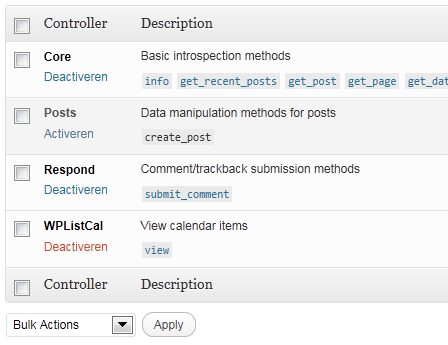
- Activate the ‘WPListCal’ controller through the ‘JSON API’ options page.
ຄຳຖາມທີ່ພົບເລື້ອຍ
- Does it work with older versions of WordPress?
-
I don’t know, try it and let me know.
ການຣີວິວ
ບໍ່ມີການຣີວິວສຳລັບປລັກອິນນີ້.
ຜູ້ຮ່ວມພັດທະນາ ແລະ ຜູ້ພັດທະນາ
“WPListCal JSON” ແມ່ນຊອຟແວໂອເພັນຊອດ (Open Source). ບຸກຄົນຕໍ່ໄປນີ້ໄດ້ມີສ່ວນຮ່ວມໃນການພັດທະນາປລັກອິນນີ້.
ຜູ້ຮ່ວມພັດທະນາ
ແປ “WPListCal JSON” ເປັນພາສາຂອງເຈົ້າ.
ສົນໃຈຮ່ວມພັດທະນາບໍ່?
ເບິ່ງລະຫັດ, ກວດເບິ່ງ ຄັງເກັບ SVN, ຫຼື ຕິດຕາມ ບັນທຶກການພັດທະນາ ຜ່ານ RSS.
ບັນທຶກການປ່ຽນແປງ
1.1
- Bugfix: Sorting results
1.0
- Initial release